10 exemples et modèles d'e-mails de correction professionnels (plus des conseils de rédaction)


Les erreurs arrivent, même aux meilleurs d'entre nous.
Peut-être avez-vous adressé le mauvais client, collé un lien brisé ou envoyé un e-mail à toute l'entreprise au lieu d'une seule équipe.
Cependant, un e-mail de correction bien rédigé peut transformer ce moment de panique en une opportunité de démontrer votre professionnalisme et votre empathie.
Dans ce guide, je vous fournirai 10 modèles d'e-mails de correction prêts à l'emploi et des exemples concrets pour vous aider à corriger vos erreurs de manière professionnelle.
Dans ce guide
- Qu'est-ce qu'un e-mail de correction (et quand devez-vous en envoyer un) ?
- How to Write an Effective Correction Email
- 10 Correction Email Examples and Templates
- 1. E-mail général d'excuses/correction (informations incorrectes envoyées)
- 2. E-mail « Oups » sur un ton léger (exemple marketing)
- 3. E-mail de mise à jour/correction de commande (scénario e-commerce)
- 4. E-mail de correction d'erreur de facturation
- 5. E-mail de correction des détails d'un événement
- 6. E-mail de correction des informations sur un produit
- 7. E-mail de suivi de correction du service client
- 8. E-mail de correction d'une pièce jointe manquante ou d'informations omises
- 9. Excuses pour un e-mail envoyé au(x) mauvais destinataire(s)
- 10. Corriger poliment l'erreur de quelqu'un d'autre par e-mail

Nous testons et recherchons rigoureusement chaque produit que nous recommandons via HeroThemes. Notre processus d'examen. Nous pouvons également gagner une commission si vous effectuez un achat via nos liens.
Qu'est-ce qu'un e-mail de correction (et quand devez-vous en envoyer un) ?
Un e-mail de correction est essentiellement un message de suivi envoyé pour rectifier une erreur dans un e-mail précédent.
Il peut s'agir de corriger des informations erronées (comme une mauvaise date, un prix incorrect ou une faute de frappe dans les détails) ou de signaler un problème technique (tel qu'un lien brisé ou une pièce jointe manquante).
Toutes les petites erreurs ne justifient pas l'envoi d'un autre e-mail. S'il s'agit d'une faute de frappe triviale ou d'un léger problème de mise en forme qui ne prête pas à confusion pour le destinataire, pourquoi attirer l'attention sur quelque chose que la plupart des gens n'ont même pas remarqué ?
Alors, quand devez-vous envoyer un e-mail de correction ?
- Lien incorrect ou brisé
- Mauvaise date, heure ou détails
- Pièce jointe manquante
- Envoyé au mauvais destinataire ou à la mauvaise liste
- Mauvaise personne adressée
- Problèmes techniques ou erreurs
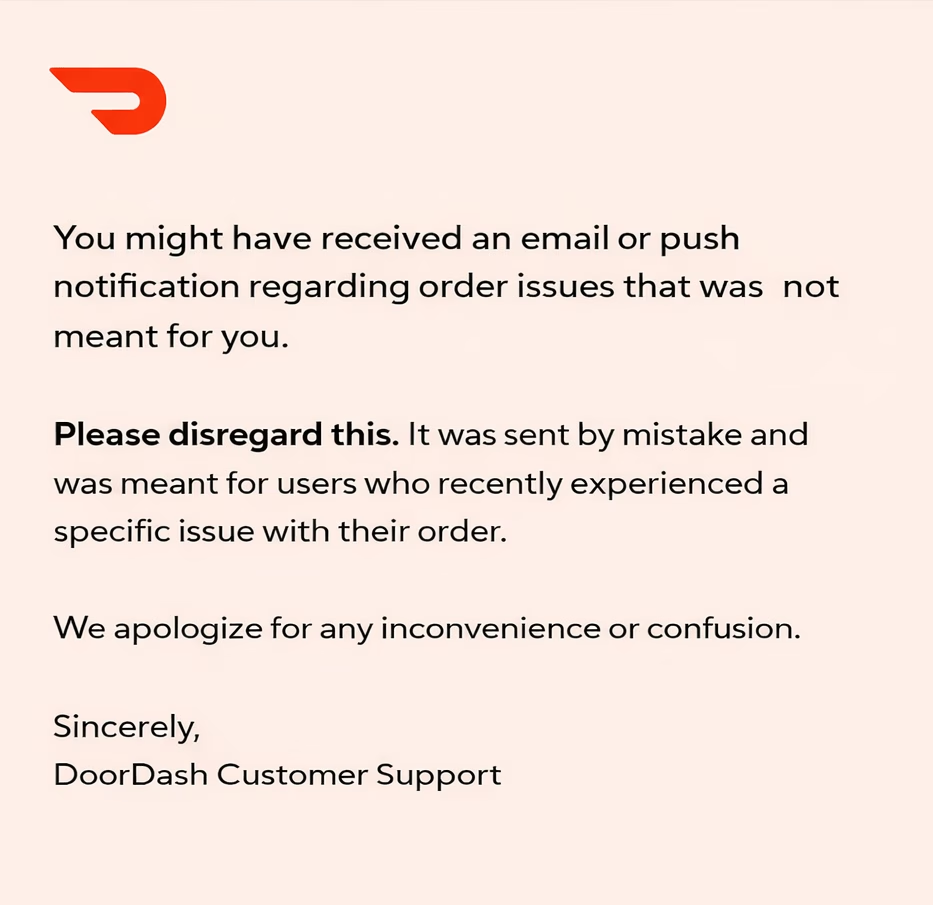
Le scénario DoorDash ci-dessus est un parfait exemple de quand envoyer un e-mail de correction.
L'erreur initiale — un e-mail de test aléatoire envoyé à des millions de personnes — était perceptible et déroutante, donc un suivi rapide était nécessaire.
L'e-mail de correction était court et clair. Il informait les clients qu'ils pouvaient ignorer le message précédent.
Et ils n’ont pas trop expliqué ni fait de courbettes, ils ont simplement reconnu l’erreur, se sont excusés et sont passés à autre chose.
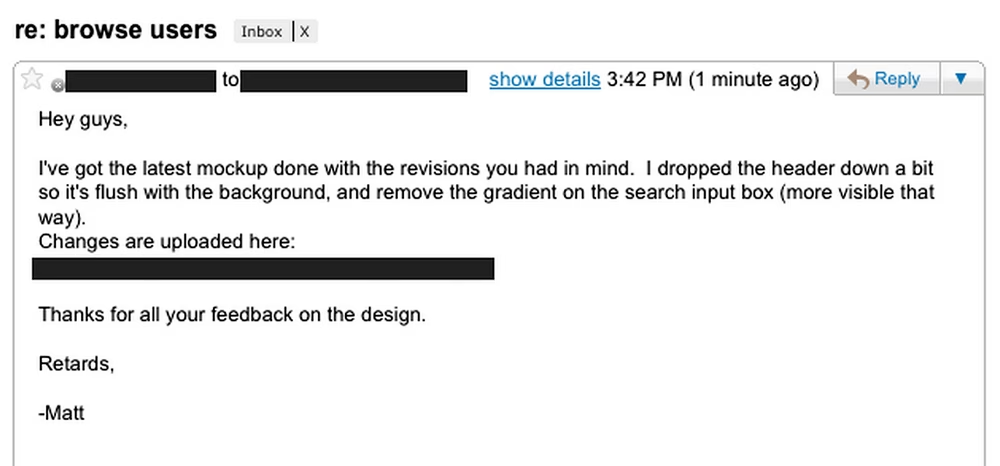
Voici un bon exemple de faute de frappe dans un e-mail professionnel. 🤭 N’oubliez pas de le lire !
Comment rédiger un e-mail de correction efficace
Voir l’exemple ci-dessus d’un e-mail de correction de DoorDash pourrait vous donner une idée de ce qui fait un bon e-mail de correction.
Voici quelques conseils d’écriture pour vous aider à rédiger des e-mails de correction efficaces :
1. Agissez vite, mais relisez avant d’envoyer
Essayez d’envoyer votre suivi avec les corrections dès que possible, mais relisez-le attentivement d’abord.
Vous ne voulez absolument pas faire d’erreur dans votre e-mail de correction !
2. Utilisez un objet clair et informatif
Idéalement, mentionnez qu’il s’agit d’une correction ou d’informations mises à jour dès le début.
Par exemple :
- Correction : Horaire mis à jour pour la réunion de lundi
- Oups – Lien corrigé pour la vente de [Produit]
Cela aide le destinataire à comprendre immédiatement le but.
De plus, consultez notre guide sur les objets d'e-mails de correction pour plus d'informations.
3. Commencez par des excuses franches
Dans le corps de l’e-mail, commencez par vous excuser pour l’erreur.
Par exemple, vous pourriez dire : « Je tiens à m’excuser pour l’erreur dans mon dernier e-mail », ou « Nous avons remarqué une erreur dans notre message précédent et souhaitons la corriger ».
Vous n’avez pas besoin de faire de courbettes ; une excuse sincère en une ligne suffit souvent. Le but est de montrer que vous assumez la responsabilité.
Nous avons récemment publié un guide détaillé sur les e-mails d'excuses si vous souhaitez en savoir plus.
4. Indiquez clairement la correction
Ensuite, fournissez les informations correctes d’une manière qui se démarque.
Si vous avez fourni la mauvaise date, écrivez la bonne date *en gras*. Si vous envoyez un lien brisé, collez le bon lien de manière visible, peut-être sous forme de gros bouton ou sur une ligne séparée.
Rendez-le très facile pour le lecteur de voir la correction en un coup d’œil.
Astuce de pro : Ne répétez pas les mauvaises informations dans l'e-mail de correction. Présentez simplement les bonnes informations de manière positive.
5. Expliquer brièvement (si nécessaire)
Selon le contexte, vous pourriez vouloir fournir une brève explication de ce qui s'est passé.
Quelque chose comme, « En raison d'une faute de frappe, le lien était incorrect ».
6. Rassurer ou prévenir la récurrence
Si l'erreur était importante ou pouvait inquiéter les gens, ajoutez une phrase pour les rassurer.
Par exemple, « Nous avons mis à jour notre processus pour nous assurer que cela ne se reproduira plus », ou « Soyez assuré que ce problème a été résolu maintenant ».
Cela témoigne du professionnalisme et montre que vous avez tiré des leçons de l'erreur.
7. Gardez un ton poli et humain
Écrivez comme si vous parliez à un collègue ou à un client en personne.
Soyez courtois et évitez le langage défensif. Il est acceptable de montrer un peu de convivialité ou d'humilité.
8. Maintenez la voix de votre marque (pour les e-mails professionnels)
Une excuse ne doit pas être stérile. S'il s'agit d'une communication d'entreprise formelle, cependant, restez sur un ton professionnel.
N'oubliez pas que la cohérence est importante, même lorsque vous corrigez une erreur.
9. Offrez un geste de bonne volonté lorsque nécessaire
Si une erreur cause un inconvénient ou peut contrarier le destinataire, offrir un petit geste de bonne volonté peut aider à aplanir les choses.
Ce n'est pas toujours nécessaire, mais je vois souvent des marques offrir une réduction spéciale, un coupon ou un bonus dans les e-mails marketing comme dédommagement.
10. Envoyez-le en réponse
Si vous envoyez un e-mail de masse à des clients, envisagez de répondre ou de transférer l'e-mail d'origine avec un nouvel objet, tel que « Correction... »
Cela préserve le contexte et montre aux destinataires que cela se rapporte directement au message précédent.
Voici un autre exemple d'e-mail de correction de Methodical Coffee, dans lequel ils gèrent leur erreur de manière professionnelle.
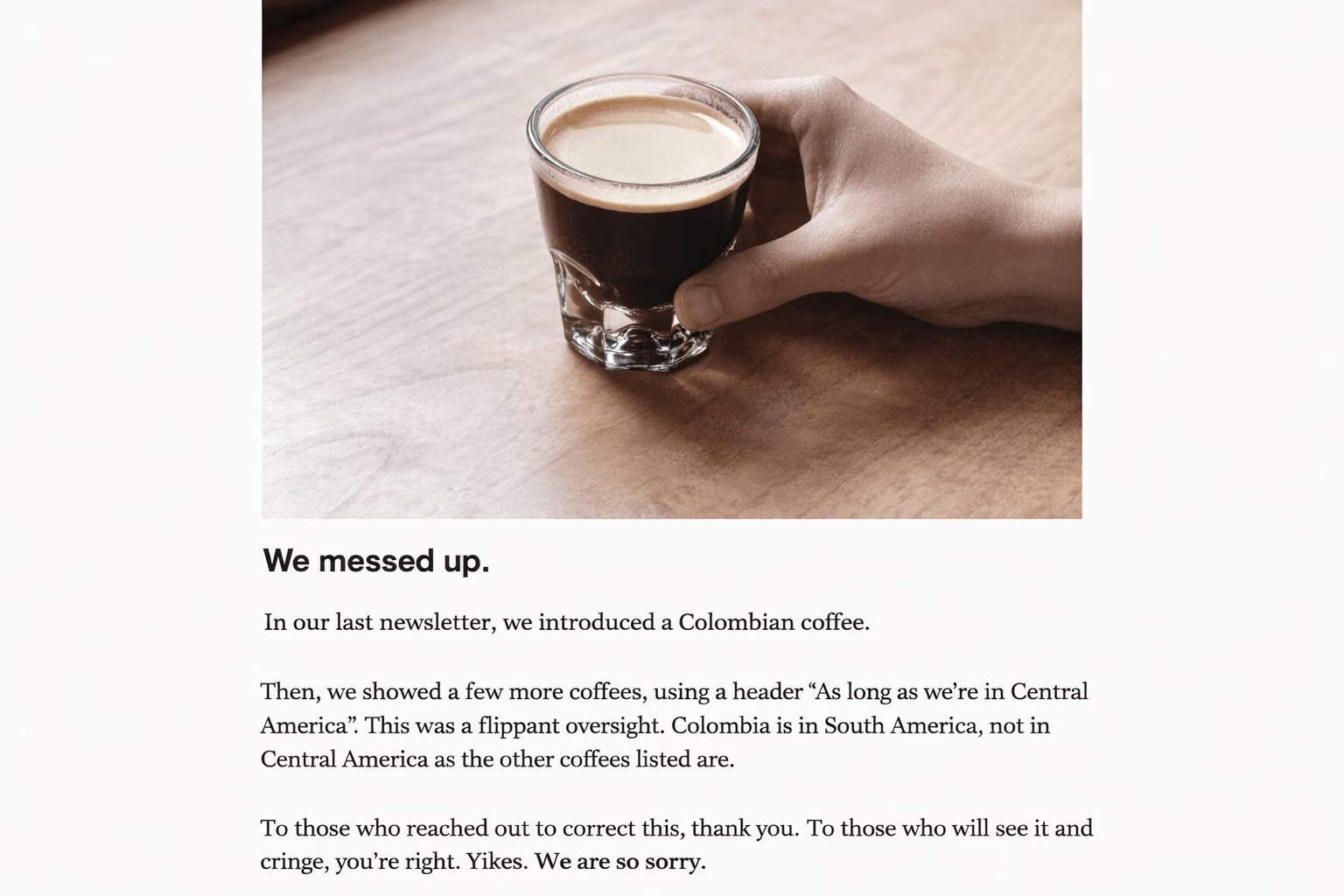
Points à en tirer :
- Il reconnaît hardiment l'erreur dès le départ et ne cherche pas d'excuses.
- Il explique exactement ce qui n'allait pas
- Remercie les lecteurs qui ont signalé l'erreur
- Le ton est également humble et sincère
10 exemples et modèles d'e-mails de correction
Maintenant que nous avons couvert les bases, passons au cœur de ce guide : 10 exemples et modèles d'e-mails de correction professionnels pour différents scénarios.
Astuce de pro : Gardez quelques-uns de ces éléments enregistrés comme brouillons ou réponses types, afin d'être prêt à réagir lorsqu'un moment « oups » se présente.
De plus, des outils comme Heroic Inbox offrent des fonctionnalités qui peuvent accélérer vos communications par e-mail.
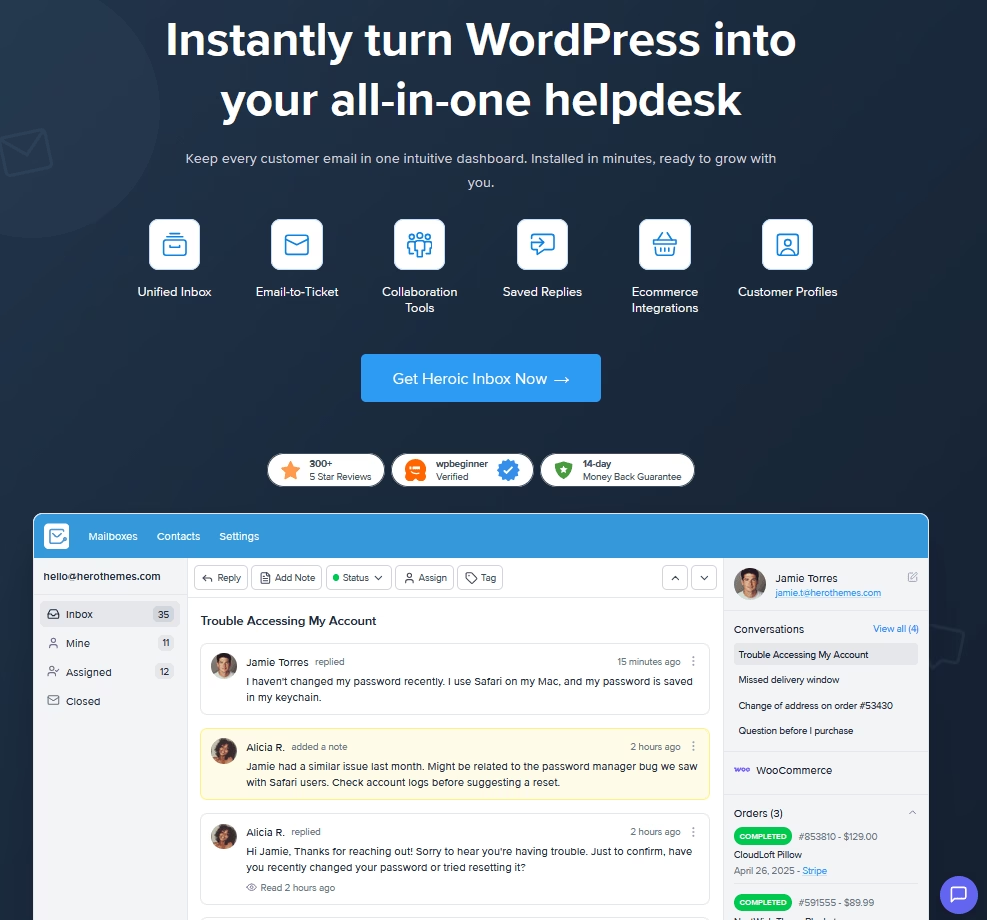
Les fonctionnalités clés incluent :
- Modèles et réponses types
- Données client et historique des conversations
- Boîte de réception partagée avec collaboration en temps réel
- Automatisation des flux de travail
- Utilisateurs et conversations illimités
1. Modèle d'e-mail d'excuses/correction générales (informations erronées envoyées)
Subject: Correction: Updated Information

Hi [Name],

I’m writing to correct an error in my previous email.

In that message, I shared incorrect information about [briefly state the issue, such as the date, price, code, or other detail]. The correct information is: [insert the correct information clearly].

I apologize for any confusion this may have caused. We’re also reviewing this internally to reduce the chance of a similar error happening again.

Please let me know if you would like me to clarify anything.

Sincerely,
[Your Name]
[Your Position]
[Company Name]
2. E-mail « Oups » sur un ton léger (exemple marketing)
Subject: Oops! – Here’s the Correct [Offer/Link]

Hey [Name],

Well, this is embarrassing… Turns out our last email had a mistake. 😅

We [explain the slip-up].

Here’s the correct information: [insert the correct offer, link, or detail].

Sorry about that. To make things right, we’re [optional perk].

Thanks for your patience, and thanks for sticking with us.

Cheers,

[Your Team Name]

[Company Name]
Ce modèle d'e-mail de correction convient bien pour les liens brisés, les codes promotionnels incorrects ou une erreur amusante.
3. E-mail de mise à jour/correction de commande (Exemple d'e-mail de correction pour le commerce électronique)
Subject: Updated Details for Order #[OrderNumber]

Hi [Customer Name],

We’re reaching out about your recent order [#OrderNumber] to correct some information we sent earlier.

Our previous message included an error. We briefly describe the error]. I’m sorry for the confusion this may have caused.

Here is the correct update: [Clear updated information]

You can check the latest order status here: [Order Status Link].

If you have any questions, feel free to reply to this email and we’ll help right away.

Thank you for your patience while we correct this.

Best regards,
[Your Name]
Customer Support Team
[Company Name]
En matière de commandes et d'argent des clients, la clarté est primordiale.
Avec cette approche, vous êtes plus susceptible de conserver la confiance de vos clients, même si quelque chose tourne mal au départ.
4. Modèle d'e-mail de correction d'erreur de facturation
Subject: Correction to Invoice [Invoice #] - Our Apologies

Hi [Client Name],

We identified an error on invoice [Invoice #] and wanted to correct it right away.

The invoice originally showed [brief description of the error]. This was a mistake on our side.

Corrected billing: The correct total for invoice [Invoice #] is [correct amount], not [incorrect amount].

We have already [issued the refund / reversed the extra charge / generated a corrected invoice]. If a refund applies, it should appear in your account within [X] business days. The updated invoice is attached for your records.

I’m sorry for the inconvenience this caused. We’ve reviewed the issue internally to prevent similar billing errors going forward.

If anything in the updated invoice needs clarification, please let me know and I’ll take care of it.

Best regards,
[Your Name]
[Your Position]
[Company Name]
[Contact Information]
Utilisez ce modèle d'e-mail pour corriger une surfacturation, envoyer la facture correcte ou résoudre une erreur comptable.
5. Modèle d'e-mail de correction des détails d'un événement
Vous avez envoyé une invitation ou une annonce pour un événement (webinaire, réunion, conférence) et vous avez réalisé plus tard qu'un détail était erroné. Peut-être la date, l'heure, le lieu ou le lien Zoom.
C'est là qu'un modèle de correction comme celui-ci s'avère utile.
Subject: Correction to [Event Name] Details

Hi [Name],

We noticed an error in the event information we sent earlier for [Event Name], and I want to share the correct details.

The previous message listed an incorrect [detail]. Please use the updated information below:

- Date: …
- Time: …
- Location / Access: …

Your registration or RSVP remains confirmed. You do not need to register again or take any additional action.

We apologize for the confusion and thank you for your understanding. If you have any questions about the event, feel free to reply to this email.

Best regards,

[Your Name]
[Your Title or Team]
[Organization Name]
6. E-mail de correction des informations sur un produit
Subject: Correction to Information About [Product Name]

Hi [Name],

I’m writing to correct an error in the information we recently shared about [Product Name].

In our earlier message, we incorrectly stated that [brief description of the incorrect information]. That detail was not accurate.

The correct information is: [Correct information].

We have updated the product page and documentation to reflect this correction. You can review the latest information here:
[Link].

I apologize for any confusion this may have caused. If this update affects your plans, or if you would like more details about the product, please reply to this email, and I will gladly assist you.

Thank you for your understanding.

Sincerely,

[Your Name]
[Your Position]
[Company Name]
L'exactitude est cruciale en ce qui concerne les informations sur les produits, car la plupart des clients basent leurs décisions sur ces détails.
Ce modèle d'e-mail explique clairement ce qui était erroné et ce qui est maintenant correct. Il fournit même un lien vers la source mise à jour.
7. Modèle d'e-mail de correction de suivi du support client
Subject: Follow-Up – Correction to Our Previous Solution

Hi [Customer Name],

I'm writing to correct the guidance I previously provided regarding your support case (#).

Initially, I recommended [original guidance]. However, after reviewing the issue more closely, I realized that this was not the right solution for your situation.

Here’s the correct solution: [Solution].

I’m sorry for the confusion this may have caused.

Please try the steps above and let me know if the issue is resolved. If you still run into trouble, reply here and I will continue working with you until it is fully sorted out.

Sincerely,

[Your Name]
[Support Team]
[Company Name]
[Contact Information]
8. E-mail de correction d'une pièce jointe manquante ou d'informations omises
Nous oublions souvent d'ajouter des pièces jointes, ce qui cause beaucoup de retards. C'est une erreur très courante lors de la communication par e-mail.
Subject: Resending with Attachment Included

Hello [Name],

I realized the attachment referenced in my previous email did not come through.

I’ve attached the [document / report / file name] here. This is the file I mentioned earlier.

Apologies for the oversight, and thank you for your patience.

Best regards,
[Your Name]
[Your Position]
[Company / Department]
9. Excuses pour un e-mail envoyé au(x) mauvais destinataire(s)
Voici comment vous pouvez gérer les e-mails mal acheminés.
Subject: Please Disregard My Previous Email

Dear [Name],

I’m writing to clarify the email you received from me earlier. It was sent to you by mistake due to an error in the recipient list.

Please disregard that message. No action is required on your side.

I apologize for the confusion this may have caused. If the message raises any questions or concerns, feel free to reply and I will clarify right away.

Best regards,

[Your Name]
[Your Position]
[Company Name]
[Contact Information]
10. Corriger poliment l'erreur de quelqu'un d'autre par e-mail
Subject: Clarification on [Topic]

Hi [Name],

I’m writing to clarify one detail in [the email, report, or document] you shared.

You noted that [original point], but my understanding is that [correct information]. I wanted to flag it now so we can avoid confusion and keep the information accurate.

If I’m missing any context, please let me know. If needed, we can update it quickly.

Best,
[Your Name]
[Your Position/Team]
[Company Name]
[Contact Info]
Celui-ci est un peu différent. Il s'agit d'écrire un e-mail pour corriger l'erreur de quelqu'un d'autre de manière professionnelle et courtoise.
Corriger quelqu'un d'autre peut être délicat. Ce modèle utilise un ton amical et tactful pour signaler le problème et évite la plupart du temps les mots accusateurs.
Conclusion
Nous faisons tous des erreurs. Ce qui distingue les professionnels, c'est la façon dont nous les abordons.
À ce stade, vous devriez avoir une bonne compréhension de la manière de rédiger des e-mails de correction pour une variété de situations.
Un thème que vous avez probablement remarqué dans tous ces exemples est l'importance de l'honnêteté et de l'efficacité.
Et franchement, la confiance ne se construit pas en ne faisant jamais d'erreurs (c'est impossible) ; elle se construit par la façon dont vous réagissez lorsque vous faites des erreurs.
Espérons que ces exemples et modèles d'e-mails de correction vous ont beaucoup aidé aujourd'hui.
Rendez-vous dans le prochain guide !
Lectures complémentaires
Plus de 1000 exemples d'objets d'e-mails professionnels
10 modèles d'e-mails d'excuses et conseils de rédaction
10 modèles de réponses aux tickets de support prêts à l'emploi
Exemples de tickets de help desk informatique et comment les gérer
Comment gérer les e-mails de retour et de remboursement
Comment gérer les demandes des clients : réponses et meilleures pratiques