SaaS Customer Support: Components, Tools and Best Practices

The main reason SaaS (Software as a Service) companies lose customers is because of their poor customer support:
- Customers don’t get replies fast enough
- Help docs are outdated
- The chatbot kept asking “Did this help?”
- Human support is hidden behind AI automation.
Customer support gets treated as a cost center until churn starts showing up in the board deck.
In this guide, we will give you the full picture of how SaaS customer support actually works in 2026: what it is, why it matters more than almost any other lever you have, its core components, and the best practices.
Let’s start!
In This Guide

We rigorously test and research every product that we recommend through HeroThemes. Our review process. We may also earn a commission if you make a purchase through our links.
What Is SaaS Customer Support?
SaaS customer support is the ongoing practice of helping subscription-software users get continuous value from your product, across the entire lifecycle. From the first awkward signup question to renewal day three years later.
It's broader than fixing bugs and broader than answering tickets.
If it’s done well, it's a structured system of channels, content, people, and workflows designed to keep paying customers paying, and to turn them into people who'll vouch for you in their Slack communities.
For example, if a customer emails you on a Tuesday morning, their decision about renewing service next month depends on how you respond.
There's no shelf to put your product back on and no warranty card to file. It's just a billing cycle that quietly renews or doesn't.
How SaaS Support Differs from Traditional Customer Support
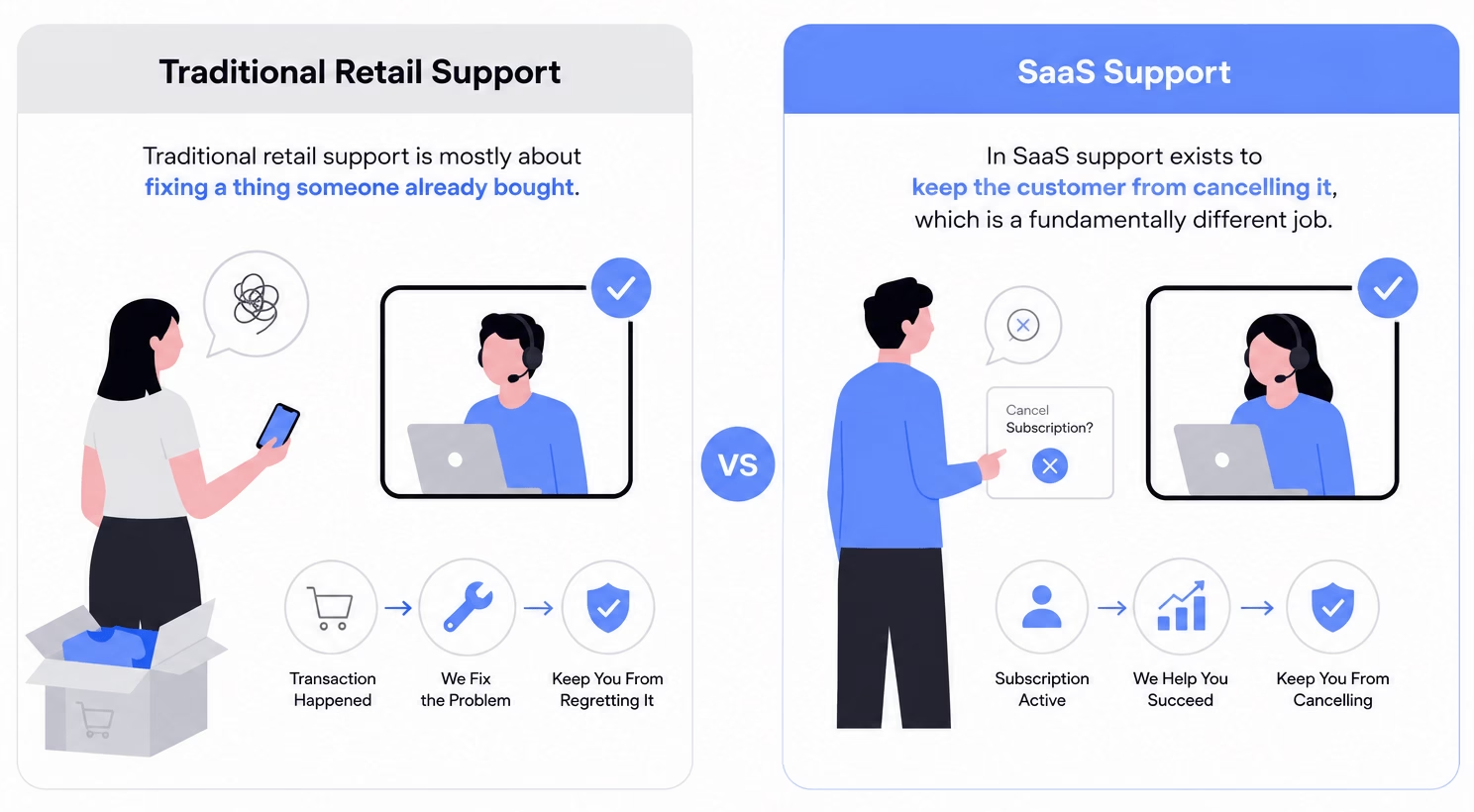
Traditional retail support is mostly about fixing a thing someone already bought.
The transaction has happened. The support is there to keep the customer from regretting it.
In SaaS support exists to keep the customer from cancelling it, which is a fundamentally different job.
Three differences matter most for how you should think about it:
- The relationship is continuous, not one-time. Every interaction either reinforces the subscription decision or chips away at it.
- The product is a moving target. Every month there are new features and outdated docs.
- Support overlaps with education. A lot of “support” requests aren't bugs at all. They're customers asking how to get more value out of something they already pay for, which is genuinely closer to teaching than fixing.
SaaS Customer Support vs SaaS Technical Support
These terms are often used interchangeably, which causes real problems when it comes to hiring and team design.
Here's the cleaner separation:
SaaS customer support is the umbrella:
- Billing questions
- Account access
- How-to guidance
- Plan changes
- General customer onboarding
The work skews toward communication skills, patience, and product knowledge.
SaaS technical support is a specialization inside that umbrella:
- API integration failures
- Webhook debugging
- SSO configuration
- Weird browser-specific rendering bugs
- Security and permissions edge cases
Technical support demands deeper product internals and the ability to read logs without flinching.
You need both.
But don’t mix them under one job description. You don’t want technical engineers answering password reset tickets while customers with broken integrations wait three days for someone qualified to look.
B2B vs B2C SaaS Support
The same customer strategy will not work for both a B2C app with 200,000 users and a B2B platform with 200 enterprise accounts.
So, be careful while copying a playbook that doesn't fit your model. You definitely don’t want to find this out the hard way.
B2B SaaS support runs on:
- Formal SLAs
- Named account managers for top-tier customers
- Deeper technical depth
- Longer acceptable response windows for non-urgent cases
- An explicit relationship between support and account expansion
The volume is lower per customer, but each customer matters more here. This is because a single churned enterprise account can erase a quarter of net new ARR.
B2C SaaS support on the other hand is:
- High-volume
- Often community-driven
- Social-media-exposed
- Frequently asynchronous
For example, products like Spotify, Duolingo, and Netflix do enormous amounts of public support on social platforms because their customers are already there.
Self-service deflection becomes existential, since you can't economically staff one human per hundred thousand free or low-priced users.
Most companies live somewhere in between.
Why Customer Support Matters in a SaaS Business
The best investment that most early-stage SaaS companies could make for growth isn't in their marketing funnel. It's in the team that communicates with existing customers because that's where the problem lies.
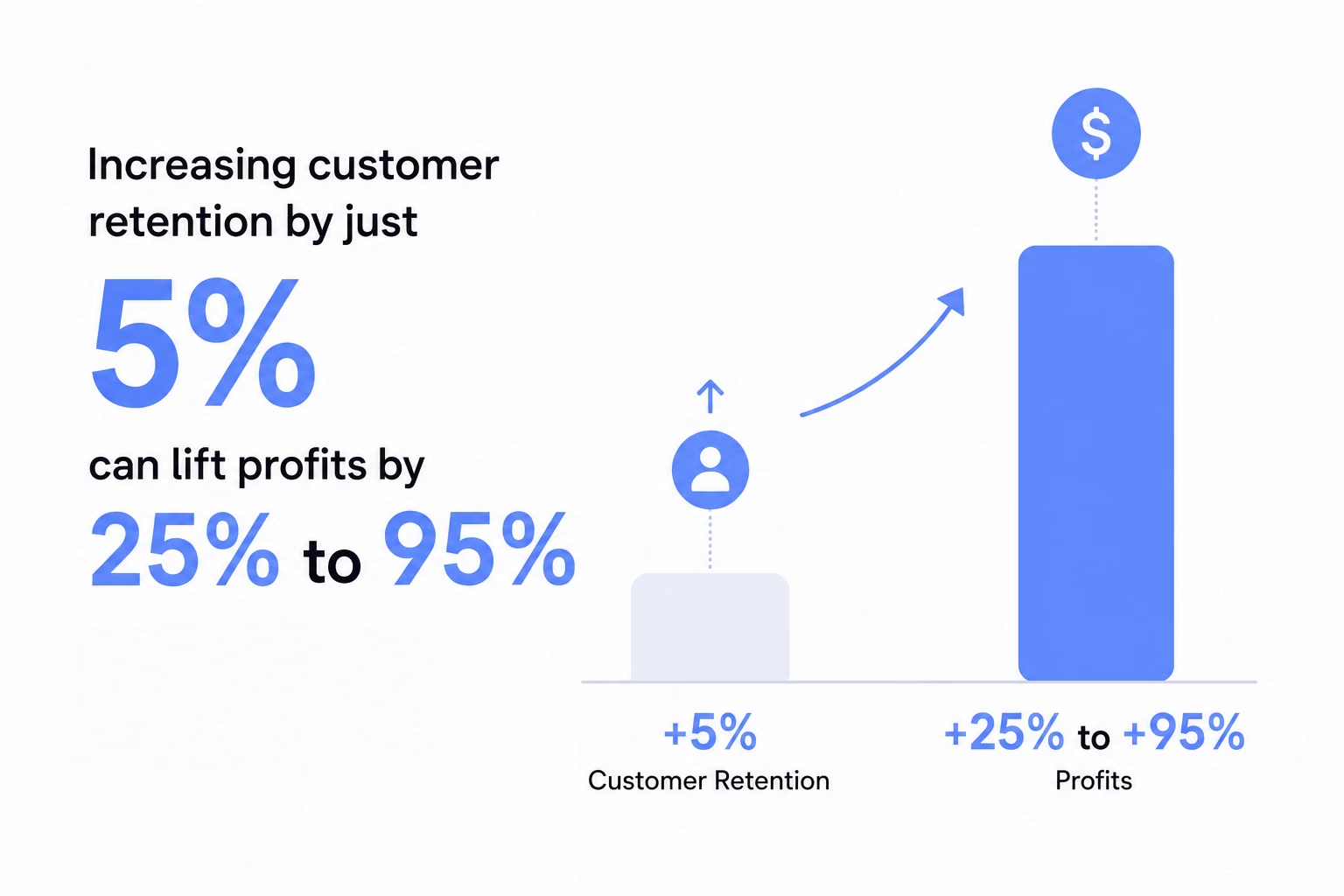
Increasing customer retention by just 5% can lift profits by 25% to 95%, according to research from Bain & Company.
In a recurring-revenue business, small movements in retention compound dramatically.
When a support team is great:
- Customers stay longer, lifting gross retention.
- Customers expand seats and plans, because the help they got built trust.
- Customers tell other customers, which lowers customer acquisition cost (CAC).
- Customers post in public communities about how good you are, which compounds for years.
When a support team is bad:
- Customers churn quietly without ever filing a ticket.
- Customers downgrade, because they don't believe future help will arrive.
- Customers write a Reddit post that ranks for your brand name, deflecting new customers.
- Customers tell their network not to bother.
The fastest-growing SaaS companies don't outspend their competitors on ads. They provide superior support, and their customers do the marketing for them.
Notion grew partly because power users wrote love letters disguised as YouTube tutorials.
Front’s Mathilde Collin spent years personally answering customer questions on social media, and her team copied that posture.
Pro tip: If you're trying to convince leadership that support matters, stop talking about CSAT scores and start talking about dollars. Compile a list of customers who churned last quarter. Look at their last five support tickets. You'll find the answer there.
Core Components of SaaS Customer Support
A working SaaS support is a coordinated stack of channels, content, people, processes, and tools. Each of which can be done well or badly more or less independently.
Below are the components that matter most for SaaS customer support.
1. Support Channels
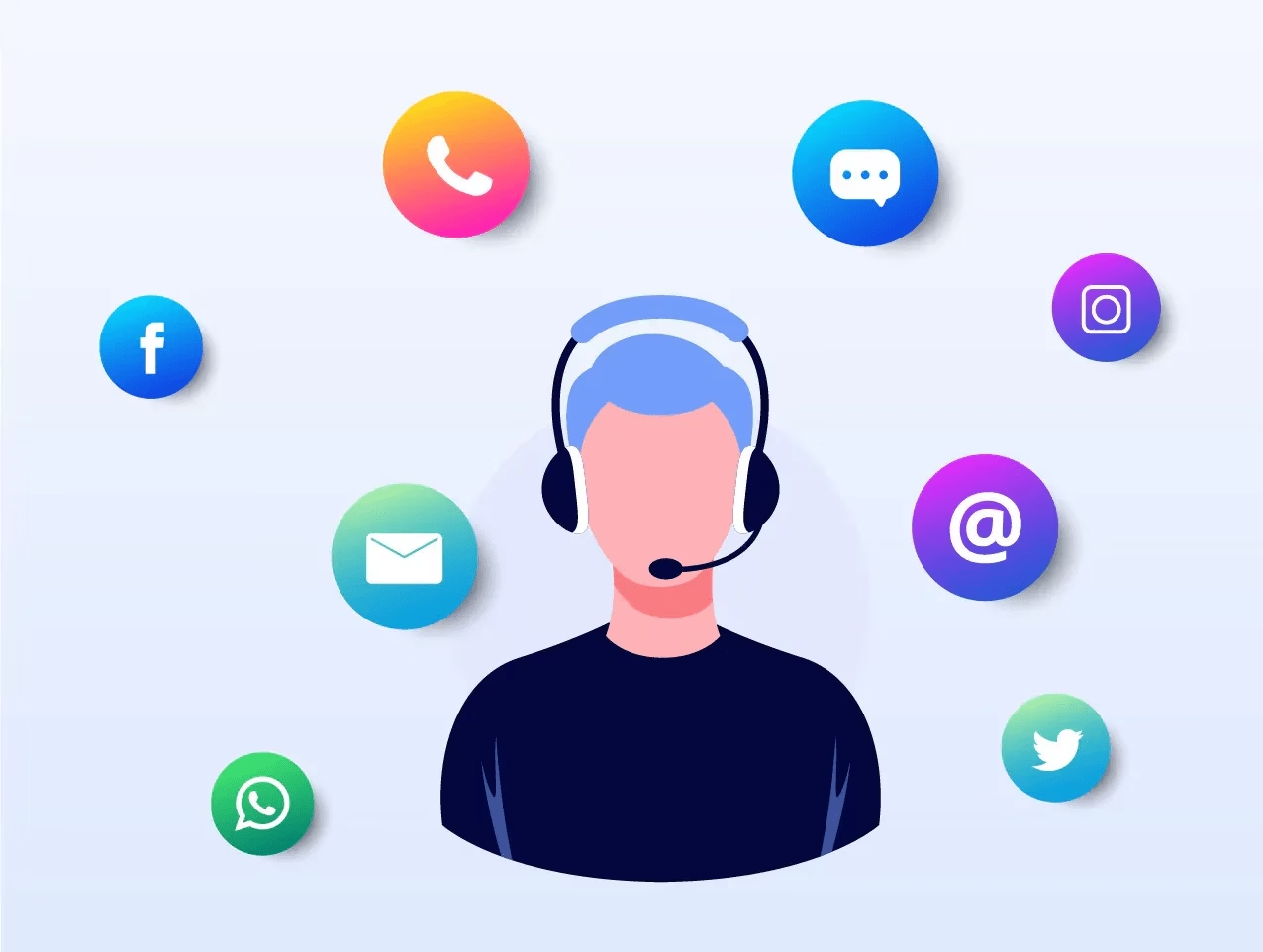
The mistake teams make with channels is assuming more is better. It isn't.
A poorly-staffed phone line that rings out is worse than no phone line at all.
Pick the channels you can do well and resource them properly, and add others only when there is concrete data.
Here are support channels that are most popular for SaaS support:
- Email and shared inbox: The asynchronous workhorse for most B2B SaaS. With email communications, customers expect a reply in hours. This is also where audit trails, attachments, and complex back-and-forth conversations happen.
- Live chat: Real-time, in-product, highest CSAT scores of any channel in most benchmarks. Best for purchase-intent questions, quick how-to clarifications, and active onboarding sessions.
- In-app messaging: A subset of chat, but worth its own line. The customer who messages you from inside the product gives you priceless context: where they were, what they were doing, what their account looks like.
- Phone: Lower volume in SaaS compared to retail support, but still essential for enterprise tiers, billing escalations, and angry-customer rescue.
- Social media: Twitter/X, LinkedIn, and Reddit are the channels customers choose.
- Community forums: Customers helping customers, at scale. If done well, this turns into one of your most powerful support and product-feedback engines.
- Video calls and screen-share: Reserved for high-value or high-complexity cases (enterprise onboarding, sticky technical issues, demos). Which is expensive per touch, but sometimes the only way to actually solve a problem.
For early SaaS support teams, start with email plus a help center, and add chat when ticket volume can support a dedicated person. Then add a phone only when enterprise customers start asking for it during deals.
2. Self-Service
Self-service is where most great SaaS support operations actually win. It's also where most of them quietly fail, because building a usable knowledge base takes time. It can be an everyday effort.
The instinct most customers have is to try to solve a problem themselves before talking to a human. They Google, search your help center, scan your YouTube videos.
After failing to find quick answers, customers reach out for human support. By this point of time, customers are already mildly annoyed.
The goal of self-service is to be there before that annoyance starts.
What a good self-service layer includes in SaaS support:
- A searchable knowledge base with clear navigation, fast search, and articles organized by what customers are actually trying to do (not by your internal product taxonomy).
- An onboarding or getting started guide that walks new users from signup to first value in their own words and at their own pace.
- In-app tooltips and contextual help that surface the relevant article from inside the screen where the customer is stuck.
- Video tutorials for workflows that are easier to demonstrate than describe.
- A clear FAQ for the common questions (billing, pricing changes, account access, cancellation).
- Helpfulness analytics so you actually know which articles are working and which are quietly making things worse.
For building a knowledge base, we recommend Heroic Knowledge Base.
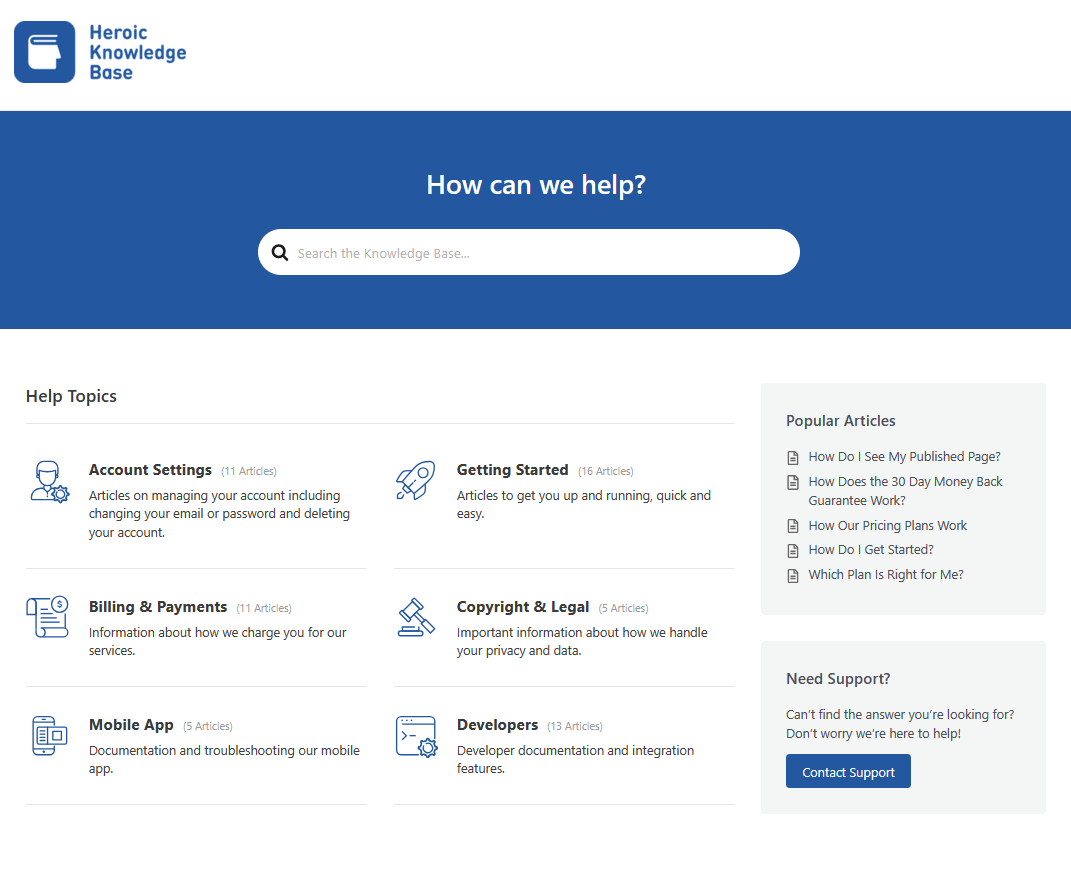
It handles the basics (categories, search, article ratings) and adds the things that matter most in 2026:
- Detailed analytics on which articles are read, helpful, or unhelpful
- A clean reader experience that doesn't make customers feel like they're rummaging through a filing cabinet.
Note: Optimizing a knowledge base is a continuous process. Outdated instructions cause more confusion, and because of that customers get angrier than they would've been otherwise.
3. Ticketing Systems and Shared Inbox Workflows
The ticketing system is where most of the actual support work happens. And a wrong system makes everything harder.
What you need from a ticketing or shared inbox system:
- Unified channels: Email, chat, in-app messages, and social mentions all in one place.
- Smart routing and assignment: Tickets get assigned to the right person automatically.
- Collision detection so two agents don't reply to the same customer with conflicting answers.
- Internal notes and mentions
- Tagging and saved replies for quickly answering common patterns.
- SLA tracking
- Reporting on the metrics that matter
For SaaS teams, Heroic Inbox offers a powerful, collaborative shared inbox and help desk experience inside WordPress dashboard.
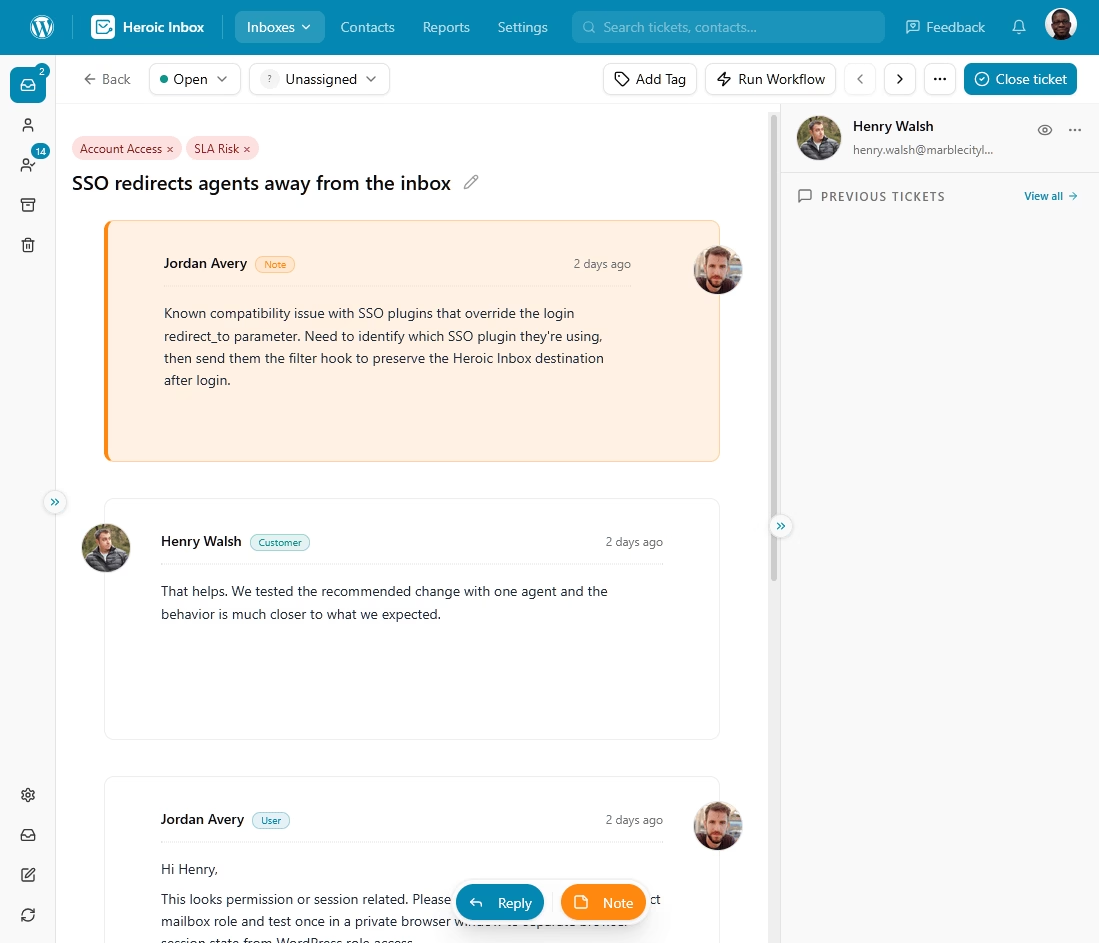
The Heroic Inbox setup process is very easy and takes roughly 30 minutes, depending on your email data.
The key features including:
- Unlimited users and tickets
- Complete control over your data and team scaling
- Automated workflows
- Reporting and analytics
- Collaboration features
- Saved replies or email templates
- Integration with knowledge base, Slack and WordPress eCommerce plugins
14-Day Money-Back Guarantee | Setup in Under 10 Minutes
4. Customer Onboarding and Education
The first 30 days of a SaaS subscription are the most predictive of whether the customer will still be around in year two.
Customers who reach their first meaningful value moment early stay longer, expand more, and complain less.
The role of SaaS support in onboarding is partly reactive (answering setup questions) and partly proactive (reaching out before the customer gets stuck).
Components of a strong onboarding flow:
- A clear welcome sequence (email plus in-app) that sets expectations and points to the most-valuable next action.
- A self-paced setup checklist inside the product, so customers can see their own progress.
- Contextual nudges when usage stalls (no logins for five days, integration started but not finished, key feature unused after 14 days).
- Easy access to human support when something doesn't make sense.
- A check-in at days 7, 14, or 30 is also helpful if done right, without any sales motive.
5. Proactive Support
For most SaaS teams, the biggest mindset upgrade is shifting from reactive support (waiting for tickets and answering them) to proactive support (anticipating problems and reaching out first).
This shift also blurs the line between customer support and customer success.
In SaaS, proactive support is mostly decided based on “customer health score”.
A customer health score is a composite number that estimates how likely an account is to renew, expand, or churn.
The exact formula varies, but most include:
- Product usage signals. Logins per week, key feature adoption, integrations connected, seats activated. This is usually the heaviest weight.
- Engagement signals. Open rates on lifecycle emails, attendance at webinars, community participation.
- Support signals. Ticket volume, sentiment in tickets, CSAT trend, escalation rate. A sudden spike in tickets from a previously-quiet account is a churn signal you can almost set a clock by.
- Financial signals. On-time payments, plan upgrades or downgrades, contract value changes.
Most teams categorize these health scores into three or four groups (healthy, monitor, at-risk, critical) and assign different actions to each.
6. Customer Success and Customer Support
These two functions often get conflicted.
Customer support is reactive and transactional. A customer has a question or problem. You resolve it. This is measured by speed, accuracy, and CSAT scores.
Customer success is proactive and relational. The CSM (Customer Success Manager) is responsible for an account's long-term outcomes, such as adoption, expansion, and renewal. This is measured by retention, net revenue retention (NRR), and account growth.
You need both.
A support team without a success function will end up firefighting and missing strategic risks. On the other hand, a success team without a strong support function will end up spending all their time apologizing for unanswered tickets.
7. SLAs and Response Times
Service Level Agreements (SLAs) may sound corporate, but they're really just promises about how fast you'll respond and resolve issues.
Even if you don't formalize them with enterprise customers, you have implicit SLAs in your customers' heads.
The question is whether you're meeting them.
Here are some SLAs examples to get you started.
Reasonable SaaS benchmarks for first response time (FRT):
- Email: Under 4 hours for paid customers during business hours. Under 24 hours always.
- Live chat: Under 2 minutes during staffed hours.
- In-app messages: Under 10 minutes during business hours.
- Phone: Answer within 60 seconds, or offer a callback.
- Social mentions: Under 1 hour during business hours.
To give you more context, resolution time is a separate and less useful measure in isolation.
A ticket “resolved” quickly via an unhelpful canned response is worse than a ticket resolved more slowly by a thorough one.
For enterprise contracts, formal SLAs typically use severity levels:
- Severity 1 (critical): 15-minute response, all-hands until resolved. Production-down for the customer.
- Severity 2 (high): 1-hour response. Significant functionality impaired.
- Severity 3 (medium): 4-hour response. Workaround available, low business impact.
- Severity 4 (low): 24-hour response. Questions, feature requests, cosmetic issues.
Don't promise what you can't consistently deliver. A missed SLA hurts more than no SLA at all, because it converts a vague expectation into a specific failure.
8. Tiered Support Models
Once support volume grows past what a single team can handle, tiering becomes structural.
The classic Tiered Support Models:
- Tier 0: Self-service (knowledge base, in-app help, community). Resolves issues before a ticket exists.
- Tier 1: Frontline agents handling common questions, scripted scenarios, and password-reset-class issues. Typically resolves 60% to 70% of incoming tickets.
- Tier 2: Technical specialists with deeper product knowledge and elevated access. Handle bug reproductions, integration issues, and root-cause work.
- Tier 3: Engineering or senior product specialists. Handle the gnarly edge cases, escalate to dev when needed, and contribute permanent fixes back to the product.
If you're a 12-person SaaS company with two support agents, you don't need a three-tier structure. You need two competent people, a clear path to engineering when something's broken, and a habit of writing down what you learn so the next ticket goes faster.
9. Internal Collaboration
In a SaaS or anywhere, support that doesn't influence the product is just expensive firefighting.
Deliberately build feedback loops between support, product, and engineering, so the patterns the support team sees actually drive product decisions.
What that looks like in practice:
- A shared bug-reporting workflow with clear reproduction steps, severity assessment, and a path from ticket to engineering ticket without retyping anything.
- A regular product-feedback ritual (weekly or biweekly) where support brings the top themes from tickets to product managers.
- An “auto-reopen” mechanism so when engineering fixes a bug, every customer who was affected gets notified automatically.
- Direct Slack channels between support and on-call engineers for production incidents, with clearly defined escalation thresholds.
- A voice-of-customer (VoC) program that aggregates ticket data, survey responses, social mentions, and community posts into themes the product team can act on.
10. Metrics and KPIs Worth Tracking
Here's the short list of SaaS customer support metrics that actually matters:
- CSAT (Customer Satisfaction): Post-interaction survey, usually 1-to-5 or 1-to-7. Software/SaaS average sits around 78%. Above 90% is genuinely good.
- FCR (First Contact Resolution): Percentage of tickets resolved without a second back-and-forth.
- FRT (First Response Time): How fast you reply first. Critical for chat, important for email.
- CES (Customer Effort Score): How hard was it for the customer to get help? Best single predictor of churn.
- NPS (Net Promoter Score): A relationship-level metric, not an interaction-level one.
- Ticket volume by tag: What are customers actually asking about? This is gold for product prioritization.
- Deflection rate: What percentage of help-center visits resolve without a ticket?
- Backlog and aging: How many open tickets do you have, and how old is the oldest one?
11. Support Team Structure and Roles
A modern SaaS support function usually includes:
- Support agents: Frontline responders, the majority of any team.
- Support leads or team leads: Coach agents, handle escalations, run QA.
- Technical support engineers: Tier 2/3 specialists with developer-adjacent skills.
- Customer Success Managers (CSMs): Account owners for higher-value customers.
- Support operations or RevOps for support: The person who owns tooling, reporting, automation, and process improvements. Often the highest-leverage hire on the team once you're past 10 agents.
12. Hiring, Training, and Enablement
When hiring for SaaS support, look for candidates who are empathetic and curious. Product knowledge can be taught.
A genuine interest in solving someone else's problem is more difficult to develop in an adult.
SaaS customer support training:
- Structured onboarding that combines product depth, tooling, and supervised shadowing. Two to four weeks before solo tickets are normal.
- A “happy file” or equivalent: a running collection of positive customer feedback that gets shared with the team.
- QA scoring with weekly review and coaching.
- Continuous training as the product evolves. Ideally tied to every release.
- Career paths that don't require leaving the support function to advance. Some of your best people will want to grow without becoming managers, and your structure should let them.
13. Tools and Tech Stack
The minimum viable SaaS support stack:
- A help desk or shared inbox (this is where Heroic Inbox fits).
- A knowledge base or help center (Heroic Knowledge Base for the same reason).
- A way to capture CSAT after interactions.
- A connection to your product so agents can see who they're talking to and what that customer looks like.
- A reporting layer that tells you what's happening week over week.
Everything else (advanced AI, customer success platforms, dedicated VoC tools) is layered on top once the foundation is solid.
14. AI and Automation in 2026 SaaS Customer Support
The year 2026 marked a turning point in the conversation about AI in support, shifting it from the theoretical to the measurable.
Salesforce's most recent State of Service report estimates service teams now handle around 30% of cases with AI, projected to reach 50% by 2027.
What AI can genuinely do well in SaaS support today:
- Answer common, well-defined questions drawn from a quality knowledge base. Questions such as password resets, plan changes, integration setup walkthroughs.
- Triage and route tickets to the right team based on content and intent.
- Summarize long ticket threads for agents who are picking up handoffs.
- Draft replies that agents review and edit before sending.
- Surface relevant articles to agents while they're typing.
- Detect sentiment and flag tickets that need escalation.
What AI still does badly in customer support:
- Handle emotionally charged conversations.
- Distinguish a confused customer from a malicious one.
- Make judgment calls about refunds, exceptions, and edge cases.
- Recognize when “I don't know” is the right answer instead of fabricating one.
15. Globalization and 24/7 Coverage
If you sell internationally, then you are already running a global support operation, whether you have structured it that way or not.
Your customers in Singapore should feel as well-served as your customers in San Francisco.
Here are three approaches to 24/7 coverage:
- Follow-the-sun staffing. Regional teams in different time zones hand off work as their day ends.
- A small async-first team with strong self-service backing the rest of the day.
- A 24/7 chatbot plus human-during-business-hours.
16. Security, Compliance, and Data Handling
Don't wait until an enterprise prospect's procurement team sends a 200-question security questionnaire and you realize you don't have any good answers.
What matters in 2026:
- SOC 2 (preferably Type II) is the de facto standard for B2B SaaS. Your support tooling should be compliant. Your processes should be auditable.
- GDPR is non-negotiable for any company touching European data. Fines reach up to 4% of global revenue, and customers do exercise their right to access and erasure.
- HIPAA for anything touching healthcare. Requires a Business Associate Agreement (BAA) with relevant vendors.
- PCI-DSS if your support agents ever see card data (they probably shouldn't, but if they do).
The AI layer introduces a new compliance issue that is still being worked out.
How to Improve SaaS Customer Support: Best Practices
By this point, you should have a solid understanding of how customer support works in SaaS.
Now it’s time to combine these pieces (components) into a support function that actually moves the business.
1. Define a Support Philosophy and Make It Stick
A support philosophy is two or three sentences that answer questions like:
- How do we treat customers when they're wrong?
- When are we willing to lose money to keep a relationship?
- What's our default posture on refunds, exceptions, and apologies?
- How do we want customers to feel after talking to us, even when we couldn't give them what they wanted?
It is something your agent can point to when they're not sure what to do.
2. Build Self-Service Before You Build Headcount
Seriously, start building a self-service portal, today.
The cheapest, scalable lever you have on support volume is a great knowledge base.
3. Cut First Response Time Through Structure
Telling agents to “respond faster” will not work. They're already trying their best.
The fix for slow response times is almost always structural:
- Better routing
- Better triage
- More useful canned responses
- AI-drafted replies
- More people are in the queue at peak hours
4. Personalize Using Account Context
Nothing ruins the customer experience (CSAT) faster than making the customer feel like the agent has no idea who they are, what they've bought, or what they've been through.
The solution is to automatically provide agents with customer context (plan, account age, recent activity, past tickets, and current health status) when a ticket opens.
Tools like Heroic Inbox give you needed context, right next to the customer ticket.
5. Move From Reactive to Proactive
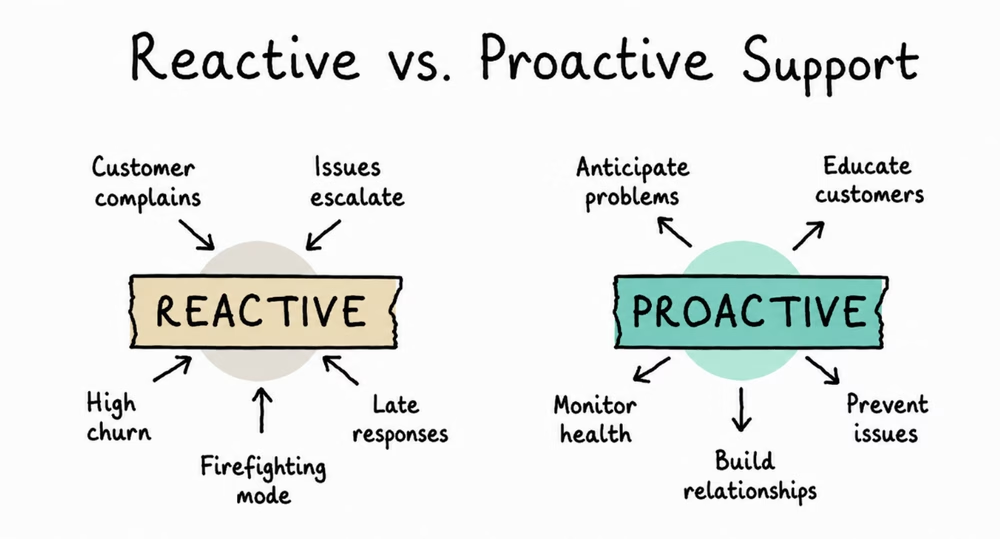
The default SaaS support mode is reactive: wait for the ticket, answer the ticket.
Build a proactive layer on top of that default:
- Outreach when a customer hits a usage pattern that predicts trouble (no logins in 14 days, key feature unused, integration broken).
- Outreach before a contract renewal when the health score is low.
- Outreach when a customer reports a bug that just got fixed, to close the loop.
- Outreach when a customer leaves a low CSAT, before they've decided whether to churn.
None of this is expensive. It just takes someone responsible for doing it.
Similarly, here are some more best practices you should adapt for you SaaS customer support or service:
- Close the loop with product and engineering
- Measure what actually matters
- Empower agents with real authority
- Train continuously, not just during onboarding
- Run a voice-of-customer program
- Use AI while maintaining the human touch
- Design onboarding and offboarding flows with equal care
- Handle outages, incidents, and angry customers like adults
- Scale support without scaling headcount linearly
Final Thoughts: Building Support That Drives the Business
If you take one thing from this guide, take this:
SaaS customer support is not a department that helps customers in trouble. It's a strategic function that determines whether your business grows or fails.
- Hire well
- Write good help articles
- Respond fast
- Listen to what tickets are telling
- Build feedback loops to engineering
- Use AI for what AI is actually good at
- Keep humans on the parts that need humans
- Measure satisfaction
- Don't promise what you can't deliver and over-deliver when you can.
See you in the next guide. 👋
Further Reading
Top Customer Support Tools for Small Businesses
Customer Service Outsourcing: A Complete Beginner's Guide
11 Types of Customer Service: Complete Guide
How to Improve Customer Service in 2026
Customer Service Philosophy, Plus 4 Tips To Develop One
eCommerce Customer Service in 2026 (Best Practices)




Leave A Comment?
You must be logged in to post a comment.