25+ Best Canned Email Templates for Customer Support and Service

A good canned response library is the difference between a support team that’s drowning and one that’s calm.
In this guide we will give you 25+ canned email templates that we actually use daily to speed up customer service and support responses.
Whether you want to introduce your service, speed up the reply drafting process with pre-made responses, we’ve got you covered.
In This Guide
- What Canned Email Templates Actually Are
- Heroic Inbox for Canned Responses
- Why Bother Building a Canned Responses Library?
- Tips for Writing Canned Responses (Best Practices)
- The Best Canned Email Templates in 2026
- 1. First Response and Acknowledgment Templates
- 2. Refund, Return, and Exchange Canned Email Templates
- 3. Complaint and Frustrated-Customer Templates
- 4. Order and Shipping Status Canned Response
- 5. Account, Billing, and Login Canned Response
- 6. Asking for More Information and Follow-Up Canned response
- 7. Escalation and Service Outage Templates
- 8. Technical Troubleshooting and Bug Report Templates
- 9. Closing a Ticket and Thank-You Canned Response
- 10. Feedback, Feature Request, and Retention Templates
- 1. First Response and Acknowledgment Templates

We rigorously test and research every product that we recommend through HeroThemes. Our review process. We may also earn a commission if you make a purchase through our links.
What Canned Email Templates Actually Are
A canned email template is a pre-written reply you save once and reuse whenever the same situation comes up.
Different tools call them different things:
- Saved replies
- Snippets
- Macros
- canned responses
- Email templates
But they all do the same job: you write the answer to a common question once, give it a name, and reuse that reply for the future tickets with a click.
Some tools also let you insert merge tags like [First Name] or [Order Number], so the customer details like name, order data fill in automatically.
To be clear, a canned email template is not an auto-reply. An auto-reply is a message that fires off the instant someone emails you, with no human involved.
A canned response is different because an agent reads the question first, picks the right template, and personalizes it before sending.
Heroic Inbox for Canned Responses
An email template is only as good as the system delivering it.
Saving everything in a doc and copy-pasting by hand works for a sole person.
But it falls apart fast: no shared library, not tags and copy-pasting can be tiring.
Any team that handles support email seriously needs a shared inbox or help desk that treats saved replies as a core feature.
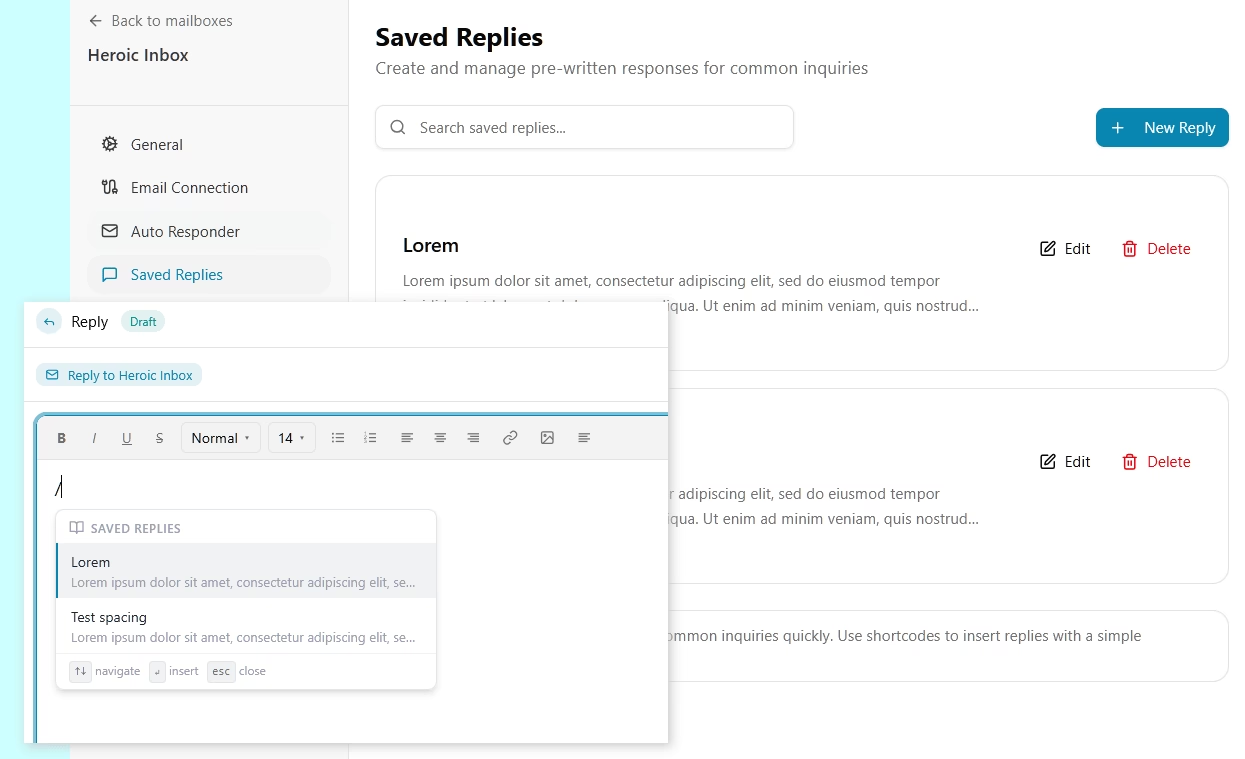
Heroic Inbox is the tool we’d point you toward. It gives you a proper shared inbox where you can manage all your customer tickets and communications.
Key Features Including:
- Saved replies and templates: Store your whole library, drop any reply into a conversation with a click, and standardize your team’s language without retyping.
- A real shared inbox: Incoming email becomes assignable, trackable tickets, with replies threaded onto the same conversation.
- Collision detection: It stops two agents from replying to the same ticket at the same time.
- Internal notes and draft approvals: Agents can leave private notes or draft a reply for a teammate to review before it goes out, which is very necessary when you’re training someone new.
- Customer and order context: Connect WooCommerce or Easy Digital Downloads and order history shows up right beside the conversation, so personalizing a refund or shipping reply takes seconds.
Heroic Inbox uses flat annual pricing with unlimited users and conversations. And with an introductory pricing you can get started with just $79.60 for the first year.
14-Day Money-Back Guarantee | Setup in Under 10 Minutes
Why Bother Building a Canned Responses Library?
Speed. With canned responses, the time between reading a question and sending a useful answer drops from minutes to seconds.
But speed is not the only benefit of canned responses.
- Consistency: The answer to “How long do returns take?” reads the same whether it comes from your newest hire or your most senior agent. Policy and legal language gets approved once, at the template level, instead of being reinvented (and occasionally fumbled) on every reply.
- Less burnout: Typing the same explanation for the fortieth time drains people and situations like these are best automated. Templates make answering such questions easy.
- Faster training: A solid library is one of the best onboarding tools you’ll ever have. New hires get approved language on day one and can handle routine tickets with confidence instead of staring at an empty reply box.
- Stability during chaos: When a launch or an outage triples your volume, pre-written replies let you keep pace without your tone or accuracy falling apart.
There’s a personalization angle too. When used right, email templates free up time to add a personal touch.
Limitations of Canned Responses
While canned email templates have lots of benefits, there are downsides as well.
- Without proper personalization, templated messages or emails feel like a generic reply.
- It can reduce brand authority and service quality (a proper, unique answer or response always hits different).
But the fix is easy:
- Use canned email templates as a base, not a final response. That’s what we do.
- Edit and remove unnecessary parts from the canned response.
- Make sure canned responses properly answer customer queries.
- Your response shouldn’t sound like a templated message created for similar questions.
Tips for Writing Canned Responses (Best Practices)
Having 30 templates is the easy part. But using them so customers never feel processed is the actual skill, and it comes down to a handful of habits we’d defend to anyone.
- Demand one personal sentence. A single line about the customer’s actual situation does more than any amount of polish. Make it the standard, coach to it, and check for it.
- Use merge tags, but don’t confuse them with personalization. Auto-filling [First Name] and [Order Number] saves time and prevents typos, which is great. Just remember that using a name in the greeting doesn’t excuse a generic body.
- Write the way your best agent talks. Read every template out loud. Does it sound like a person? Keep it. Sounds like a policy memo? Rewrite it.
- Keep each template single-purpose. One template, one problem. For a ticket with two issues, send two replies instead of building a Frankenstein template that half-fits everything.
- Name templates so an agent finds the right one in five seconds. For example, “Shipping delay, 1 to 3 days” beats “Template 24” every time.
Pro tip: Instead of writing complete email templates, you can also create short response blocks. Such as services you offer, return policy, or your introduction to speed up the reply drafting process.
When to Skip the Template Entirely
Templates handle the predictable majority of tickets, but knowing when to drop them is just as important as having them.
Write replies from scratch when:
- You’re not sure what the customer is actually asking. Ask the customer for more details and clarification.
- The customer is genuinely angry, or the situation is emotionally charged.
- The problem is complex or has a lot of moving parts.
- It’s a high-value account or a sensitive issue.
The moment you find yourself reshaping a customer’s problem to fit a template, that’s your cue to close the template and start typing.
The Best Canned Email Templates in 2026
Here are the types of canned email templates you will find in the below list:
- First response and acknowledgment
- Refunds, returns, and exchanges
- Complaints and frustrated customers
- Order and shipping status
- Account, billing, and login help
- Asking for more information and following up
- Escalation and service outages
- Technical troubleshooting and bug reports
- Closing a ticket and saying thank you
- Feedback, feature requests, and retention
If you’re starting from scratch with canned responses, build the first-response and refund templates first. Those two categories alone will cover a significant portion of your daily volume.
1. First Response and Acknowledgment Templates
The first reply sets the tone for the entire conversation. Its real purpose is to show that a human has seen the message.
Even if you can’t fix the problem yet, a fast, warm acknowledgment buys you goodwill and a little breathing room.
We’ve Received Your Request
Subject: Re: [Original Subject]

Hi [First Name],

Thanks for reaching out. I'm sorry to hear that you're dealing with [brief description of their issue]. I've got your message and I'm looking into it now.

If you have any new details to add in the meantime, feel free to reply to this email. Any additional information may help speed up the review.

Talk soon,
[Agent Name]
Welcome Email Template for a New Customer
Subject: Welcome to [Company], [First Name]

Hi [First Name],

Welcome to [Company], and thank you for choosing us.

Getting started is often the hardest part, so we've put together a guide to help you get up and running quickly:

[Link to setup guide or knowledge base]

Most customers find the answers they need there during their first few days. If you have a question, need help with setup, or run into anything unexpected, reply to this email and a member of our team will be happy to help.

We're glad to have you with us and look forward to helping you get the most from [Product Name].

Best regards,
[Agent Name]
[Company]
After-Hours Acknowledgment
Subject: Re: [Original Subject]

Hi [First Name],

Thanks for contacting us.

You've caught us outside our usual hours ([support hours, time zone]), but your message landed safely.

We'll review your request and respond on [next business day] as soon as the team is back online.

If you need assistance before then, you may find an answer in our help center:

[Self-service link]

For urgent issues, please contact: [Emergency contact information]

Thank you for your patience. We'll be in touch soon.

Best regards,
[Agent Name]
[Company]
2. Refund, Return, and Exchange Canned Email Templates
Money makes people anxious, so refund emails carry more weight.
While responding such emails be clear about three things:
- What’s happening
- When it’s happening
- What (if anything) the customer needs to do.
Vagueness about money is a way to make customers angry.
Refund Approved
Subject: Your Refund for Order [Order Number] Has Been Processed

Hi [First Name],

I've approved your refund of [Amount] for order [Order Number].

The refund has been issued to your original payment method, and you don't need to take any further action.

Most refunds appear within [Timeframe], although processing times can vary between banks and payment providers.

If the refund hasn't arrived by [Date], reply to this email and I'll look into it for you.

Thanks for giving us the opportunity to make this right.

Best regards,
[Agent Name]
Refund Declined, With an Alternative
Subject: Re: Your Refund Request for Order [Order Number]

Hi [First Name],

Thank you for contacting us about your refund request.

I've reviewed order [Order Number]. Unfortunately, I can't approve a refund because [plain-language reason, e.g., the order was delivered more than 30 days ago], which falls outside our refund policy.

While I'm unable to issue a refund, I'd still like to help.

I can offer [alternative, e.g., a 20% credit toward a future order, a replacement item, or an account credit].

I understand this may not be the outcome you were hoping for, and I appreciate your understanding.

If you have any questions about the decision or would like to discuss the available options, I'm happy to help.

Best regards,
[Agent Name]
Saying no is the hardest email to write, which is precisely why you want it ready before you need it.
Return and Exchange Instructions
Subject: How to Return or Exchange Order [Order Number]

Hi [First Name],

I'd be happy to help with your [return/exchange] request for order [Order Number].

Please follow these steps:
1. Print the prepaid return label attached to this email.
2. Pack the item securely, preferably in its original packaging.
3. Attach the return label to the package.
4. Drop the package off at any [Carrier] location.

Once the package is in transit, we'll begin processing your [refund/replacement]. You'll receive updates as the return moves through the process.

If you have any questions or run into any issues along the way, reply to this email and I'll be happy to help.

Best regards,
[Agent Name]
Explore:
How to Respond to Angry Emails: Tips, Strategies, and Examples
How to Handle Customer Inquiries: Effective Responses and Best Practices
3. Complaint and Frustrated-Customer Templates
This is where templates are tested.
Frustrated customers can spot a script from a mile away, and a poorly timed, generic apology only makes matters worse.
Your emails don’t need to sound polished. It should sound like a real person who gets why they’re upset and is going to fix it.
General Complaint Apology
Subject: Re: [Original Subject]

Hi [First Name],

I'm sorry about [specific issue]. I understand why this has been frustrating, and I appreciate you bringing it to our attention.

I've reviewed the situation and I'm currently [specific action]. I expect to have an update for you by [timeframe].

I'll follow up personally once I have more information, so you won't need to chase us for updates.

Thank you for your patience while I work through this.

Best regards,
[Agent Name]Delivery Complaint
Subject: Re: Your delivery issue with order [Order Number]

Hi [First Name],

I'm sorry your order [didn't arrive / arrived damaged]. That's frustrating, especially when you've been waiting on it.

I've already [reshipped the item / opened a claim with the carrier / sent a replacement].

You won't pay anything extra, and I'll track it from my side until it's in your hands.

Thanks for your patience,
[Agent Name]
Note: If a customer is genuinely furious, or the situation is unusual, skip the template and write from scratch. Canned responses are for the predictable majority of tickets, not the emotional ones.
4. Order and Shipping Status Canned Response
“Where is my order?” is probably the single most common email in eCommerce support, which makes it the highest-leverage template you can build.
Order Status Update
Subject: Update on Order [Order Number]

Hi [First Name],

I've checked the status of order [Order Number].

Your order is currently [status] and is expected to arrive by [estimated date].

You can track the latest shipping updates here:

[Tracking Link]

Everything looks on track at the moment. If anything changes, we'll let you know and share the latest delivery information.

If you need further help, reply to this email and I'll take a look.

Best regards,
[Agent Name]
Shipping Delay
Subject: Delivery Delay for Order [Order Number]

Hi [First Name],

I'm contacting you about a delay affecting order [Order Number].

The shipment is currently delayed because of [brief, honest reason]. The revised delivery estimate is [Date].

I've already [added a discount / upgraded shipping / credited your account] to acknowledge the inconvenience.

You can view the latest shipment status here:

[Tracking Link]

We'll continue monitoring the delivery and will contact you if the carrier provides additional updates or changes the estimated arrival date.

Thank you for your understanding, and I'm sorry for the delay.

Kind regards,
[Agent Name]
5. Account, Billing, and Login Canned Response
Emails or tickets related to accounting, billing and login are always urgent and sensitive. Because money and access are both on the line.
Speed and precision matter more than warmth here. And a little reassurance never hurts.
Password Reset Help
Subject: Your Password Reset Link

Hi [First Name],

We received a request to reset the password for your [Company] account.

To create a new password, use the secure link below:

[Reset Link]

This link expires in [Timeframe] and can only be used once.

If you did not submit this request, you can ignore this email. No changes have been made to your account.

If you're unable to access your account after completing the reset process, reply to this email and our team will assist you.

Kind regards,
[Agent Name]
Billing Error or Overcharge
Subject: We've Corrected the Billing Error

Hi [First Name],

Thank you for bringing this to our attention. I understand how concerning unexpected charges can be, and I'm sorry for the inconvenience.

After reviewing the transaction, I confirmed that the [duplicate charge / incorrect amount] from [Date] was caused by an error on our side.

I've reversed [Amount], and the refund is now being processed. Most customers see the credit within [Timeframe], although timing can vary depending on the payment provider.

I've also reviewed the account to address the underlying issue and reduce the risk of it happening again.

I really appreciate your patience while I sorted it out.

Best,
[Agent Name]
6. Asking for More Information and Follow-Up Canned response
Sometimes, you can’t help until the customer provides more information.
These canned email templates keep things moving forward.
Requesting More Information
Subject: Re: [Original Subject], Additional Information Needed

Hi [First Name],

Thank you for the information you've already provided.

I've started looking into the issue, and I need a few additional details before I can continue:

- [Specific item 1, e.g., the email address associated with your account]
- [Specific item 2, e.g., a screenshot of the error message]
- [Specific item 3, e.g., the browser and device you're using]

Once I have those details, I'll continue the investigation and work toward a resolution.

No rush here, but the sooner I have them, the sooner it's solved.

Best regards,
[Agent Name]
Friendly Follow-Up
Subject: Re: [Original Subject]

Hi [First Name],

I'm following up on [specific issue].

The last update we had was [where things stood], and I haven't received a response since then.

I wanted to check whether you're still experiencing the issue or if everything is working as expected now.

If you still need help, reply to this email and I'll continue working on it. If the issue has already been resolved, a quick reply is enough to let me know.

Best regards,
[Agent Name]
Explore: Best Follow-Up Email Subject Lines
Closing After No Response
Subject: Re: [Original Subject], Closing This Request for Now

Hi [First Name],

I haven't heard back regarding [issue], so I'm going to close this request for now.

If the issue is still affecting you, or if it comes up again later, simply reply to this email and we'll pick up where we left off.

Thank you, and please don't hesitate to get back in touch if you need anything further.

Best regards,
[Agent Name]
That “Closing After No Response” is quietly one of the most useful templates in the whole set.
It clears dead tickets from your queue without being abrupt.
7. Escalation and Service Outage Templates
When a problem exceeds your ability to resolve it at your desk or when something breaks for everyone at once, the way you communicate essentially becomes the entire job.
Customers can handle bad news. What they can’t stand is silence, or getting bounced around with no explanation.
Escalating to a Specialist
Subject: Re: [Original Subject], Escalated for Further Review

Hi [First Name],

I've reviewed your issue regarding [specific problem] and escalated it to [team or specialist name], who has the access and expertise needed to investigate further.

I've included all of the information you've already provided, so you won't need to repeat the details or start the process again.

You can expect an update by [timeframe].

Although a specialist is now involved, I'll continue tracking the case and making sure it progresses.

If you have any questions or additional information, reply to this email and we'll make sure it reaches the right people.

Kind regards,
[Agent Name]
Service Outage Acknowledgment
Subject: Service Issue Identified

Hi [First Name],

We've identified an issue affecting [specific feature or service] and our engineering team is currently investigating.

Current impact:

- Affected service: [Feature or Service]
- Customer impact: [Brief description]
- Unaffected services: [Working features]

We'll continue posting updates here: [Status Page Link]

Our next communication will be sent by [Time]. If the situation changes before then, we'll provide an update sooner.

We're sorry for the disruption and appreciate your understanding.

Kind regards,
[Agent Name]
Two things make outage canned email templates work.
Describe the impact in the customer’s terms (“you can’t log in”) rather than your internal cause (“the auth service is throwing 500s”), and always commit to a next-update time so nobody’s left refreshing the page wondering if you forgot about them.
8. Technical Troubleshooting and Bug Report Templates
With technical tickets you want to give clear steps without sounding like you’re reading from a script that ignores what the customer already tried.
Basic Troubleshooting Steps
Subject: Re: [Original Subject], A Few Troubleshooting Steps

Hi [First Name],

Thank you for the detailed information. Based on what you've described, I'd like to try a few troubleshooting steps that commonly resolve this issue:

1. [Step 1]
2. [Step 2]
3. [Step 3]

If you've already completed any of these steps, please let me know which ones you've tried and what happened.

Once you've had a chance to test the suggestions above, reply with the results and I'll continue from there.

Best regards,
[Agent Name]
Bug Confirmed and Logged
Subject: Re: [Original Subject], Bug Confirmed

Hi [First Name],

Thanks for reporting this.

I've confirmed that the issue is caused by a bug on our side.

I've logged it with our development team and linked your case to the report [reference number, if shared].

The team is now reviewing the issue. I don't have an estimated fix date to share at this stage, but I'll keep your case attached to the report and let you know as soon as I have an update.

In the meantime, [workaround] should help you continue working around the issue.

Thank you for bringing this to our attention.

Best regards,
[Agent Name]
9. Closing a Ticket and Thank-You Canned Response
A clean close reassures the customer it’s truly handled.
These templates are intentionally short because brevity itself conveys confidence at this stage.
Resolution and Close
Subject: Re: [Original Subject], Resolved

Hi [First Name],

I'm glad we were able to resolve [issue].

I'll close this ticket now. If the issue returns or you need help with anything related, simply reply to this email and we'll continue from where we left off.

Thank you for your patience and for working through this with us.

Best regards,
[Agent Name]10. Feedback, Feature Request, and Retention Templates
This last canned response is where support quietly turns into growth.
Asking for Feedback or a Review
Subject: How Did We Do?

Hi [First Name],

Now that we've resolved [issue], I'd appreciate your feedback.

If you have a minute, please share your experience here:

[Feedback or Review Link]

Your feedback helps us improve our support and better serve customers in the future.

If anything about your experience fell short, I'd welcome the opportunity to hear about it directly.

Thank you for your time and for choosing [Company].

Best regards,
[Agent Name]Cancellation and Retention
Subject: Re: Your Cancellation Request

Hi [First Name],

I've received your cancellation request and can take care of that for you.

Before I process it, I'd appreciate understanding what prompted the decision.

This will help us improve, and if there's an issue we can address, I'd welcome the opportunity to help.

If you'd still prefer to cancel, simply let me know and I'll complete the cancellation right away.

Thank you for being a customer, and thank you for giving us the opportunity to support you.

Best regards,
[Agent Name]
Explore:
17 Customer Feedback Email Templates That Work (2026 Guide)
Best Retention Email Templates (Expert Guide)
Final Thoughts: Canned Email Templates Done Right
Canned email templates aren’t a shortcut around good support. They are:
- What makes good support possible at scale
- Hand you back the minutes you’d otherwise waste retyping the same shipping update
- Let you spend your time where it counts: personalization, the real apology, the customer who needs human support instead of a script.
So start small.
Pull your last 30 days of tickets, find the 10 questions you answer most, and template those first.
A template is a strong first draft, never the last word. The teams that win with canned responses treat them as a foundation to build on.
Further Reading
10 Quotation Email Templates, Examples & How to Write Them
Meeting Recap Email Templates (With Examples and Writing Tips)
Best Goodbye Email Templates for Colleagues (With Examples)
Professional Correction Email Examples and Templates
Best Email Subject Lines That Work in 2026



Leave A Comment?
You must be logged in to post a comment.