17 Customer Feedback Email Templates That Work (2026 Guide)

Most feedback emails are built to be ignored. Like the last few feedback requests you ignored without a second thought.
The reason?
They arrive at the wrong moment, ask too many questions, sound overly corporate, and make customers work harder than they should.
The best customer feedback emails feel personal, timely, and easy to answer.
They sound like a real person asking a real question instead of a brand trying to hit a KPI.
In this guide, you’ll get 17 customer feedback email templates for key customer moments. Plus practical tips to help you launch and improve your feedback collection campaigns.
In This Guide
- What Is a Customer Feedback Email?
- Why Customer Feedback Emails Matter
- How to Automate and Scale Feedback Collection with Heroic Inbox
- How to Write a Customer Feedback Email That Actually Gets Responses
- Best Customer Feedback Email Templates
- 1. Post-Purchase Product Feedback Email
- 2. Post-Service Customer Satisfaction Survey Email
- 3. NPS Survey Email (Universal)
- 4. Post-Support CSAT Email
- 5. Onboarding Completion Feedback Email
- 6. The Product Review Request
- 7. Feature Request and Roadmap Email
- 8. Churn Prevention "We Miss You" Email
- 9. Cancellation Exit Survey Email
- 10. Event or Webinar Feedback Email
- 11. Beta Tester Feedback Email
- 12. Annual Customer Satisfaction Check-In Email
- 13. The Customer Interview Request Email
- 14. The One-Question Micro-Survey Email
- 15. Re-Engagement Email for Inactive Users
- 16. Testimonial and Case Study Request Email
- 17. The Thank You for Your Feedback Email
What Is a Customer Feedback Email?
A customer feedback email is a short, targeted message sent to a customer at a specific moment—after a purchase, support ticket, onboarding milestone, or cancellation—that asks for their honest reaction and routes the response to someone who will act on it.
Most teams treat feedback emails like surveys with a sender line. They’re not. The email is the relationship, and the survey is the byproduct.
Why Customer Feedback Emails Matter
Customer feedback is the cheapest market research money can buy, when customers actually reply.
Getting that feedback is not easier, so your emails need to work harder to get it.
Customer feedback emails are the only reliable way to hear from the silent majority. The customers who don’t post on Trustpilot, don’t tweet at you, and don’t open support tickets but quietly churn anyway.
These feedback emails can surface:
- Roadmap signals
- Generate testimonials
- Catch service recovery moments before customers leave
- Give your customer experience team a paper trail of what’s actually working.
Pro tip: Treat every customer feedback email as the start of a two-way conversation. If your email says “do not reply to this email”, almost 99% of customers will ignore it completely.
How to Automate and Scale Feedback Collection with Heroic Inbox
Feedback collection email templates are useful only if you can actually send them at scale, route the replies to the right people, and act on what you learn.
That’s where a shared inbox tool like Heroic Inbox earns its keep.
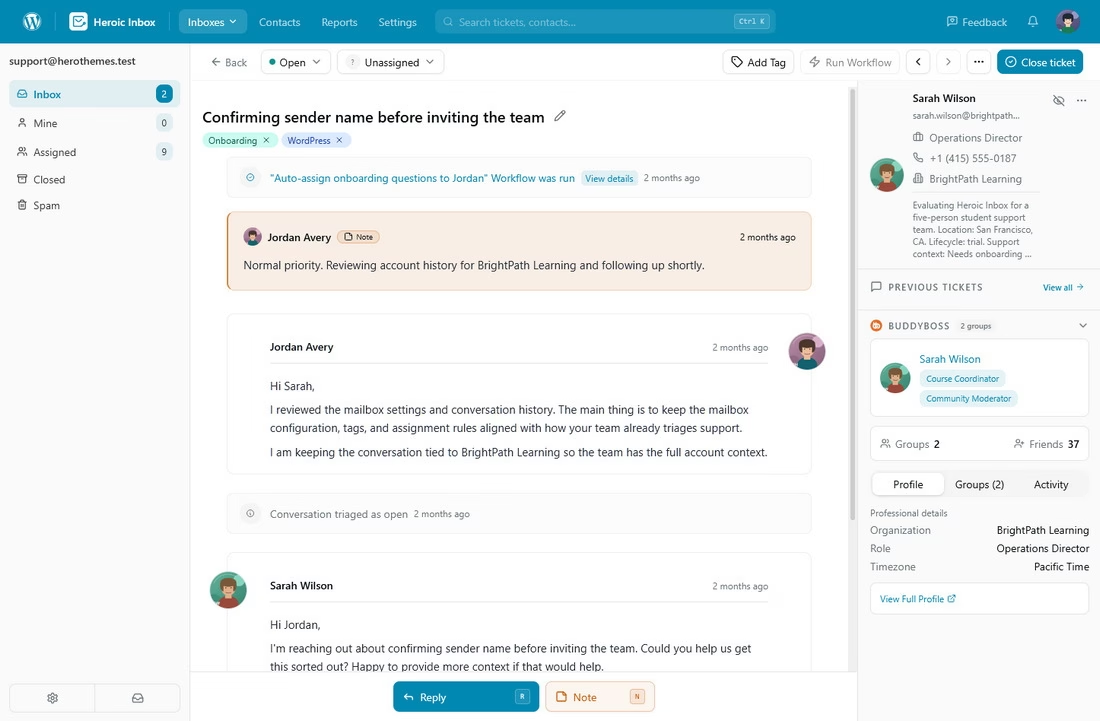
Heroic Inbox is a WordPress-based help desk plugin worth a serious look for any team running customer feedback workflows out of their site.
Especially customer support teams that deal with hundreds of support tickets a day.
The features that make it work specifically for feedback programs come down to four things:
- Workflow automation
- Saved replies / templates
- Customer history
- Unlimited users
Workflow automation for example lets you automate hundreds of tasks.
In our case, collecting feedback after the conversation with the customer ends.
With Heroic Inbox, you can create the following workflow to send automated feedback collecting email.
Set the following conditions:
- Tags contain “Support”
- Status is “Closed”
Set the following action:
- Send an Email
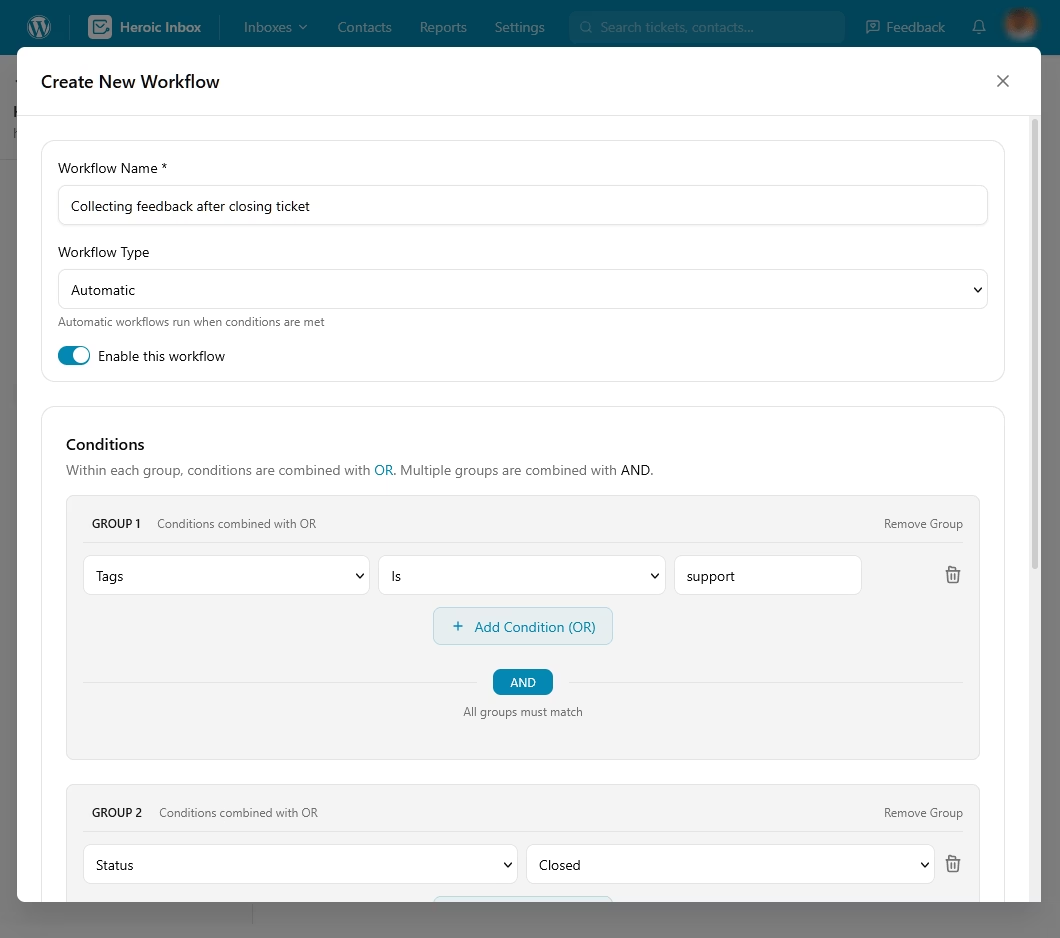
This will automatically send your feedback collection email whenever you close a ticket that has a “support” tag.
Or you can simply create a workflow where you add a specific tag (feedback request) to a ticket, after that workflow auto send a feedback collection email and mark the ticket as closed.
In edge cases, you can use saved replies/templates to quickly send feedback request emails.
14-Day Money-Back Guarantee | Setup in Under 10 Minutes
How to Write a Customer Feedback Email That Actually Gets Responses
Before you copy a single feedback email template, get the fundamentals right.
1. Make Your Email Subject Awesome
Before you can even think about getting your customer to leave feedback, you need to get them to actually open the email. Everything that comes after this section is moot if you can’t get that.
Good feedback subject lines do three things at once:
- They signal a short ask
- Hint at why the recipient should care
- Avoid the trigger words that get filtered into “Promotions.”
Here are some patterns that consistently outperform generic asks:
- Specific and short: “Quick question about your Nov. 12 order”
- First-person and human: “Mind sharing two minutes of honest feedback?”
- Benefit-framed: “Help us make [Product] work better for you”
- Curiosity-first: “Did we actually fix it?”
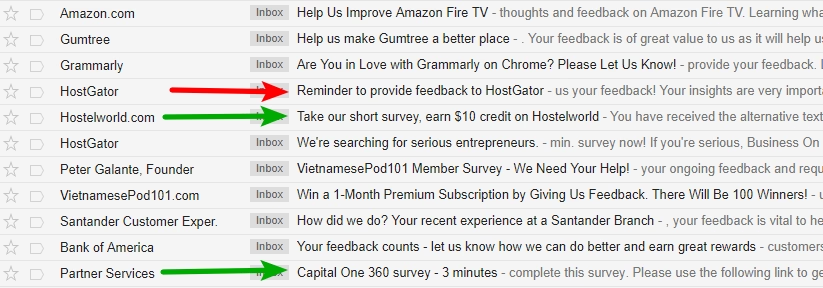
To see how well brands follow these guidelines, I took a look back through some recent feedback emails that I’ve received:
2. Opening, Structure, and Length
The first sentence has one job: reference something specific.
Use the order ID, the support ticket number, the meeting date, the feature name.
Anything that proves this isn’t a bulk campaign. Then state the ask in plain English within the first 25 words.
Most customer feedback emails are too long:
- Aim for 50 to 125 words in the body
- One clear call to action
- A button that’s visible without scrolling on mobile
If you need more space, you’re probably trying to ask too much in the first place.
3. CTAs, Timing, and Personalization
If you regularly work on emails, make it a habit to add only one CTA per email, always.
Having two CTAs means zero conversions, or no satisfying results. Because customers have to decide which thing to click, and then they give up entirely.
Here in our case (asking feedback) your CTA can be:
- “Rate your experience” for a one-tap survey
- “Share your thoughts” for longer responses
- “Book 15 minutes” for an interview
Timing is as important as the content. Below are some guidelines for when to send customer feedback emails:
- Post-purchase: 3 to 7 days after delivery for physical products, same day for digital goods
- Post-support: Within 24 hours of ticket resolution, while the experience is fresh
- Post-onboarding: 7 to 14 days after activation, once the customer has actually used the product
- Milestone moments: 30, 60, 90 days, anniversaries, and major feature adoption
- Churn risk signals: Usage drops, missed renewals, support escalations
- Periodic NPS: Quarterly for relationship NPS, after key transactions for transactional NPS
- Cancellation: Same day the cancellation is processed, before the customer mentally moves on
- Post-event: Within two hours of an event closing for the highest completion rates
Send these feedback emails during business hours in the customer’s time zone from Tuesday to Thursday, and you’ll see a significant increase compared to sending them on Friday afternoons or during the weekend.
For personalization though, don’t just depend on first names:
- Mention the product the customer bought
- Used features
- Name of the agent who helped with customer issue
- The date of event
Each detail tells the customer you actually know who they are, which is the entire point.
4. Mobile Optimization and Follow-Ups
Most business emails get opened on mobile, and feedback emails are no exception. So, aim for:
- Single-column layouts
- 16px minimum body text
- Tap targets at least 44 pixels tall
- No images that hide your CTA when they fail to load.
Test every email template on your phone before you send it to your list.
Also set one follow-up reminder, sent 3 to 5 days after the original. Which can lift total response rates substantially.
Explore:
Free Email Writer Tool
Best Free AI Email Reply Generator
Best Support Ticket Response Templates for Fast, Consistent Customer Service
Best Customer Feedback Email Templates
Below are 20 ready-to-use customer feedback email examples, balanced across B2B and B2C, with subject line options and a quick breakdown of when to use each and why it works.
Copy them, swap in your details, and test the subject lines with your own audience.
Don’t send these word-for-word. The reason they work is that they sound like a real person wrote them to a specific customer. A copy-paste blast loses that personal touch quickly.
1. Post-Purchase Product Feedback Email
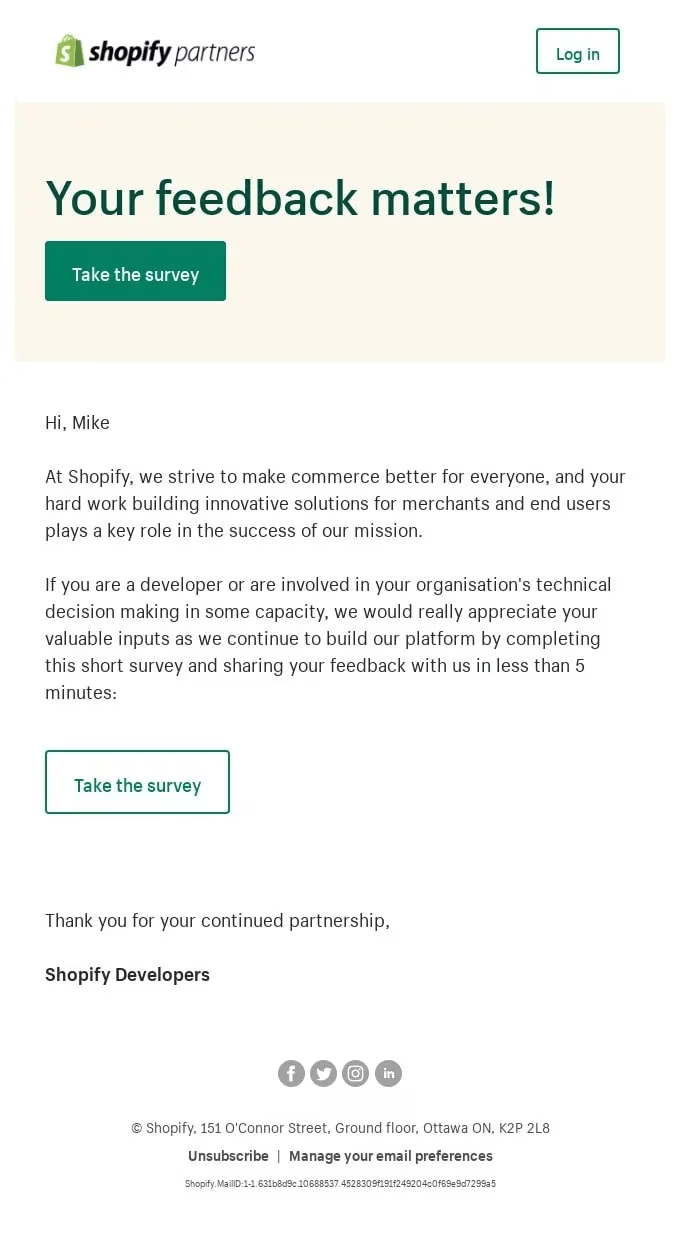
This is the workhorse customer feedback email template for any eCommerce brand, and it doubles as a soft review request.
Send these 5 to 7 days after delivery, once the customer has actually used the product.
Subject line options:
- How’s your [Product Name] working out?
- A week in. What do you think?
- What’s your honest take on [Product Name]?
Email:
Hi [First Name],

Your [Product Name] should have been in your hands for about a week now, which feels like the right time to ask: how's it going?

You've had your [Product Name] for about a week now. We would like to know if it's working for you.

We're not fishing for a five-star review. If something's off, the size, the color, the way it arrived—we want to know so we can fix it.

If it's working, we'd love to hear that too.

It will hardly take about 90 seconds.

[Share Your Feedback]

Thanks,
[Your Name]
[Brand Name]
2. Post-Service Customer Satisfaction Survey Email
Most B2B services firms wait until project completion to ask for feedback. That’s the worst possible moment. Instead, you should be catching it mid-engagement, when there’s still time to fix what’s broken.
Subject line options:
- A quick read on how things are going
- How are we doing on [Project]?
Email:
Hi [First Name],

We're about halfway through [Project Name], and before we get deeper into [Phase 2 / the next sprint / Q1], I wanted to pause and ask how this is actually feeling from your side.

You've got the clearest view of what's working and what isn't, and the only way we improve is if you tell us straight. The survey below covers five questions: scope, communication, responsiveness, deliverables, and overall confidence.

If you'd rather just reply with thoughts in your own words, that works too.

[Take the 5-Question Survey]

Appreciate you,

[Your Name]
[Title], [Agency Name]
The right time to send such emails are 48 to 72 hours after project milestones or quarterly check-ins.
3. NPS Survey Email (Universal)
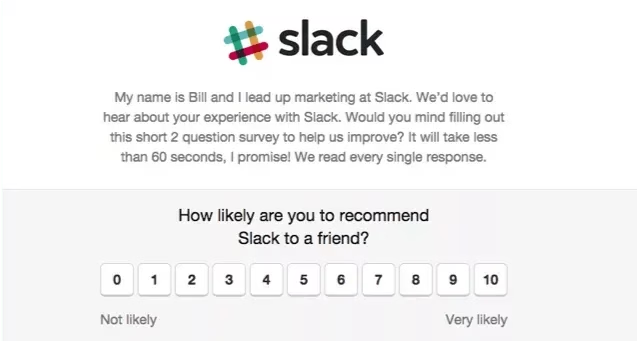
The classic NPS survey email template, dressed up enough that it doesn’t feel like a robot wrote it.
Subject line options:
- One question, one number
- Would you recommend us? (0 to 10)
Email:
Hi [First Name],

On a scale of 0 to 10, how likely are you to recommend [Company Name] to a friend or colleague?

[0] [1] [2] [3] [4] [5] [6] [7] [8] [9] [10]

That's it. One tap, no survey waiting on the other side.

If you've got a sentence or two on why you picked that number, even better.

Thanks,
[Your Name]
Embedded rating buttons allow customers to respond in one tap without leaving their inbox.
Slack uses a near-identical format and gets it right because there’s nothing to skim.
4. Post-Support CSAT Email
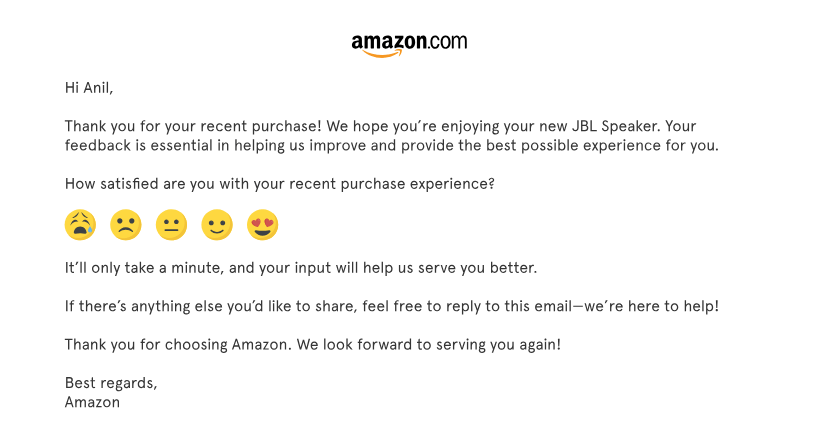
Within one hour of resolving a support ticket is the sweet spot for this email. Customers have an opinion right now and they won’t have one tomorrow.
Subject line options:
- Did we actually fix it?
- Quick rating on ticket #[ID]
- How did [Agent Name] do?
Email:
Hi [First Name],

We just closed your ticket about [issue summary]. Before this conversation fades from memory, mind telling us how we did?

😀 Great 😐 Okay 😞 Not great

If something's still off, hit reply and an agent (the same one who helped you, if you'd like) will pick this back up. We'd rather reopen the ticket than close a bad one.

Thanks,
[Agent Name]
[Company Name]
This is the single highest-response feedback email type in most CX (customer experience) programs. Send it the moment the ticket closes.
5. Onboarding Completion Feedback Email
Most B2B SaaS churn occurs during onboarding, yet most teams never ask the right questions until it’s too late.
Subject line options:
- You’re two weeks in, how’s it really going?
- A 10-minute onboarding pulse check
- Honest take on getting started with [product name]?
Email:
Hi [First Name],

You hit the two-week mark with [Product Name] yesterday. In our experience, that's when we learn the most about how the next six months will go.

Three questions:
1. What's one thing working better than you expected?
2. What's one thing that's slower or clunkier than it should be?
3. On a scale of 1 to 10, how confident are you that [Product] will deliver what you signed up for?

Just reply right here.

If anything flags as a problem, I'll personally get on a 20-minute call with you this week to sort it out.

[Your Name]
[Title]
Explore:
Customer Onboarding: Step-by-Step Guide with Examples and Best Practices
New Employee Onboarding Checklist
6. The Product Review Request
Reviews are public, but feedback is private. Ask for both at different times and through different emails.
Subject line options:
- Mind leaving a quick review?
- Help the next shopper out
- 30 seconds for a review?
Email:
Hi [First Name],

If [Product Name] is working out for you, would you take 30 seconds to leave a review?

Other shoppers rely on these to decide if it's right for them, and your honest take does more than any marketing page could.

[Write a Review]

If it's not working out, please don't leave a one-star review before giving us a chance to fix it.

Hit reply and we'll sort it out.

Thanks,
[Your Name]
[Brand Name]
Send this email 10 to 14 days after a product delivery. After you’ve already collected private feedback in a previous email.
Never on the same day or before the customer had a chance to actually use the product.
7. Feature Request and Roadmap Email
This feedback email template is intended for power users and high-ARR accounts. It’s for the people who know your product better than your product team does.
Subject line options:
- Shape our next roadmap
- One thing you’d change about [Product]
Email:
Hi [First Name],

We're finalizing the [Q2/H2] roadmap over the next two weeks. Before we lock anything in, I want to hear from you.

If you could add, change, or cut one thing in [Product Name], what would it be?

I'm reading every reply. The top themes go directly into the product team's planning doc, and if we build what you suggested, you'll hear from me first.

Reply to this email by [data]. We are happy to hear your thoughts and act on it.

[Your Name]
[Title], [Company]
8. Churn Prevention “We Miss You” Email
This feedback email template is for B2C subscribers who have become inactive or skipped a billing cycle.
The goal isn’t to win them back with a discount. Rather, it’s to find out what changed before they cancel.
Subject line options:
- Did we drop the ball?
- Haven’t seen you in a while
- One quick question before you go
- What happened?
Email:
Hi [First Name],

You haven't logged into [Product Name] in about three weeks. That's usually a signal something's off.

No pitch. Just one question: what happened?
- Life got busy and I'll be back
- I'm not getting enough value
- I found something better
- Honestly, I forgot it existed
- Something else (reply and tell us)

Whatever the answer, knowing helps us. If it's the second or third option, we'd genuinely like to fix it.

[Your Name]
[Product Name]
9. Cancellation Exit Survey Email
There is a small window of time after a cancellation when the customer’s memory of the experience is still useful.
Maybe 48 hours, at most.
Send this kind of feedback collection email the same day the cancellation is processed.
Subject line options:
- Before you go, one honest question
- Sorry to see you go, can we ask why?
- 90 seconds of honest feedback?
Email:
Hi [First Name],

Your [Product Name] account is officially canceled, and I won't try to talk you out of it.

But the only way we can improve is if you could spare 90 seconds to give us your honest feedback. Would you tell us what tipped the decision?

[Take the Exit Survey]

If something specific pushed you away, just reply to this email. I read every one personally. If you ever want to come back, the door's open.

[Your Name]
[Title], [Company]
10. Event or Webinar Feedback Email
Speed is of the essence. Feedback collected within two hours of an event ending is measurably more actionable than feedback collected the next day or the following week.
Subject line options:
- How was today’s session?
- Two quick questions about [Event Name]
- Worth your time? Honest answer.
Email:
Hi [First Name],

Thanks for joining [Event Name] today. While the session's still fresh, two quick questions:

On a scale of 1 to 10, how useful was the content?

What one topic would you want us to cover next?

The recording and slides are linked below, and I'll send a summary of the top-requested topics to everyone who replies.

[Watch the Recording] [Share Feedback]

Thanks,
[Your Name]
[Title]
11. Beta Tester Feedback Email
Beta testers self-selected into the work, so this email can be more demanding than a typical feedback email.
You can send this feedback collection email weekly or bi-weekly during active beta cycles.
Subject line options:
- Week 2 beta check-in
- Bugs, wins, wishlist
- Your beta verdict so far?
Email:
Hi [First Name],

Two weeks into the [Feature Name] beta. You've probably hit some rough edges by now.

Three quick sections, fill in whatever you've got:
Bugs: What broke or behaved unexpectedly?
Wins: What's already saving you time?
Wishlist: What's missing that would make this a clear choice?

Reply here. We will try our best to make this product perfect for you.

[Your Name]
[Product Team]
12. Annual Customer Satisfaction Check-In Email
A customer satisfaction survey email template designed for once-a-year, relationship-level feedback.
Crucially, this is not a renewal email. It’s the email you send before the renewal email.
Subject line options:
- Our annual honest-feedback check-in
- 10 minutes for next year’s relationship
- Year in review, your side of it
Email:
Hi [First Name],

We're coming up on a year together, with renewal in [Month]. Before that conversation, I'd rather have the honest one.

The survey below takes about 10 minutes. It covers four things: the value you're getting, how our team is performing, where we've fallen short, and what you'd want us to do differently next year.

Your answers go directly into how we plan your account for [Year]. If anything you share is a red flag, I'll set up a call within the week.

[Take the Annual Survey]

[Your Name]
[Account Manager / CSM Title]
13. The Customer Interview Request Email
For the kind of feedback a survey will never capture, you need to get on a call.
Subject line options:
- 30 minutes to make [Product] better?
Email:
Hi [First Name],

I'm running a small batch of customer interviews this month to understand how teams like yours actually use [Product Name] day to day.

This is not a sales call or a renewal conversation, just questions and listening.

It's 30 minutes on Zoom, your time zone, with a $50 [coffee / Amazon] gift card as a thank-you.

If you're up for it, here are three times this week:
[Day, Time]
[Day, Time]
[Day, Time]

If none of those work, reply with what does.

[Your Name]
[Research / Product Title]Explore: Best Meeting Recap Email Templates (With Examples and Writing Tips)
14. The One-Question Micro-Survey Email
The shortest viable customer feedback email.
Subject line options:
- One quick question
- 👍 or 👎 on [Thing]?
Email:
Hi [First Name],

Did [the article / feature / download] actually help?

[👍 Yes] [👎 No]

If you tap 👎, there's a one-line field on the next screen if you have 10 seconds to say why.

[Your Name]
15. Re-Engagement Email for Inactive Users
This is a good email template for B2C apps when a customer has installed and signed up for the app, but then stopped using it.
The feedback you collect here often reveals exactly why your activation funnel is leaking.
Subject line options:
- What pushed you away from [App Name]?
- Did we lose you? (and why)
- One honest answer, no guilt trip
Email:
Hi [First Name],

You signed up for [App Name] a few weeks back, then we lost you. That's our problem to figure out, not yours.

If you have a second, what got in the way?
- The app didn't do what I expected
- It was too hard to figure out
- I forgot about it
- I'm using something else now
- Nothing wrong, just busy

Whatever the answer, it helps us fix the right thing.

If you want to give it another shot, this [feature / tutorial / starter pack] gets you to the good part in two minutes: [Link]

[Your Name]
[App Name]
16. Testimonial and Case Study Request Email
Never send this type of emails out cold. Send it when you receive a glowing reply and the customer has already told you they’re happy.
Subject line options:
- Mind if we share what you said?
- Would you be open to a case study?
- Your [9/10 NPS] made our week
Email:
Hi [First Name],

Your feedback about [specific quote or theme] made our team's week. Can we ask a small favor?

We're putting together case studies on how [target customer type] uses [Product Name], and your story would be a strong fit.

It's a 30-minute call with our marketing team. We write the draft, and you approve everything before we publish anything.

If you're open to it, I'll have someone reach out to schedule.

[Yes, Let's Talk] [Maybe Later]
[Your Name]17. The Thank You for Your Feedback Email
The thank you for your feedback email template most companies forget to send entirely.
After someone takes the time to provide feedback, the worst thing you can do is remain silent.
The second worst thing is to send a generic “We appreciate your input” message with no specifics.
Subject line options:
- Thanks for the honest feedback, here’s what we’re doing
- You said it, we heard it
- Quick update on what you told us
Email:
Hi [First Name],

Thanks for taking the time to share your feedback about [specific topic] last week.

It actually landed in a planning meeting two days later, which is a good sign of how seriously we're taking it.

Here's what we're doing:
- Short term: [Specific action happening in the next 2 weeks]
- Medium term: [Specific roadmap commitment]
- Honest: [Something you can't or won't change, and why]

I'll follow up in 30, 60, or 90 days with a progress update. Until then, feel free to contact me directly if anything else comes up.

Thanks for making us better,
[Your Name]
[Title]
Final Thoughts: Customer Feedback Emails
The brands that get customer feedback emails right aren’t doing anything mystical.
They’re sending the same kinds of emails you’ll find in this guide: At the right moments, with personal authorship, and then they’re actually using that feedback to improve their products.
Start with five templates.
Pick the ones that match your highest-traffic customer moments (post-purchase, post-support, NPS, exit, thank-you), build them into Heroic Inbox or whatever tool you’re using, and ship them this week.
The customer who replies to your next feedback email is telling you something your dashboard can’t.
The only question is whether you’re going to listen.
Further Reading
31 Email Subject Lines to Collect Feedback (Best Picks)
18 Good Subject Lines for Survey Emails
Customer Feedback Surveys: Tools, Best Practices
How To Ask for Feedback From Customers
Best Email Subject Lines for Requests (Plus Examples)
11 Retention Email Templates That Work (Expert Guide)
Professional Correction Email Examples and Templates




Leave A Comment?
You must be logged in to post a comment.