Introducing HelpJet: The FREE AI Support Chatbot That Learns Your Business in 5 Minutes

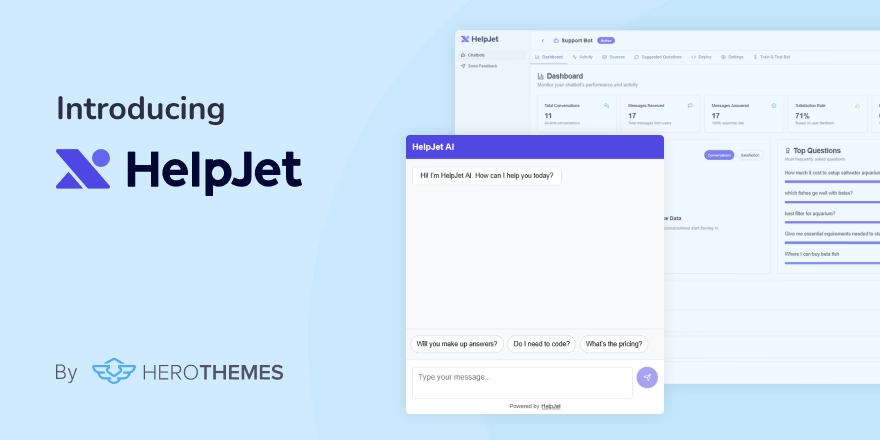
Quick summary: HelpJet is our brand-new AI customer support chatbot. It uses your existing WordPress site content to answer customer questions through an embeddable chat widget. No flowcharts, decision trees or prompt engineering are required.
HelpJet is free and built to work on any type of website, including WordPress, Shopify and Wix.
Why We Built HelpJet
It’s been 15 years since we started building WordPress plugins that specifically focused on customer support and service.
When we built Heroic KB, the idea was simple: give customers a place to find answers themselves. And it works.
A well-structured knowledge base genuinely reduces ticket volume. But it doesn't eliminate it, because some customers won't search, and others search and still can't find what they need.
Heroic Inbox solves the next layer. When a customer does reach out, your team handles it from one clean shared inbox.
But here's the problem neither product fully addressed: most of the tickets landing in that inbox shouldn't require a human intervention at all.
To solve this, we introduced Heroic AI Assistant as a Heroic KB feature. And it genuinely helped most of our customers to solve more customer problems on the knowledge base before they become tickets.
Building on that success, we created a dedicated AI chatbot/assistant platform (HelpJet) that more businesses can access. Which offers:
- A usable free solution
- Easier data feeding and control over it
- Activity logs and reporting functionally
- Bot training
- Easier implementation
- Customization options
We know that HelpJet is not one of a kind—there are hundreds of similar services. What sets HelpJet apart is its simplicity.
Getting started with HelpJet takes just 5 minutes, and its feature set is just what you need from an AI chatbot. Nothing fancy, overly complicated or costly.
What HelpJet Can Do
By now you already have a good enough idea what HelpJet does. But,let's look at its key features in more detail.
Have Real Conversations, Not Scripted Ones
The biggest complaint about traditional chatbots is that they feel like a broken phone tree.
They work when a customer's question matches a pre-written script exactly. The moment someone phrases something differently or asks a follow-up, the whole thing falls apart.
HelpJet doesn't work like scripts:
- It reads the intent behind a question, not just the keywords.
- If a customer is frustrated, it picks up on that.
- If they're confused, it tries a different explanation.
- If they're asking about something your content covers from a different angle, it finds the right answer rather than defaulting to “I'm sorry, I didn't understand that.”
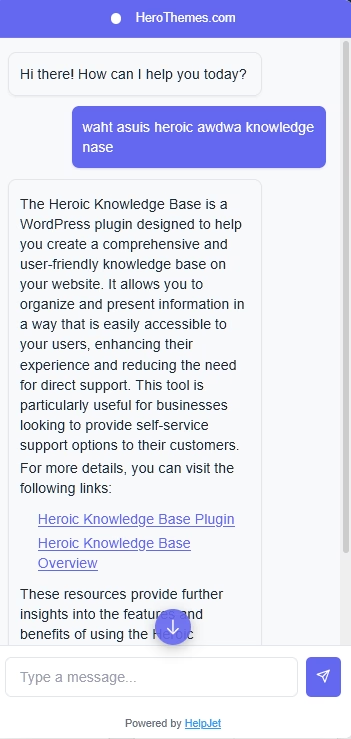
In below image you can see I asked HelpJet “waht asuis heroic awdwa knowledge nase”, and it come up with right answer.
In such situations any generic or highly scripted chatbot would fail. But not HelpJet.
Train HelpJet with Your Existing Content
Most chatbots force you to rebuild your knowledge base within their platform. HelpJet, on the other hand, fetches your existing data from WordPress sites.
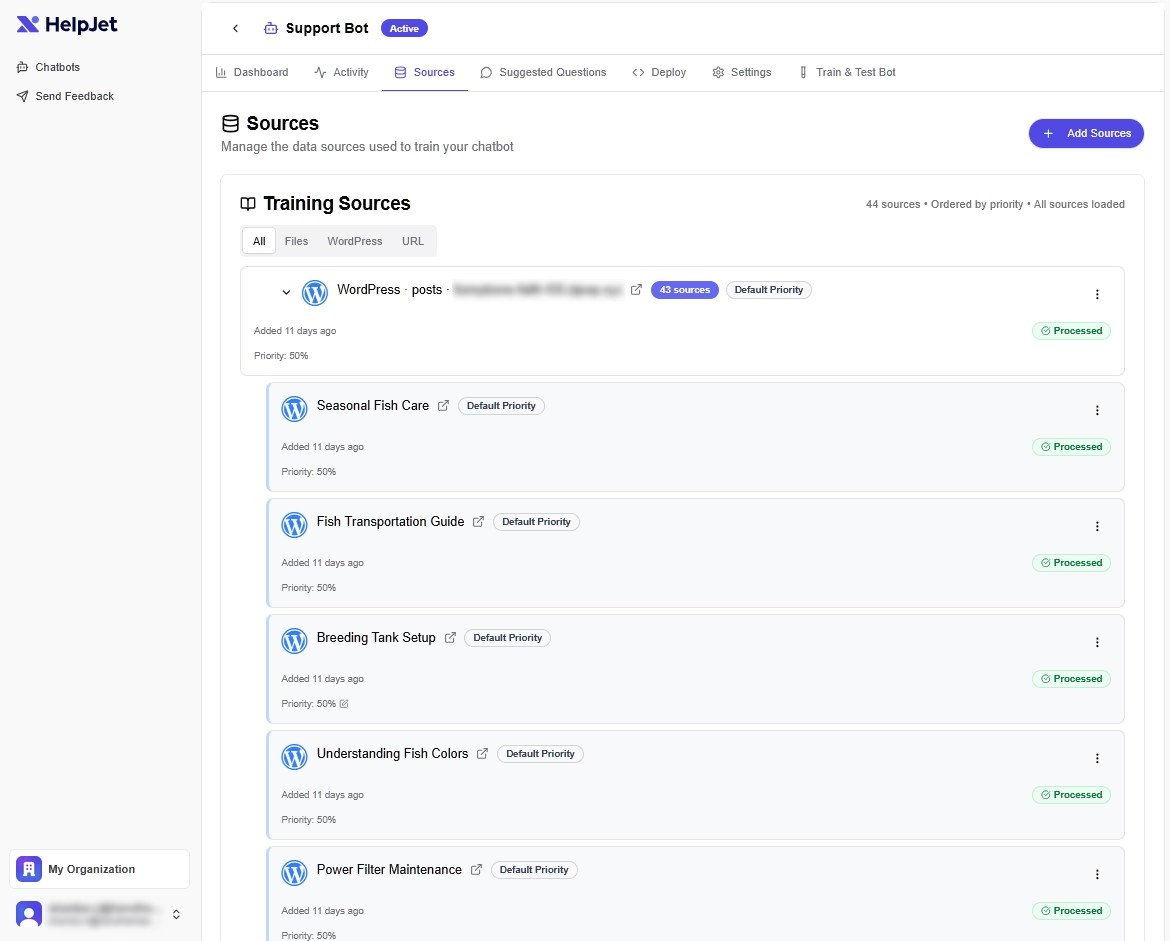
Every source shows processing status, priority weighting, and timestamp.
You can manage, reorder, or remove sources any time. And once a week, HelpJet automatically re-ingests your content to stay current as your site changes, with no manual retraining required.
Clean Human Escalation
HelpJet handles the questions it can handle, and steps back from the ones it can't.
When a conversation goes beyond what the bot knows, or when a customer explicitly asks for a person, HelpJet routes the conversation to a contact form or email address, wherever your team is.
This isn't just a fallback. It's a feature.
The worst version of a support bot is one that loops a confused customer in circles rather than admitting it can't help.
Real-Time Dashboard for Conversations, Satisfaction, and Top Questions
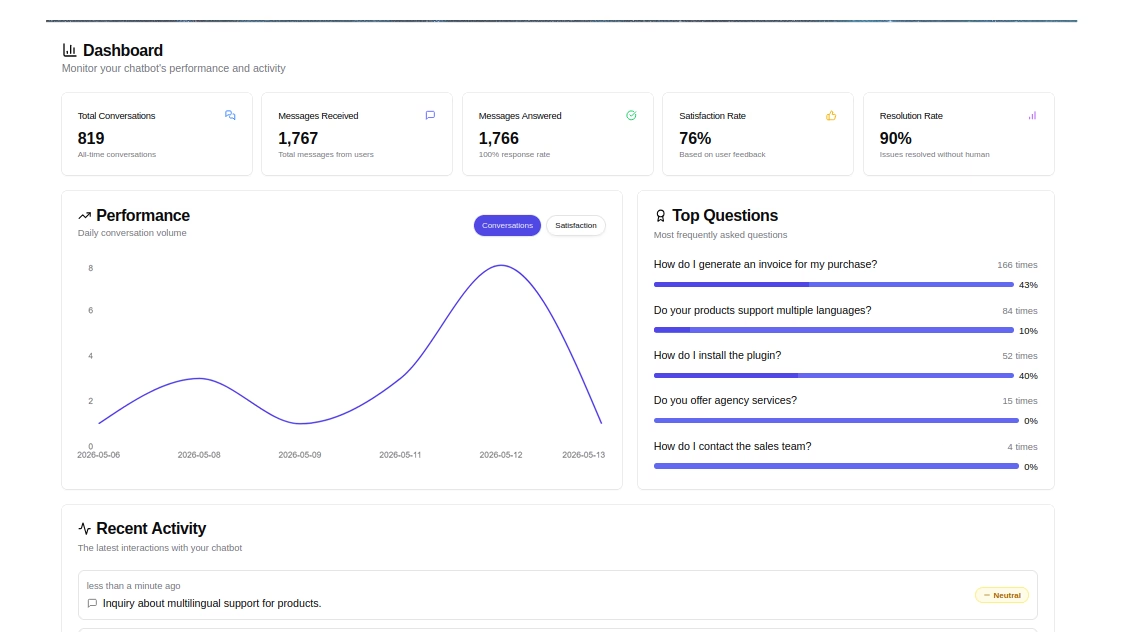
You shouldn't have to guess how well your bot is performing. HelpJet's dashboard gives you a clear picture of what's happening:
- Total conversations and messages received over any time window
- Satisfaction rate based on user feedback (thumbs up or down after each conversation)
- Resolution rate: how many issues get resolved without human intervention
- Top questions: the specific queries your customers ask most, ranked by frequency
- Activity log: a searchable, filterable record of every conversation, with sentiment tagging (positive, negative, or neutral) and resolution status
Built-In Preview Environment
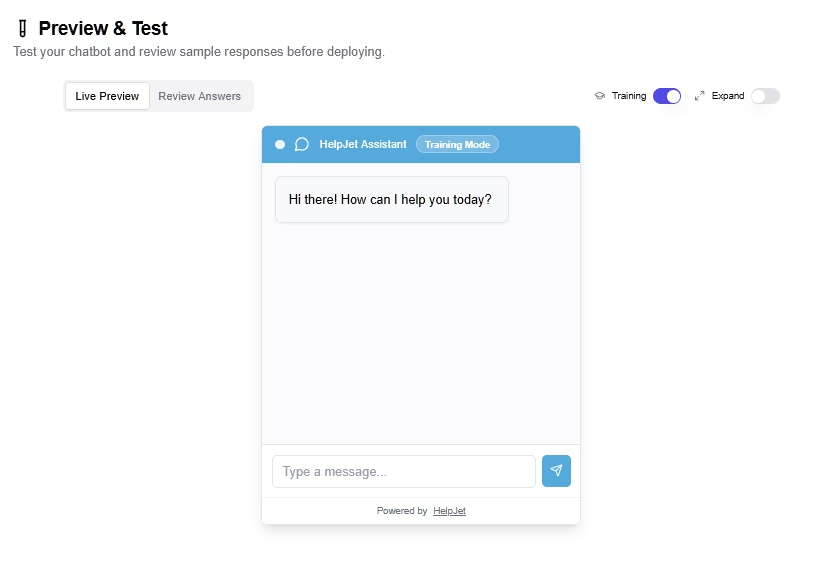
HelpJet includes a built-in preview environment where you can test the bot against your real content before deploying it to your site.
The Preview & Test interface shows exactly how the bot responds to your questions, so you can catch problems before customers do. In Training Mode, you direct the bot’s responses for future conversations, tweaking the behavior directly from the preview.
How Much Does HelpJet Cost?
HelpJet is free to start and does not require a credit card. The Free plan gives you one bot and 100 conversations per month, which is enough to see real results before spending anything.
The Pro plan costs $29 per month ($23 per month with annual billing) and increases your limit to three bots and 1,000 conversations per month.
There are also add-ons:
- $30 for 1,000 message credits, which never expire
- Additional bots for $20 per bot per month
- White-label removal to hide the “Powered by HelpJet” badge for $79 per month
Both plans include a 14-day Pro trial, so you can test the full feature set before committing.
What's Coming Next
This is the first version of HelpJet, and there's more on the roadmap:
- Deeper native integrations between HelpJet, Heroic KB, and Heroic Inbox. Including the ability to trigger Heroic Inbox ticket creation directly from a bot handoff so nothing falls through the cracks.
- Expanding platform integrations with dedicated plugins and apps.
If you have feedback on the early version, use the Send Feedback link inside your HelpJet dashboard. We read everything, and a lot of what's already on the roadmap came directly from our early-access testers.
Try HelpJet Free Today
Getting HelpJet live takes about 5 minutes. Here's the process:
- Create your free account. Head to helpjet.com and sign up.
- Add your website support content to train the bot.
- Test the bot.
- Deploy to your site. Install the WordPress plugin or paste the embed code onto any other platform or page to display HelpJet chat widget.
HelpJet works with WordPress, WooCommerce, Shopify, Wix, and Squarespace, and it'll run on any site that accepts a JavaScript snippet. There’s also a WordPress plugin that can be used on any WordPress site to display the bot – zero coding required.
That's it. Your bot is live, trained on your real content, and ready to handle customer questions around the clock.
Further Reading






Leave A Comment?
You must be logged in to post a comment.