How to Scale Customer Support: 12 Proven Strategies for 2026


Scaling customer support is not the same as hiring more support agents. That’s the best advice I can give you in this guide, and getting it backwards is what burns the most cash.
Real scaling means expanding your customer service capacity to handle more conversations without letting quality, speed, or your support team collapse.
More often, the bigger lever is removing the reasons customers contact you in the first place and automating the work that doesn’t need a human.
In this guide, we’ll walk you through 12 proven strategies for scaling customer support in 2026, including how to scale customer service without sacrificing the quality your customers came to you for.
Let’s start!
In This Guide
- What Scaling Customer Support Actually Means
- Signs You Need to Scale Your Customer Service Operation
- The Pillars of Scaling Customer Support
- The 12 Proven Strategies to Scale Customer Support
- 1. Build a Usable Knowledge Base
- 2. Deploy AI Chatbots
- 3. A Proper Help Desk or Shared Inbox Software
- 4. Automate Workflows, Routing, and Repetitive Tasks
- 5. Structure Your Team with Tiered Support
- 6. Hire Deliberately and Onboard for Speed
- 7. Invest in Training, Coaching, and Quality
- 8. Close the Loop with Voice of Customer
- 9. From Reactive to Proactive Support
- 10. Consolidate Channels Into a True Omnichannel Setup
- 11. Segment Customers (VIP vs. Standard)
- 12. Outsource and Use Flexible Capacity Where It Fits
- How to Scale Customer Support Without Growing Headcount
- Customer Support Metrics to Track When You Scale
What Scaling Customer Support Actually Means
Scaling customer support means each new customer costs you less to serve than the last one.
That’s the real test of a scalable customer service operation.
If doubling your customers means doubling your support payroll, you don’t have a scaling plan. You have a growth plan dressed up as a scaling plan.
For example, a busy restaurant kitchen. You can hire more cooks, and that helps for one Friday night. But if you never redesign the layout, add prep stations, or install a real expediting system, every service will still be chaos.
The kitchens that grow into restaurant groups change how the kitchen works; not just how many bodies are in it. Support is the same.
Note: Growth and scaling are the different things. Growth is more customers and more tickets. Scaling is building a system where capacity grows faster than headcount.
Signs You Need to Scale Your Customer Service Operation

You rarely get a clean memo telling you it’s time to scale customer service. The signs appear as friction and they tend to arrive in clusters.
Here’s what we look for when we audit a team:
- Response times are creeping up. Your initial response times are consistently exceeding what customers tolerate for this channel, and the backlog is growing faster than you can clear it.
- The same questions keep arriving. If the same question gets asked every day, that’s not a staffing problem. It’s a deflection problem dressed up as one.
- Quality is slipping under load. Customer satisfaction (CSAT) scores are dropping, reopen rates are climbing, and your best agents are making errors they never used to make.
- Everything routes through one inbox. A shared email address with no assignment, no tracking, and no visibility into who’s handling what.
- Knowledge lives in people’s heads. It takes new hires months to get up to speed because nothing is written down. When a senior agent is out, certain issues simply don’t get solved.
- Burnout is showing. Agent turnover is rising, and the people who stay sound exhausted in their replies.
If three or more of these describe your reality, then you’re already behind. That’s normal.
The important thing is to take action before your team is overwhelmed by the next product launch or holiday surge.
The Pillars of Scaling Customer Support
Treat these as the structural foundation of every customer support scaling strategy outlined in this guide:
- People: The agents, leads, and managers doing the work, plus how you hire, train, coach, and retain them. Technology amplifies a strong team and exposes a struggling one.
- Process: Documented workflows, escalation paths, service-level agreements, and decision rights that keep service consistent no matter who picks up the ticket.
- Technology: The help desk, knowledge base, AI tools, and automation that give your team leverage. The stack should help reduce manual work.
- Knowledge: The internal and external documentation that lets customers self-serve and lets agents answer without interrupting a colleague.
- Measurement: The metrics and feedback loops that tell you what’s working, where you’re stretched thin, and when to actually hire. You cannot scale what you cannot see.
- Customer experience: The throughline that connects all of it. Speed and cost only matter if customers come away feeling helped instead of processed.
The 12 Proven Strategies to Scale Customer Support
Here’s the heart of the guide.
These 12 strategies are the ones we recommend, and in roughly the order we’d implement them.
They work together, and the best results come from combining several rather than betting everything on one.
1. Build a Usable Knowledge Base
The most scalable support ticket is the one that never gets created.
Customers across industries try to take care of issues themselves before reaching out to a live representative.
Your help center is the front door to your support operation whether you’ve invested in it or not.
“Customer service is only needed when a company does something wrong.” Bill Price, Amazon’s first global customer service VP and co-author of The Best Service Is No Service.
We think it’s the right mindset: every recurring question is a signal to fix a root cause or document the answer once, permanently.
Here’s what separates a knowledge base that actually scales from a static FAQ page nobody uses:
- Real search: Customers should be able to find answers by asking natural questions, not by guessing category names. An instant, relevance-ranked search is non-negotiable.
- Analytics: You need to see what people search for, which searches fail, and which articles spawn follow-up tickets. That data is very important to manage your knowledge base.
- Feedback loops: Let readers flag whether an article helped them or what is not working.
- Maintenance discipline: Outdated content trains customers to ignore your help center. Update articles every time the product changes.
A strong self-service support layer is the cheapest way to scale customer service.
Tools like Heroic Knowledge Base help you build a fast, searchable help center.
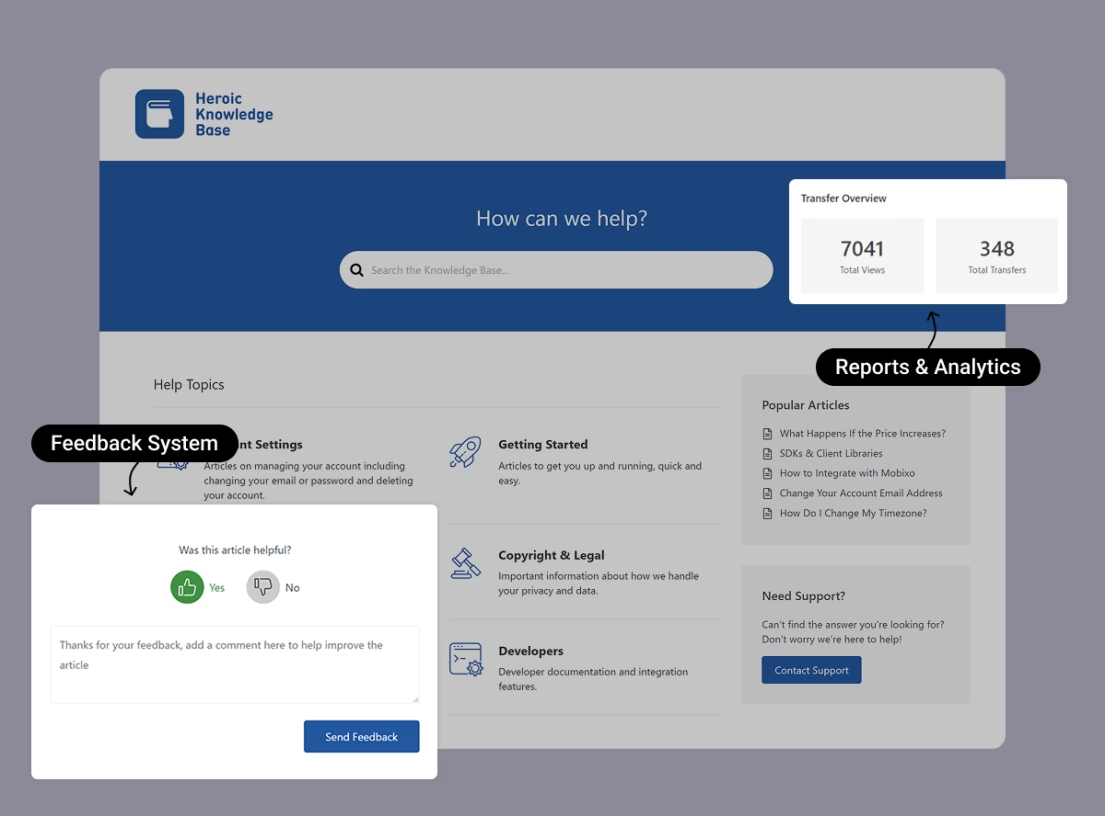
The key features include:
- Live AJAX search
- Article-level analytics that surface failing searches and ticket-generating content
- Built-in user feedback
- Unlimited users and knowledge base articles
2. Deploy AI Chatbots
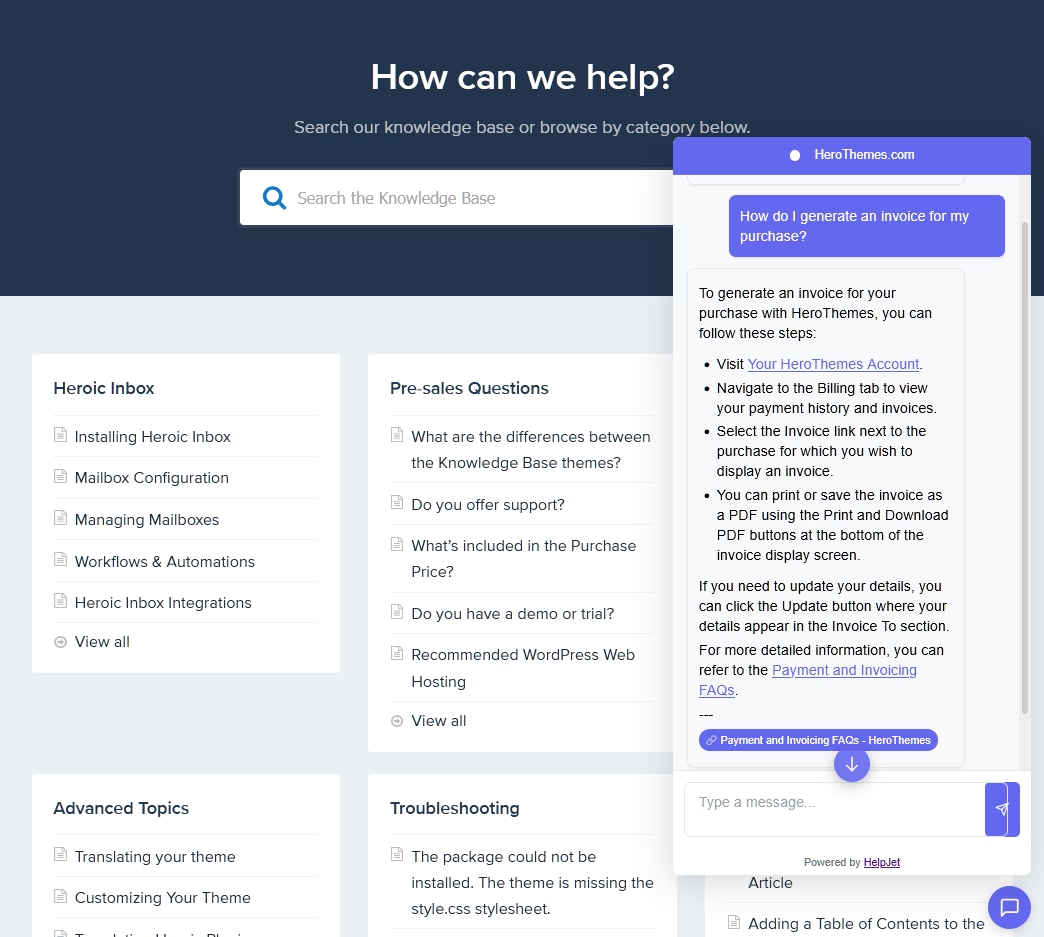
AI-powered customer support automation is the single biggest lever for scaling capacity without growing your customer service team.
It can also ruin a customer experience that took years to build.
Which is what makes this strategy so dangerous when you rush it.
Modern AI chatbots work best when they’re grounded in your real documentation rather than left to improvise.
This is where HelpJet fits the scaling playbook for small and mid-sized teams.
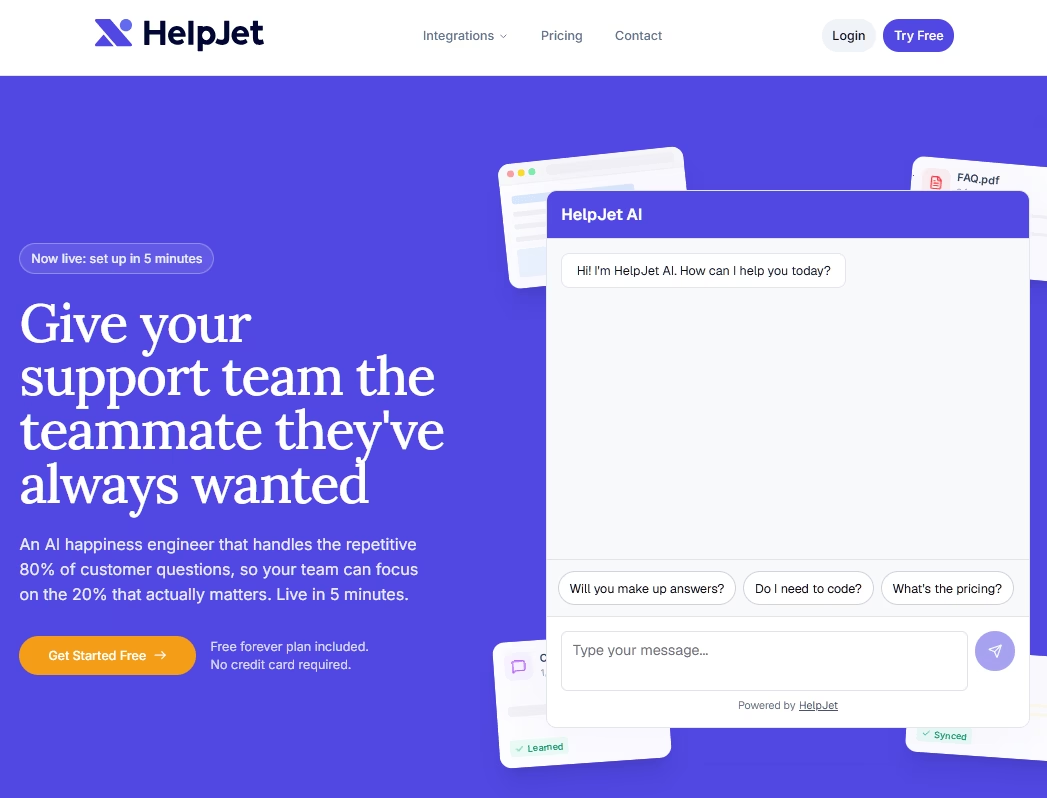
Point HelpJet at your knowledge base, FAQ pages, and product content, and within a few minutes it builds a conversational agent that can answer a chunk of repetitive questions based on your documentation.
Here’s what makes HelpJet worth trying:
- It’s grounded in your content. So it doesn’t invent answers about your refund policy.
- It escalates cleanly instead of trapping customers in a loop or pretending to be human.
- It starts free and scales affordably.
3. A Proper Help Desk or Shared Inbox Software
If you’re still running support out of a shared Gmail account, you should upgrade it today.
A help desk turns the chaos of an inbox into a system:
- Tickets get assigned
- Conversations get tracked
- Collision detection stops two agents from replying to the same customer at the same time
- You finally get visibility into volume and performance.
And the benefits compound as you grow:
- Onboarding gets faster because new hires can search past tickets instead of pinging colleagues all day
- Saved replies kill the retyping problem
- Automation rules send the right message to the right person
- Reporting helps you identify bottlenecks
We recommend Heroic Inbox.
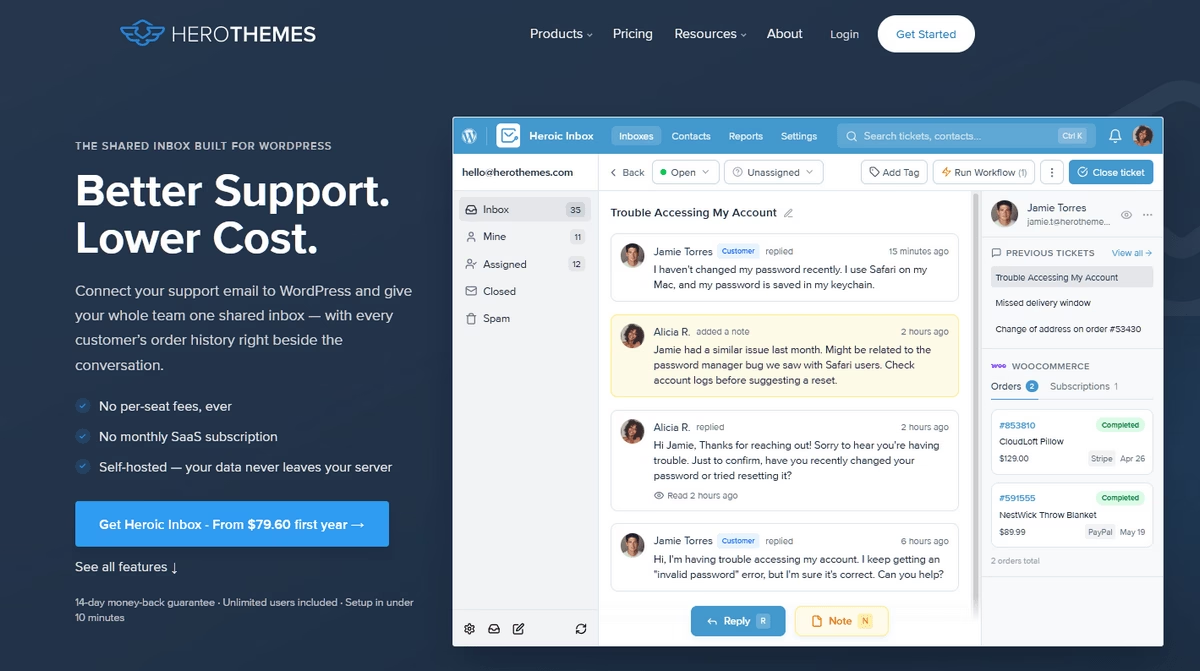
Heroic Inbox connects to Gmail, Outlook, or any IMAP mailbox in a few clicks. And brings every support, sales, and general inbox into one shared workspace inside your WordPress dashboard.
For a flat annual fee you get unlimited agents and unlimited tickets.
14-Day Money-Back Guarantee | Setup in Under 10 Minutes
4. Automate Workflows, Routing, and Repetitive Tasks
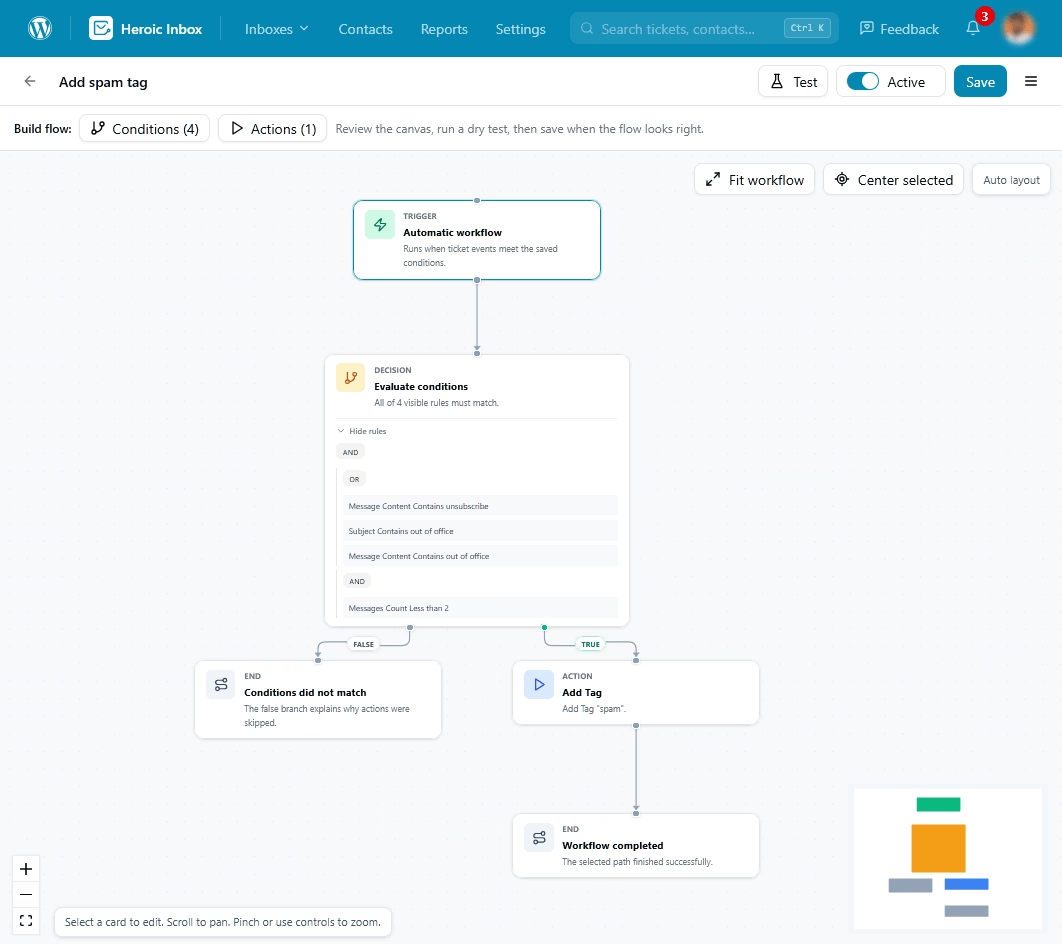
Beyond chatbots, scaling customer support involves behind-the-scenes automation that frees your team from work that doesn’t need a brain.
For example, ticket tagging, routing, data entry, and follow-up nudges.
Automate these, and you free up agents to work on resolving actual problems.
Start with the high-frequency, low-judgment work first:
- Routing rules that send billing questions to the billing-savvy agent and technical issues to the technical team, automatically.
- Auto-acknowledgments that set accurate expectations. A simple “we got your message and will reply within two hours” cuts customer anxiety and buys your team time. Most companies still don’t do this, which is wild to us.
- Saved replies and macros for the answers you send constantly, so agents personalize a template instead of writing from scratch.
- Triage and tagging so reports stay clean and you can actually see what’s driving volume.
The goal here isn’t to remove the human from the conversation. It’s to remove the busywork around the human so their attention lands where it matters: the customer.
5. Structure Your Team with Tiered Support
As ticket volume and complexity grow, an expanded customer service team needs structure, or you’ll waste your most expensive talent on your simplest problems.
Tiered support solves this problem by sorting issues by difficulty and routing them accordingly.
The most common model goes from Tier 0 to Tier 3:
- Tier 0: Self-service: Knowledge base, FAQs, and AI assistants that resolve issues with no humans involved.
- Tier 1: Frontline: Generalist agents who handle the bulk of common questions. Like account access, order status, and basic how-tos.
- Tier 2: Technical: More experienced agents who tackle account-specific or technical issues Tier 1 can’t resolve.
- Tier 3: Specialists: Product engineers or senior experts who own complex bugs and escalations.
This kind of tiered structure within the support team improves efficiency, plus a real career ladder for your team.
Tiers also tend to drop resolution times significantly once roles are clear, because Tier 1 stops trying to solve problems that were never meant for them.
6. Hire Deliberately and Onboard for Speed
The most common mistake is hiring reactively by throwing people at a growing queue before building the systems that would make them productive.
New agents are expensive and take months to become productive. Placing them in a broken system means that you now have a broken system with additional salaries.
To solve this:
- Hire only when your systems are genuinely maxed out
- Hire smart people
- Instead of relying on resumes, use scenario-based interviews and role-plays
- Screen for problem-solving skills, empathy, and clear writing because those qualities can be scaled up with your processes.
Onboarding is where you win or lose the next six months. The faster a new hire reaches competency, the faster your investment pays off.
To speed up the onboarding process for new hires in customer support, use a:
- Provide a searchable ticket history. So new agents can learn from how past issues were handled instead of pinging a colleague every time.
- Create a strong internal documentation. So the answer to “how do we handle refunds” lives in a document, not in someone’s memory.
This is another reason why a real help desk and knowledge base are so important. They dramatically reduce ramp-up time, so each new hire adds capacity more quickly rather than reducing the available time of the team.
Explore:
The Ultimate New Employee Onboarding Checklist
Customer Onboarding: Step-by-Step Guide with Examples
7. Invest in Training, Coaching, and Quality

A bigger team is not automatically a better one.
Once you grow past the point where the manager can personally review everyone’s work, you need deliberate coaching systems to keep quality from drifting.
The highest-leverage moves here are mostly low-cost:
- Study your top performers. Document the techniques of agents who consistently close more conversations at high quality.
- Have your top performers mentor the rest of the team.
- Helping the whole team close just a few more conversations a day creates real capacity without hiring anyone.
- Coach with real examples. Pull actual CSAT comments and ticket transcripts into coaching sessions instead of leaning on abstract advice.
- Celebrate the agents who turn a rough interaction into a high score. Recognition like this reinforces the behavior you want repeated.
- Run lightweight QA. Set aside 30 minutes each week for a quality huddle to review a sample of tickets.
- Catch drift early. Small, consistent adjustments yield faster results than large-scale retraining projects.
Training also serves as a retention tool, and retention is an important issue when it comes to scaling.
Burnout in support has been climbing for years, and burned-out agents are the ones most likely to leave within 12 months.
Given how expensive turnover is in this function (and how long replacements take to ramp), keeping the people you’ve trained is one of the most underrated levers in the whole playbook.
Explore:
10 Best Employee Training Software (2026 Review)
Best Free Training Documentation Software in 2026
8. Close the Loop with Voice of Customer
The support team has access to the most valuable product insights in the company, but most teams don’t take advantage of them.
Every recurring ticket is data about a confusing interface, a broken flow, or a missing feature. Feeding that data back to the product is how you reduce future volume at the source.
Buffer built its entire support philosophy around this idea.
The company deliberately chose, for years, not to over-automate certain answers, because (as its support leadership has put it) the team learns nothing if customers find the answers themselves on a forum or knowledge base.
Instead of burying a confusing billing question in a help article, they let the volume of that question pressure the product team to fix the interface, so the next 500 customers never had the problem at all.
You don’t have to copy Buffer exactly (they trade efficiency for learning on purpose, which works for them but not for most companies).
The principle, though, is gold. Systematize the flow of support insights to products.
- Weekly: A summary of the top issues by volume and any new patterns the team noticed.
- Quarterly: A root-cause deep dive with recommended product changes.
- Always: Real-time alerts for critical issues that need immediate attention.
Fix the root cause once, and you don’t just close a ticket. You close a whole category of future tickets you would have had to handle for the next year.
That helps scale customer support by solving product issues at their source.
9. From Reactive to Proactive Support
Proactive support solves problems before the customer has to ask.
For example, a shipping-delay notification sent automatically from your store removes the potential future “where is my order” ticket. Which is cheaper than answering it. More importantly, it creates a better customer experience.
Here are some practical ways to become proactive without much effort:
- Status notifications for orders, outages, and known issues, sent before customers come looking.
- Onboarding nudges that guide new users past the points where people typically get stuck.
- Targeted help triggered by behavior. Like surfacing a relevant article when someone lingers on a tricky page or aborts a checkout step.
10. Consolidate Channels Into a True Omnichannel Setup
Modern customer service scale means meeting customers wherever they are: email, chat, social, and phone. And they expect you to keep up without making them repeat themselves.
Most teams aren’t built for that, which produces fragmented conversations and slower resolutions.
Having many channels is not the same as being omnichannel.
Omnichannel in customer service means all those channels feed one system of record, where context follows the customer.
When an agent can see that the customer already tried the chatbot yesterday and emailed this morning, they resolve the issue faster. The customer feels known instead of processed.
A consolidated help desk is the backbone of omnichannel, because it’s where the conversations land.
11. Segment Customers (VIP vs. Standard)
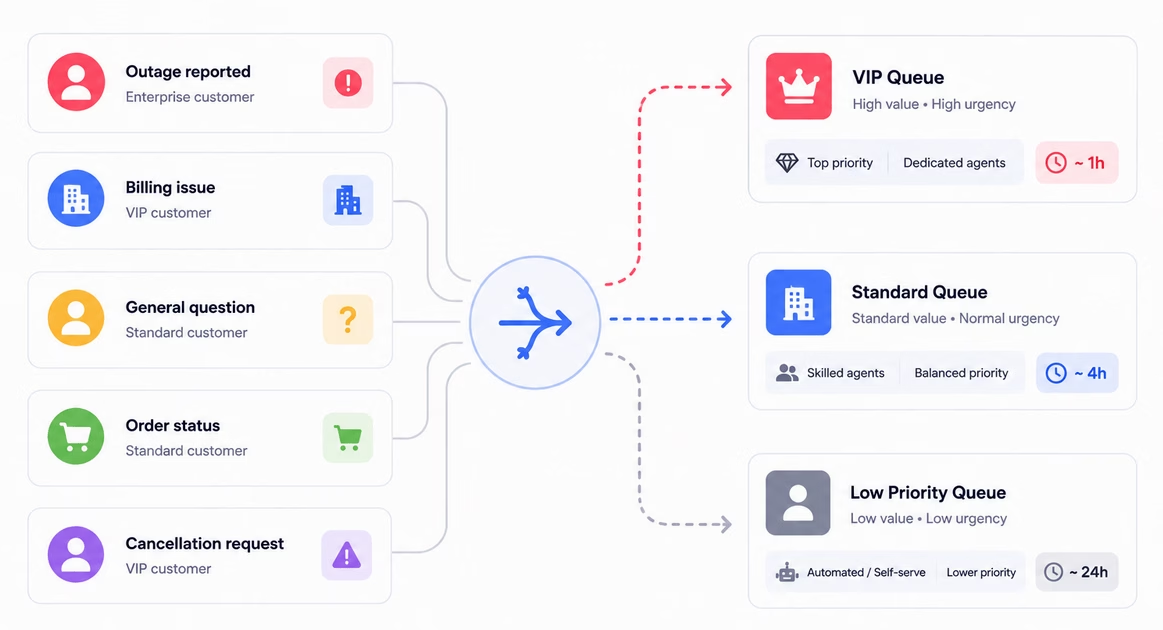
Not every ticket deserves the same urgency, and pretending otherwise quietly damages your most important relationships.
For example, routing an enterprise account’s outage through the same queue as a free-tier “how-to” question will likely cause the paying customer to leave.
Segmentation lets you match service level to customer value and issue urgency.
Build a simple triage system around three dimensions:
- By customer value: VIP, enterprise, and high-lifetime-value customers receive faster response times and often have a dedicated contact.
- By urgency: A failed payment or order problem jumps ahead of a general question. No matter who’s asking.
- By intent: Conversations about cancellations or angry customers need a human, and a fast one, not a bot. Route those out of automated flows immediately.
A dedicated VIP queue can pull top-customer response times down to as little as an hour, and smart routing alone can cut your average first response time meaningfully.
12. Outsource and Use Flexible Capacity Where It Fits
When volume spikes or you need coverage you can’t staff internally, outsourcing to a business process outsourcer (BPO) gives you flexible capacity without long hiring cycles.
It’s especially useful for seasonal peaks, after-hours coverage, and predictable Tier 1 overflow.
Outsourced roles often cost a fraction of fully loaded in-house agents, which is why so many companies reach for this option as they grow.
The trade-off is real though. Poorly managed outsourcing degrades quality fast.
If you decide to outsource customer service, do so deliberately:
- Document everything: Tone of voice, escalation paths, tools, FAQs. Outsourced agents should ramp without guessing what your brand sounds like.
- Use it for predictable scopes: Tier 1, overflow, and off-hours coverage. Don’t use it for your most complex or emotionally sensitive interactions.
- Hold partners to your standards: They should have the same SLAs, QA, and metrics as your internal team. Treat them as an extension of your team, not a dumping ground.
How to Scale Customer Support Without Growing Headcount
The mental model comes from Bill Price’s book title we mentioned earlier: The Best Service Is No Service.
The idea isn’t to abandon customers. It’s to eliminate the dumb, repetitive contacts that shouldn’t need a human in the first place.
Your people should be free for the conversations that genuinely require them.
Here’s the order of operations we recommend, and the order matters:
- Deflect with self-service: A strong, searchable knowledge base handles the questions customers would rather solve themselves anyway
- Automate with AI: Layer an AI assistant grounded in your docs on top of the knowledge base to handle repetitive questions conversationally, 24/7, with clean handoff to a human.
- Automate the workflow: Routing, tagging, auto-acknowledgements, and canned responses to strip the busywork out of every ticket that does reach a person.
- Fix root causes: Feed support data to product. So the confusing thing gets fixed and the tickets stop coming entirely.
One honest caveat though.
Self-service and AI have their limits. Complex, emotional, and high-stakes issues still need skilled humans.
For us, scaling without headcount means growing capacity faster than headcount, not freezing hiring forever.
Customer Support Metrics to Track When You Scale
You can’t manage what you don’t measure. At scale, you lose the ability to instinctively sense your customer service team’s pulse, which is why picking the right customer service KPIs matters so much.
But more metrics is not better. Pick a focused set, put them on a dashboard, and review them weekly.
Here are the metrics that actually drive decisions:
- First Response Time (FRT): How long does it take before a customer hears back? A target of under four hours is widely accepted for email, while under one hour is considered best-in-class. Live chat is measured in seconds.
- CSAT (Customer Satisfaction): A post-interaction pulse on how the customer feels.
- First Contact Resolution (FCR): The percentage of issues resolved in a single interaction. FCR correlates more tightly with satisfaction than almost anything else. Improving FCR reduces the repeat contacts that secretly inflate your real cost per resolution.
- Ticket Deflection Rate: The share of questions resolved by self-service before becoming a ticket. This is your scaling scoreboard. Measure true deflection (problem actually solved), not just “the bot closed it.”
- Cost per ticket: Total support spending divided by tickets handled. Seeing this number fall as the volume rises is clear proof that you are scaling rather than just growing.
- Reopen and Repeat Contact Rate: A rising reopen rate means that you are closing tickets that are not actually resolved. This hidden cost cancels out deflection savings.

Final Thoughts: Scaling Customer Support
After supporting 32,000+ customers for more than 15 years, one principle has held true at every layer: grow your capacity faster than your headcount by removing the reasons customers need you, automating the work that doesn’t need a human, and pouring your people into the conversations that do.
Your next move is simple. Pick the one strategy that maps to your biggest current pain and implement it this quarter.
Scaling isn’t a project you finish; it’s a system you continually refine.
Further Reading
SaaS Customer Support: Components, Tools and Best Practices
14 Knowledge Base Benefits for Customers and Employees
Best Help Desk Best Practices for IT and Service Desk
AI in Customer Service: Examples, How to Implement
Best FREE Help Authoring Tools (2026 Edition)





Leave A Comment?
You must be logged in to post a comment.