13 Best Contact Us Page Examples to Learn From in 2026

Your contact page is the last thing someone sees before deciding whether to trust you with their question, their money, or their partnership.
Get it wrong and visitors bounce. Get it right and you turn a routine page into a conversion tool, a trust signal, and a support cost reducer all at once.
But, most companies still treat “Contact Us” as an afterthought, a form slapped onto a template with a mailing address underneath.
The best contact page examples in this list go much further:
- They route visitors by intent
- Deflect routine questions through self-service,
- Build trust with social proof
- Reflect the brand’s personality in every design choice
In this guide I will break down 13 real-world contact page examples from SaaS companies, E-commerce brands, and creative agencies—revealing what makes each one work, where they fall short, and what you can steal for your own site today.
In This Guide

We rigorously test and research every product that we recommend through HeroThemes. Our review process. We may also earn a commission if you make a purchase through our links.
What Makes a Great Contact Us Page (Best Practices)
Before jumping into examples, here’s what separates forgettable contact pages from ones that actually convert.
1. Make it easy to find
Put your “Contact” link in the top navigation or footer, somewhere users instinctively look.
If someone has to hunt for it, you’ve already frustrated them before the conversation starts.
2. Keep the copy tight
The page’s only job is to connect people with you, so anything that doesn’t serve that goal should go.
Trim form fields to the essentials: name, email, and message type cover most use cases.
With these, a well-designed contact page typically covers these bases:
- Response time expectations
- Multiple contact channels
- Brand-consistent design
- Trust signals like real photos and office addresses
- Self-service options such as embedded FAQs
- Accessible form design
Here are some common mistakes that kill conversions:
- Using visible CAPTCHAs (which can reduce completions by up to 40%),
- Hiding phone numbers entirely
- Providing no confirmation after form submission
- Forcing every visitor through a single generic funnel regardless of their intent
Integrating a Knowledge Base With Your Contact Form
One of the highest-impact improvements you can make to a contact page is connecting it with a knowledge base.
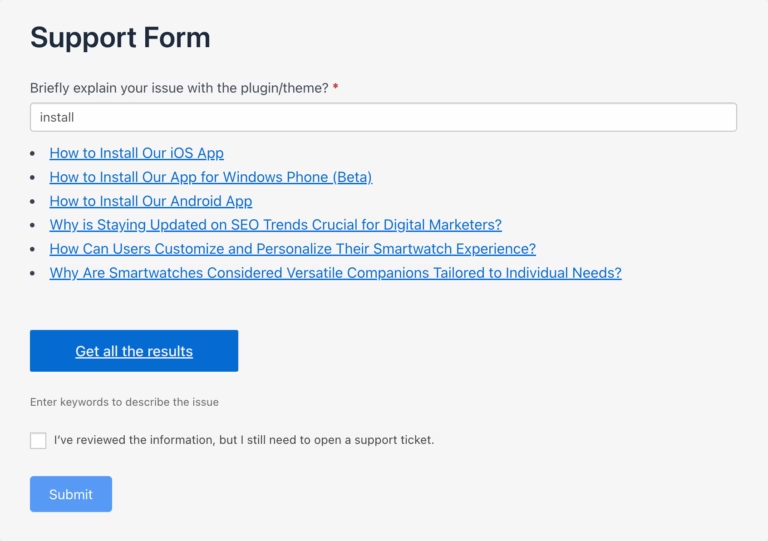
The logic is simple: repetitive questions like password resets, shipping status inquiries, and billing FAQs typically account for 60 to 70% of total support volume.
Every one of those resolved through self-service saves five to ten minutes of agent time.
You use WordPress plugins like Heroic Knowledge Base with Formidable Forms to have such functionality.
Rather than forcing visitors to browse a knowledge base, the form itself becomes the first line of defense, surfacing answers at the exact moment someone is about to submit a ticket.
Pro tip: Make self-service slightly easier than submitting a ticket, but never block human contact entirely. If the article doesn’t solve the visitor’s problem, the contact form should be immediately accessible with no additional navigation required.
SaaS Contact Page Examples
1. HubSpot Contact Us
HubSpot’s contact page functions as both a contact hub and a credibility statement.
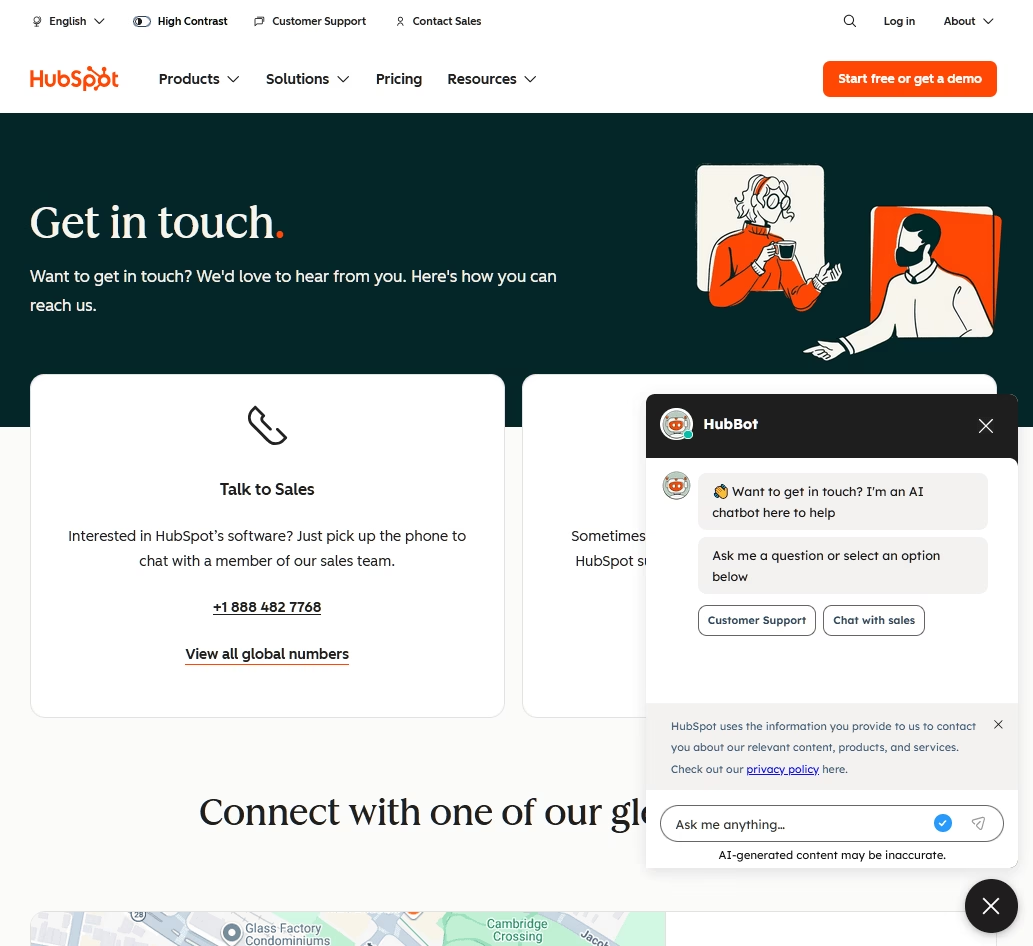
The page opens with a warm “Get in touch” headline and a custom illustration of diverse people, then immediately presents two prominent cards: “Talk to Sales” and “Contact Customer Support.”
This binary routing prevents the most common contact page problem, misdirected inquiries ending up in the wrong inbox.
What makes it work:
- Global office showcase: The page features 13+ office locations with real photographs, transforming a utilitarian page into a trust signal.
- International phone coverage: Over 30 phone numbers organized by region, with multiple language options per country. This level of detail signals commitment to international customers.
- Accessibility toggle: A high-contrast accessibility option sits in the top-right corner alongside a six-language selector. Small touches that show design maturity.
- Chatbot presence: An AI chatbot in the bottom-right corner provides immediate interaction for visitors who don’t want to navigate away.
What to watch for:
- Every path route to a separate page. There’s no embedded contact form on the page itself.
- No direct email address is listed anywhere.
- The extensive office directory makes the page extremely long, which can overwhelm visitors looking for quick help.
If your company has multiple offices or a global customer base, HubSpot’s contact us page example is worth studying closely.
2. Canva: Aggressive Self-Service with Trade-offs
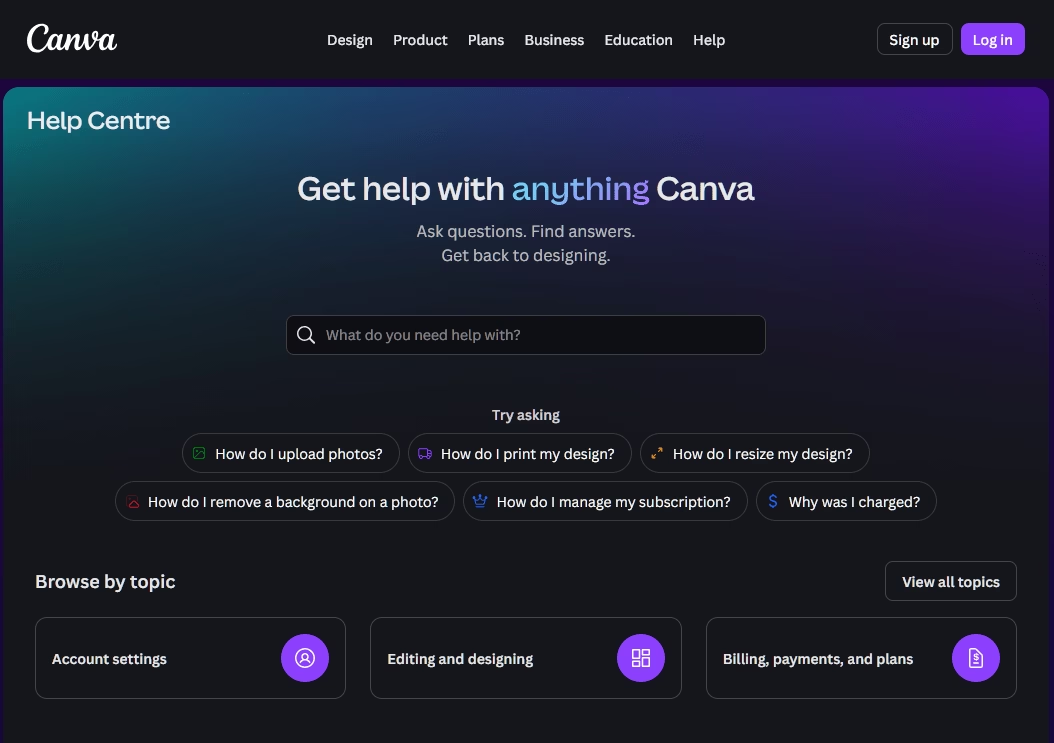
Canva takes the self-service-first philosophy further than any other company on this list.
There is no standalone “Contact Us” page. Contact options are buried within the Help Center, accessible only after browsing self-service articles, tutorials, and the Design School.
What makes it work:
- Excellent search and categorization: The Help Center opens with a search bar and category cards. The design matches Canva’s vibrant brand identity.
- Scam prevention: Canva deliberately does not publish a phone number and warns against third-party scam numbers, a thoughtful security measure.
What to watch for:
- Contact options are genuinely buried. Multiple Trustpilot reviews (Canva holds a 3.7 star rating, partly driven by support complaints) describe frustration with the chatbot cycling through articles before offering human help.
- No phone support for any tier.
- The aggressive deflection strategy works for simple questions but fails users with urgent billing or account issues.
Canva is included here as a cautionary example alongside a positive one.
The Help Center design is excellent. But the lesson is clear: deflection strategies must include an obvious, always-accessible escape route to human support.
When users can’t find a way to reach a person, satisfaction plummets regardless of how polished the self-service content is.
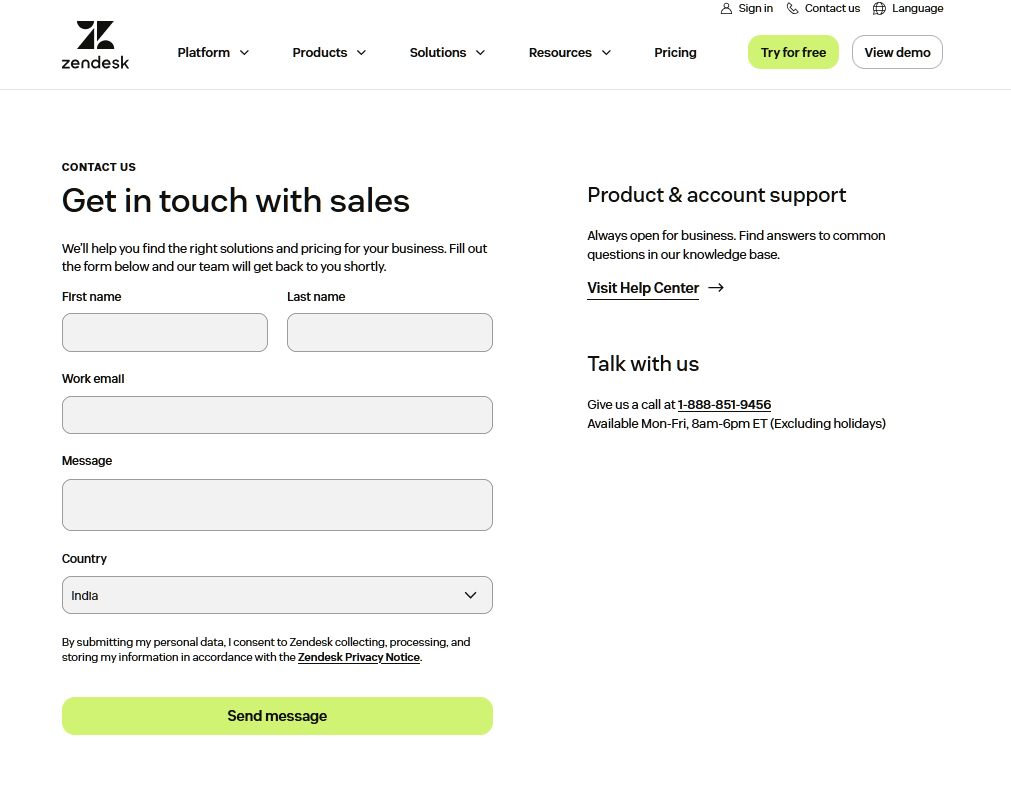
3. Zendesk: The On-Page Form Done Right
Most SaaS companies hide their contact form behind a help center or a separate page.
Zendesk puts a full contact form directly on the page, above the fold.
What makes it work:
- Visible form with lead qualification: The form includes most required fields only.
- Clean separation below the fold: A “Visit Help Center” card, a phone number (1-888-851-9456, Mon-Fri 8am-6pm ET), and a 20+ office global directory with Google Maps links all sit below the form without competing for attention.
- Signed-in users get greeted by an AI agent that can resolve issues before escalating to humans, adding a self-service layer without replacing the form.
What to watch for:
- Support requires signing in first, which can be frustrating for customers or anyone locked out of their account.
4. Shopify: Intent Segmentation at Its Finest
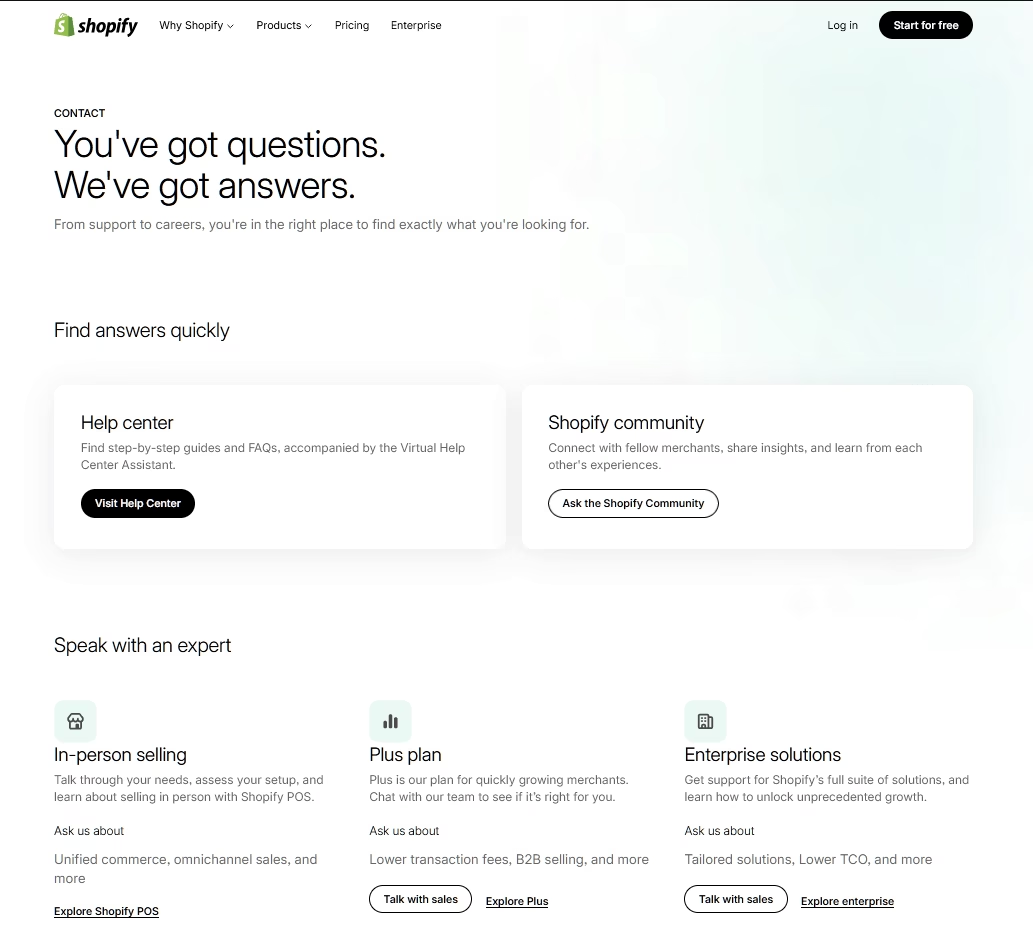
Rather than one generic “Contact Sales” button, Shopify breaks its contact page into three distinct audience-specific cards: one for POS/in-person selling, one for Shopify Plus (growing brands), and one for enterprise solutions.
Each card has tailored messaging about what the sales team can help with.
What makes it work:
- Self-service first: The page opens with the confident headline, and presents two self-service options (Help Center with a Virtual Assistant and Community Forum) before any sales cards appear. This structure respects the visitor’s time.
- Each of the three sales cards includes an “Ask us about” section describing relevant topics, so visitors self-select based on their business size and needs.
- Impeccable design: Generous whitespace, custom SVG icons, and localization for 40+ countries. A free trial CTA is woven throughout, keeping conversion always accessible.
What to watch for:
- No general-purpose contact form exists for miscellaneous inquiries. No phone number visible, no direct email.
- Shopify’s Trustpilot rating of 1.3/5, with complaints about month-long response waits, suggests the beautiful contact page doesn’t always match the actual support experience.
If your product serves distinct customer segments (small business, mid-market, enterprise), an approach similar to Shopify’s contact page prevents wasted time for both visitors and your team.
Just make sure the experience after the contact page lives up to the promise it makes.
5. Slack Contact Page: AI-First Support with Human Backup
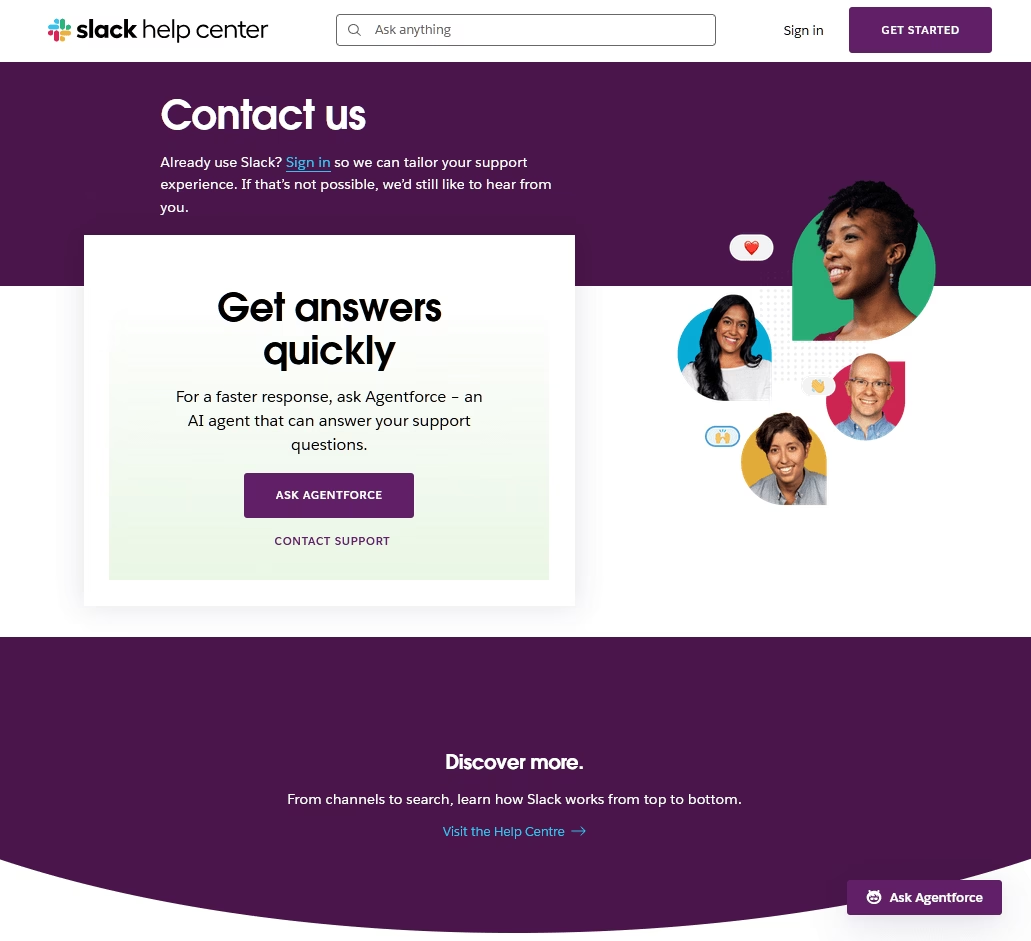
Slack’s contact experience reflects its integration with Salesforce’s ecosystem.
The page leads with “Agentforce,” an AI agent prominently featured before the traditional support form, with the tagline “For a faster response, ask Agentforce.”
What makes it work:
- Dynamic article suggestions: As users type their issue description, related help articles surface in real time, potentially resolving the problem without a ticket being created. This is the most effective self-service deflection pattern on this list.
The similar kind of functionally that you can achieve with Heroic KB. - Smart topic routing: A dropdown of ten categories (Audio & video, Billing & plans, Connection trouble, and so on) determines where the inquiry goes, reducing misrouted tickets.
- Automatic transcript delivery: After a chat session, transcripts are emailed automatically with the reassuring copy. A small touch that demonstrates real UX thinking.
What to watch for:
- No public phone number for non-Enterprise users.
- Reddit users report the AI agent sometimes loops through help articles before offering a human handoff, creating frustration for urgent issues.
- Sales contact is handled through an entirely separate flow, with no unified contact page.
If you’re deploying chatbots on your contact page, study this example, but make sure the path to a human is always clear and accessible.
Users tolerate AI when it genuinely helps. They resent it when it becomes a barrier.
6. Zoom: Phone Number Visibility Done Right
Zoom’s contact page features a warm hero photograph of a woman on a phone outdoors, followed by six illustrated cards under the heading “How can we help?”
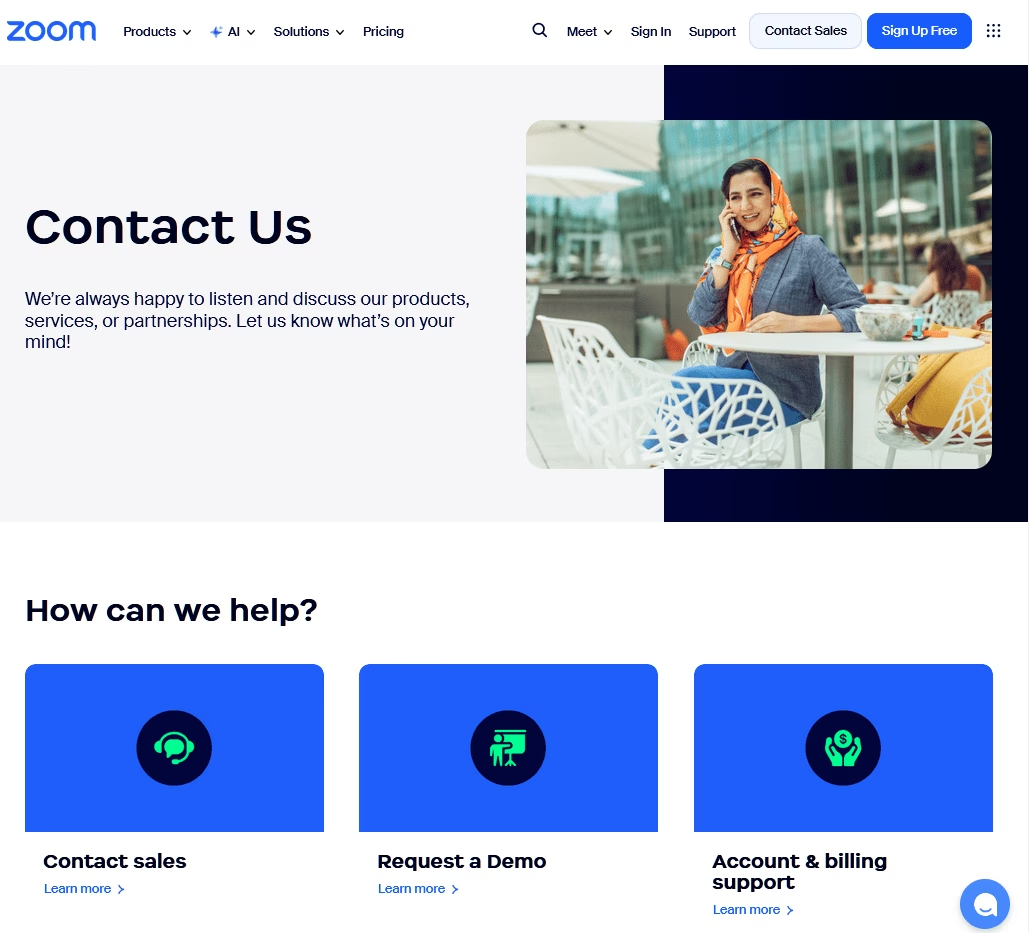
This is one of the most comprehensive and accessible contact pages analyzed.
What makes it work:
- Six clear routing cards: Contact Sales, Request a Demo, Account & Billing Support, Technical Support, Trust Center, and Employment Verification. Every conceivable reason someone visits a contact page is covered.
- Phone number everywhere: This is the most prominently displayed phone number of any SaaS company analyzed, and it works as a trust accelerator.
- Global reach: The page supports 17 languages and multiple currencies, with a global office directory organized by continent.
What to watch for:
- None of the six cards contain a direct form. They all lead to different pages.
- The Employment Verification card feels out of place for most visitors and could be deprioritized.
For companies comfortable offering phone support, try Zoom’s approach (phone number in header, body, and footer).
Users view companies without visible phone numbers as evasive.
7. Intercom: Eating Their Own Dog Food
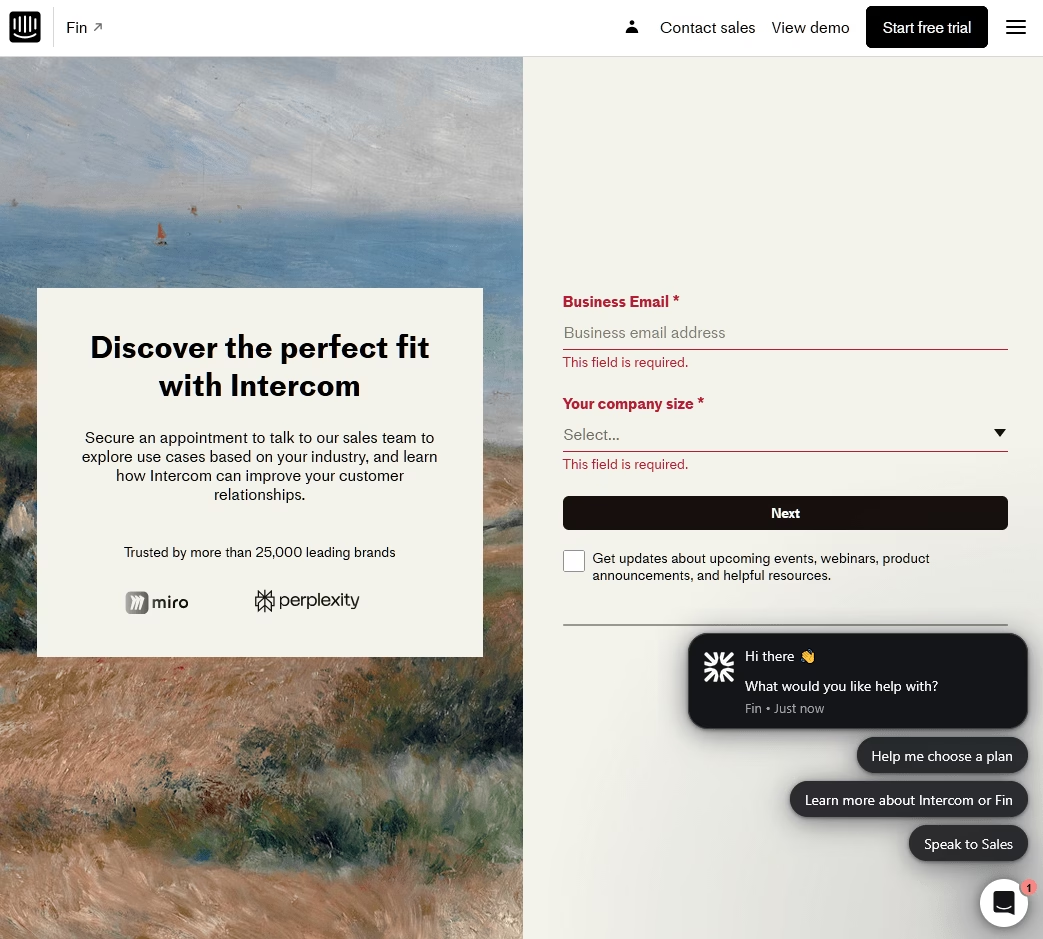
Intercom’s contact page is primarily a sales-focused demo request form.
What makes it remarkable is the meta-demonstration: Intercom uses its own Messenger widget as a contact channel on the page.
What makes it work:
- Product as proof: The Messenger widget in the lower-right corner serves double duty. It’s both a contact channel and a live product demo. If your product is a customer communication tool, using it on your own contact page is the most powerful demo possible.
- Social proof: A “Trusted by more than 25,000 leading brands” banner beneath the fold adds credibility at the right moment.
What to watch for:
- This is a demo request page, not a comprehensive contact page. No phone number, no email, no link to support resources.
- Existing customers looking for technical support will not find anything useful here.
8. Freshworks: The Phone Number Champions
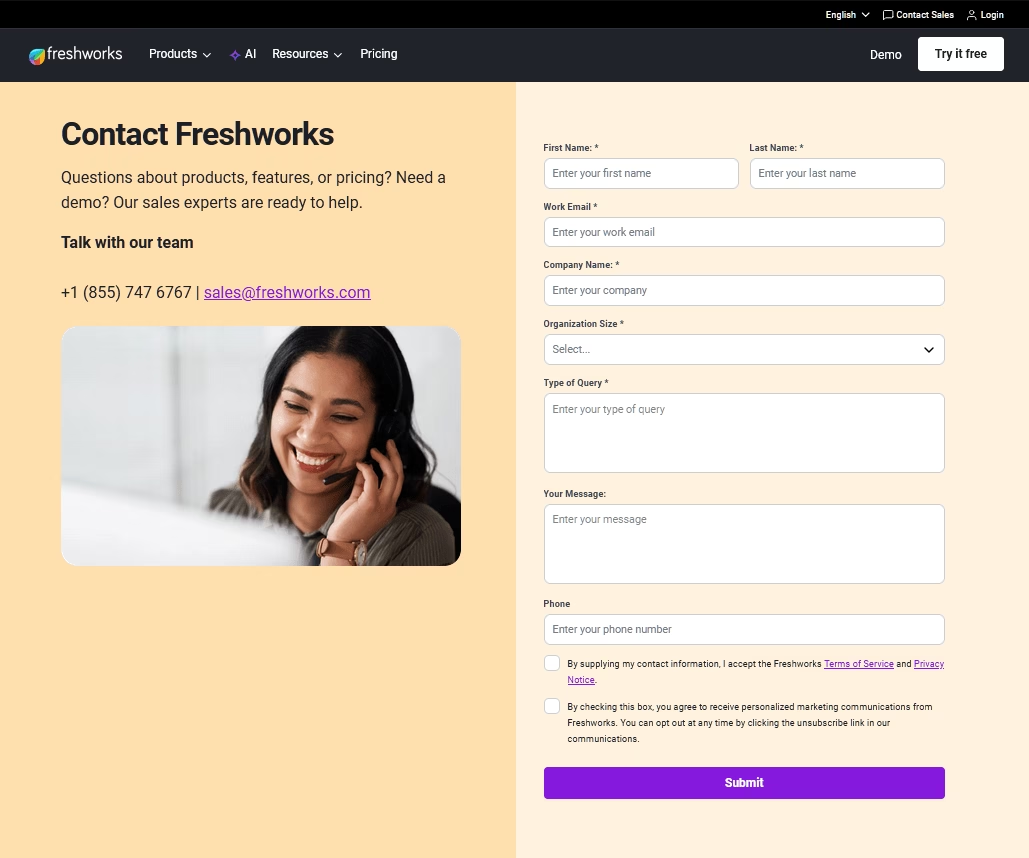
In an era where most SaaS companies hide direct contact behind chatbots and self-service portals, Freshworks contact page example bucks the trend with a prominently displayed phone number alongside a visible email address, and a form.
What makes it work:
- Direct contact details, front and center
- Support ticket form
- 24/7 in-product live chat: Always-on support for active users.
9. Monday.com: The Three-Card Routing Hub
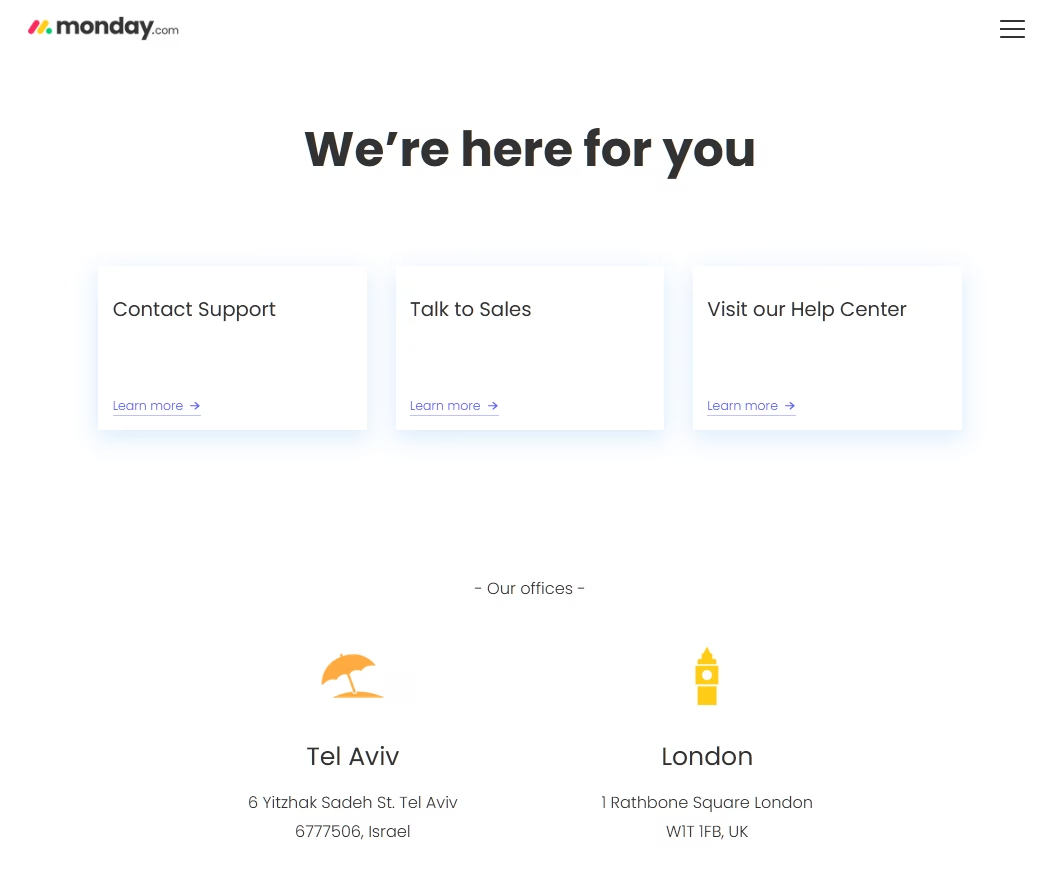
Clean, intuitive, and hard to get wrong.
Monday.com’s contact hub presents three equally weighted cards: Contact Support, Talk to Sales, and Visit Help Center.
What makes it work:
- Simple and effective layout: Three cards, three paths, zero confusion.
- City photography: Below the routing cards, 12 global office locations feature city thumbnail photographs. These add visual warmth that most SaaS pages lack.
- 24/7 support visibility: The navigation highlights round-the-clock availability.
What to watch for:
- No direct contact information on the hub page. Users must click through at least one more step.
- For support you have to navigate through the Help Center before reaching a human.
E-commerce Contact Page Examples
10. Apple: The Device-First Routing Gold Standard
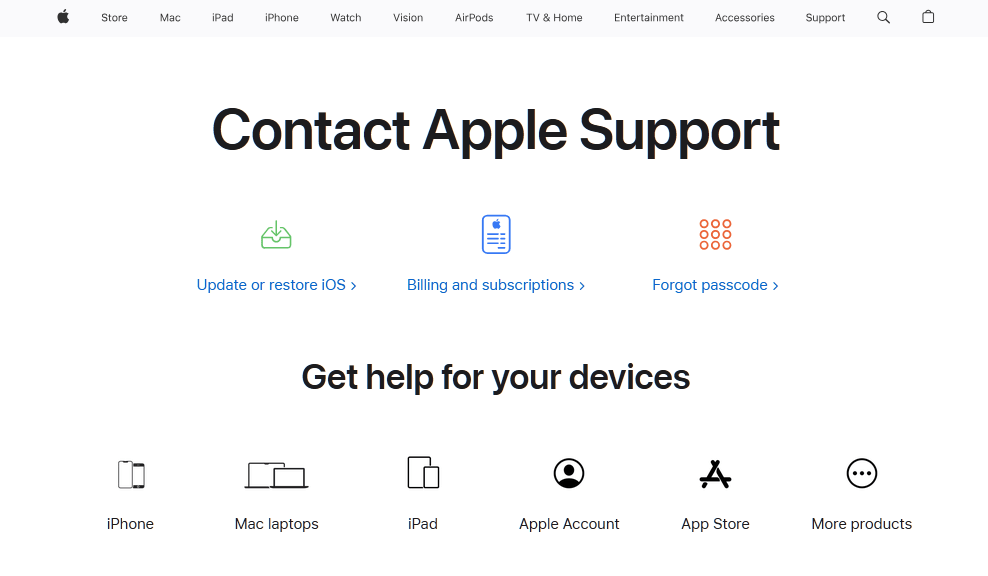
Apple’s contact hub is the most sophisticated routing experience of any company analyzed.
Rather than asking users to describe their problem, Apple asks them to select their device first (iPhone, Mac, iPad, Apple Watch) and then narrows to the specific issue through progressive disclosure.
What makes it work:
- Quick-action tiles: Three tiles at the top address the most common issues (Update/Restore iOS, Billing & Subscriptions, Forgot Passcode) before the device selection grid, handling the highest-volume requests immediately.
- Truly multi-channel: Phone, live chat via the GetSupport wizard, Apple Support app, iMessage support, and in-store Genius Bar appointments.
- SignTime ASL support: American Sign Language interpreters for deaf and hard-of-hearing customers, available for both shopping and technical support.
What to watch for:
- Apple does not offer email-based customer support, a frequent complaint in community forums.
- The multi-step GetSupport wizard (product → topic → subtopic → contact method) can feel like a deflection strategy for users with urgent problems.
11. Nike: AI-Forward E-commerce Support
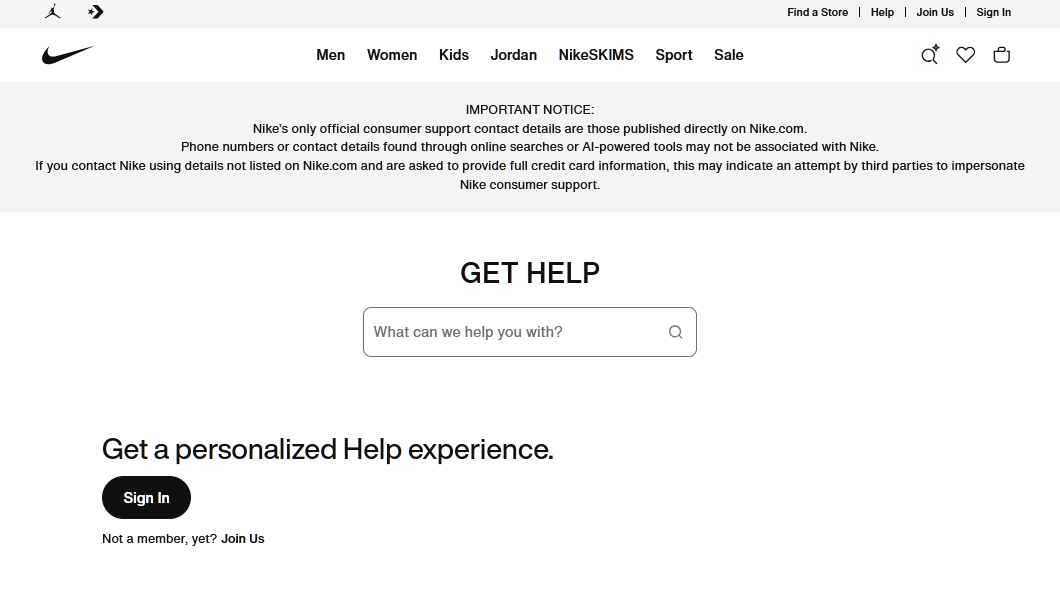
Nike’s help page leads with a bold “GET HELP” headline and a prominent search bar, followed by quick-link tiles for the most common E-commerce needs: Order Status, Shipping & Delivery, Returns, Order Cancellation, Size Charts, and Payment Options.
What makes it work:
- NikeAI integration: An AI-powered assistant sits directly in the help page header, providing instant answers. This is among the most visible AI implementations in E-commerce.
- Deep E-commerce integration: Order tracking, returns initiation, and cancellation are all one click away.
- Membership personalization: Signed-in Nike Members get personalized support including order history access and free return options.
- Discount integration: A promotions section links to student, military, teacher, first responder, and birthday discounts directly from the help page.
What to watch for:
- No general email address. Asynchronous communication options are limited.
- The actual “Contact Us” options sit at the bottom of the help page rather than prominently displayed.
Creative Agency Contact Page Examples
12. Pentagram: Editorial Richness Meets Functionality
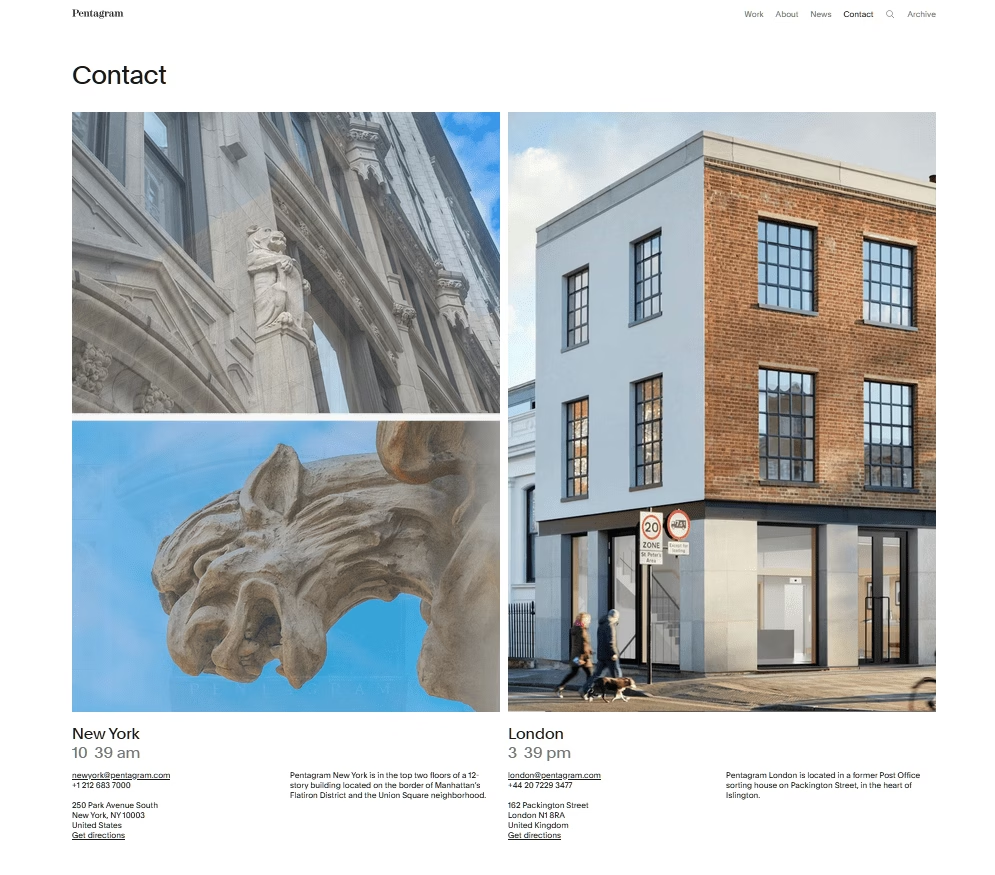
Pentagram’s contact page transforms a utilitarian page into a brand showcase. It’s a really visually rich contact page.
What makes it work:
- Live city clocks: Next to each of Pentagram’s four offices (New York, London, Austin, Berlin), a live clock displays the current local time. It’s an elegant way to communicate global presence and availability without words.
- Office photography as portfolio
- City-specific emails: newyork@pentagram.com, london@pentagram.com. Direct and clear.
- Integrated content: A news section with recent work thumbnails keeps the page dynamic and current.
What to watch for:
- No contact form. Pentagram relies entirely on direct email, which fits their boutique model but could deter quick inquiries.
- No indication of which partner or practice area to contact for specific work types.
For agencies and studios, this proves your contact page doesn’t have to be a boring form. It can be one of your best portfolio pieces.
13. IDEO: Human-Centered Design Applied to Contact
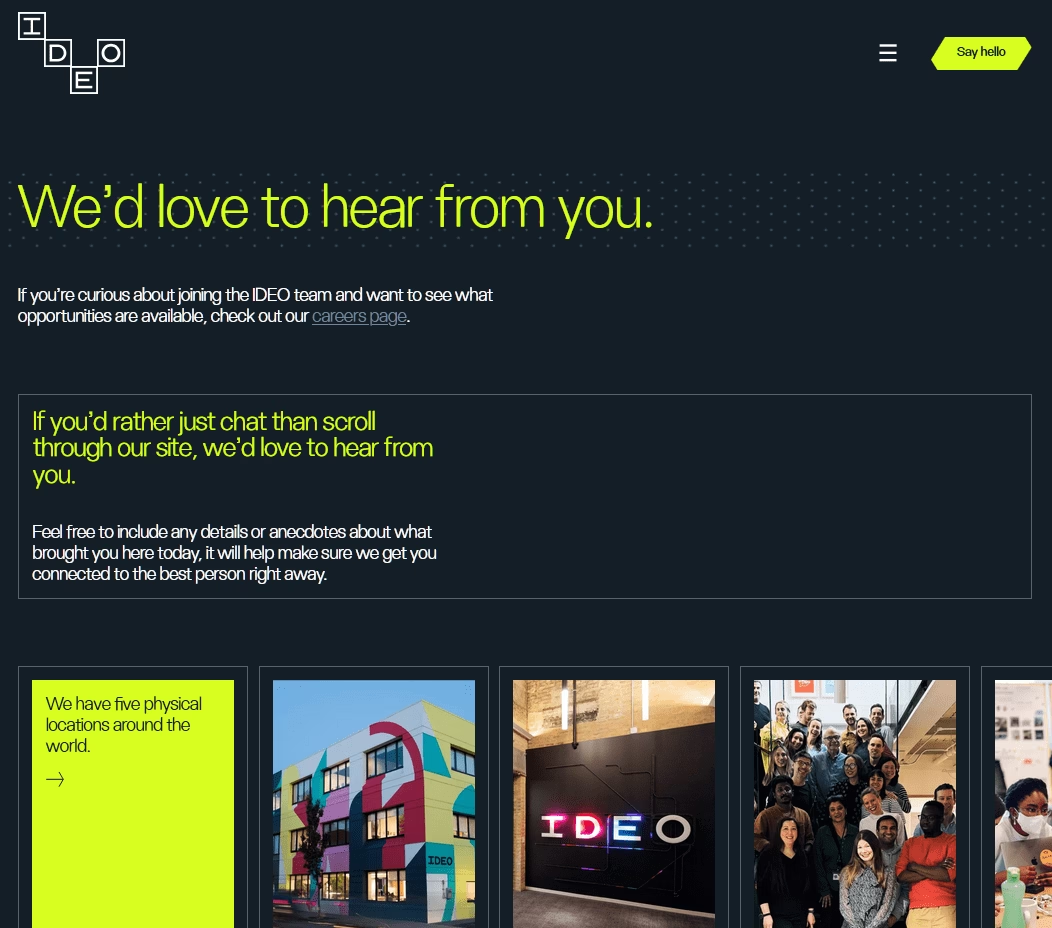
IDEO’s contact page opens with the warm headline “We’d love to hear from you” and then does something unusual: it invites visitors to “include any details or anecdotes about what brought you here today” in the message field.
What makes it work:
- Narrative form prompt: By asking for “anecdotes,” IDEO encourages storytelling rather than transactional data entry. This filters for thoughtful inquiries and reflects the firm’s empathy-driven methodology.
- Candid studio photography: Photos for all available locations feel human rather.
- A clear redirect for job seekers from cluttering the general contact form.
What to watch for:
- Given IDEO’s innovation reputation, the page could be more visually experimental.
Final Thoughts on Contact Us Pages
Looking across all these contact page examples, several patterns reveal where the industry is heading and what choices actually matter:
- The routing hub has replaced the simple form.
- Phone numbers are a trust accelerator.
- AI-first support is universal but polarizing. Never hide behind automation.
- Integrate self-service intelligently.
- Brand personality outperforms generic templates.
Now it’s your turn. Pull up your current contact page and ask: can someone reach the right person with just one click? If not, you know what to fix.
Further Reading
9 API Documentation Examples to Learn From
Best E-Commerce Chatbot Examples to Get Inspired
10 Top FREE Knowledge Base Software (With Open-Source Options)
10 Knowledge Base Examples (Good + Bad Lessons)






Leave A Comment?
You must be logged in to post a comment.