Les 10 meilleurs plugins Wiki WordPress (Guide 2026)

Si vous prévoyez de développer une entreprise en ligne avec un site web WordPress, vous devriez envisager de créer un wiki comme première ligne de support.
Un wiki vous permet de créer une base de connaissances autour de votre produit ou service, ou de partager un large éventail d'informations sur un sujet donné. Il est consultable et organisé hiérarchiquement afin de permettre aux utilisateurs de trouver rapidement les bons articles. Avec un wiki, vous pouvez :
- Permettre aux clients de trouver eux-mêmes les réponses à leurs questions
- Réduire la dépendance et économiser de l'argent sur le personnel de support
- Améliorer les taux de conversion en répondant immédiatement aux objections ou préoccupations
- Fournir un support 24h/24 et 7j/7 et améliorer la satisfaction client
La meilleure façon de créer un wiki sur votre site WordPress est d'utiliser un plugin wiki. Il vous permet de créer un beau wiki sans toucher au code.
Une autre option est un thème ou modèle wiki. Mais ce n'est vraiment adapté que si vous créez un site Web wiki dédié. Si votre wiki doit être une extension de votre site Web professionnel, l'utilisation d'un plugin wiki est la solution.
Dans cet article, nous examinerons les éléments à prendre en compte lors de l'évaluation des différents plugins wiki WordPress du marché, et les meilleurs plugins disponibles pour le support client.
Dans ce guide
Choisir un plugin wiki WordPress

Nous testons et recherchons rigoureusement chaque produit que nous recommandons via HeroThemes. Notre processus d'examen. Nous pouvons également gagner une commission si vous effectuez un achat via nos liens.
Gérer un wiki sur votre site va au-delà de la simple création et organisation de contenu. Vous devez faire tout votre possible pour offrir la meilleure expérience à vos visiteurs et clients.
En gardant cela à l'esprit, voici les facteurs que vous devriez considérer lors de l'évaluation d'un plugin wiki WordPress :
Vitesse : À mesure que votre entreprise se développe, votre clientèle et ses besoins d'information augmenteront également. Votre plugin wiki devrait améliorer la capacité de votre site Web à traiter les demandes des clients rapidement et efficacement.
Compatibilité : Lors de l'examen d'un plugin wiki WordPress, la compatibilité avec le thème est importante. Assurez-vous qu'il fonctionne avec n'importe quel thème WordPress et tous les autres plugins que vous utilisez sur votre site.
Facilité d'utilisation : Un plugin wiki doit être facile à utiliser pour vos visiteurs côté front-end, ainsi que pour vous et votre personnel côté back-end.
Conception réactive : Un bon plugin wiki doit garantir que vos articles de base de connaissances WordPress s'affichent parfaitement sur tous les appareils sur lesquels vos utilisateurs y accèdent.
Analyses et commentaires : Vous ne pouvez pas améliorer ce que vous ne pouvez pas mesurer. La possibilité de voir quels articles de wiki reçoivent le plus de vues et de votes positifs et lesquels nécessitent des améliorations est cruciale pour un plugin wiki WordPress.
Pièces jointes : Un bon plugin wiki devrait permettre aux utilisateurs de télécharger facilement et rapidement tous les fichiers supplémentaires (tels que les manuels PDF ou la documentation supplémentaire).

Les meilleurs plugins wiki pour WordPress
Nous avons sélectionné pour vous les plugins ci-dessous pour créer et publier des articles wiki sur votre site WordPress. Ils vous aideront à créer un wiki externe ou interne à l'aide de WordPress qui s'affiche parfaitement sur les appareils de bureau et mobiles.
Voici un tableau comparatif rapide des plugins wiki listés ci-dessous :
| Greffon | Prix | Meilleur choix | Points forts remarquables |
|---|---|---|---|
| Heroic Knowledge Base | Premium | Wiki/KB WP soigné pour le support + libre-service | Recherche AJAX rapide Analyses Commentaires sur les articles Rôles/protection par mot de passe Assistant IA |
| Helpie WP | Premium | Wiki collaboratif avec communauté/équipes | Soumissions d'articles en front-end Permissions granulaires (modifier/publier/approuver) Révisions + retour arrière Restrictions de sujets Vote |
| Yada Wiki | Gratuit | Structure wiki de base avec un type de publication personnalisé | Type de publication wiki séparé Catégories/étiquettes TOC Widgets/shortcodes |
| WP Glossary | Premium | Glossaire + wiki pour le SEO + définitions | Glossaire alphabétique Info-bulles au survol Hyperliens de termes pour le SEO Styles intégrés + styles personnalisés Compatibilité BuddyPress/WooCommerce |
| Encyclopédie / Glossaire / Wiki | Gratuit | Dictionnaire/lexique/wiki avec auto-cross-linking | Page d'index automatique Étiquettes/catégories Cross-linking automatique Prêt pour WPML Révisions, commentaires Recherche dédiée + autocomplétion/suggestions |
| Wikipedia Preview | Gratuit | Afficher les cartes de résumé de Wikipedia | Extrait les résumés et les images directement de Wikipedia |
| Base de connaissances très simple | Gratuit | Mises en page légères « type KB » à partir des articles existants | Afficher les articles/CPT existants via shortcode/widget en colonnes Catégories Réorganiser l'affichage |
| RiseWiki | Premium | Plugin Wiki riche en fonctionnalités pour wiki interne | Structure de livre et d'article Recherche intégrée Marquer des articles en favoris TOC automatique Types de contenu multiples |
| DW Knowledge Base Pro | Premium | KB abordable avec des mises en page épurées | Mises en page prédéfinies Recherche avec suggestion automatique |
| RDP Wiki Embed | Gratuit | Intégration de pages MediaWiki externes dans WP | Récupérer + reformater le contenu de MediaWiki (par ex. Wikipédia) Options TOC + infobox |
1. Base de connaissances Heroic
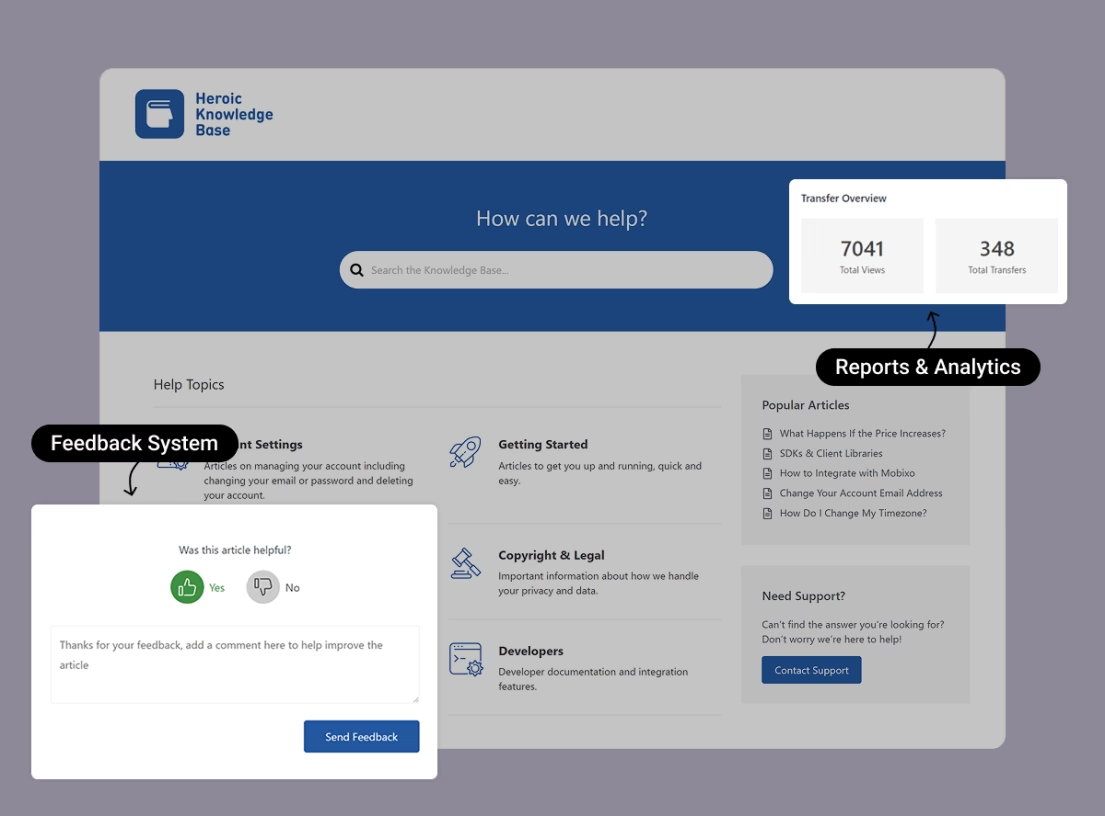
Heroic Knowledge Base est un plugin de base de connaissances et aussi la meilleure solution wiki pour WordPress. Ce plugin wiki premium pour WordPress est facile à configurer et à gérer. Avec Heroic Knowledge Base, vous pouvez ajouter un wiki convivial à votre site, compatible avec n'importe quel thème WordPress, permettant à vos visiteurs d'accéder instantanément aux connaissances de support.
L'une des meilleures fonctionnalités de ce plugin est une puissante fonction de recherche basée sur AJAX qui peut suggérer des articles au fur et à mesure que l'utilisateur tape sa requête. Vous pouvez également configurer les résultats de recherche pour certaines requêtes afin que vos articles sélectionnés s'affichent en haut.
De plus, vous avez accès à des rapports d'analyse robustes pour vous aider à évaluer ce que les visiteurs recherchent et s'ils trouvent les informations qu'ils souhaitent. Les clients peuvent également fournir des commentaires sur les articles.
Les principales caractéristiques de Heroic Knowledge Base incluent :
- Facile à utiliser et s'intègre parfaitement à votre site WordPress
- Superbe design qui signifie que votre site wiki est fantastique dès le départ
- Recherche AJAX ultra-rapide permet aux clients de trouver ce dont ils ont besoin en quelques secondes
- Collectez des commentaires sur les articles afin que vous puissiez identifier quels articles aident les clients
- Analyses intégrées pour découvrir à quel point votre base de connaissances aide les utilisateurs
- Ordre des catégories par glisser-déposer pour que vous puissiez tout organiser à votre manière
- Protégez par mot de passe et masquez les articles de différents rôles d'utilisateurs
- Fournissez à vos visiteurs des fichiers téléchargeables dans les articles avec prise en charge intégrée des pièces jointes
- Plusieurs types de widgets pour afficher des articles, des catégories et des auteurs sur votre site
- Compatible avec la plupart des thèmes bien codés, avec un style réactif
- Prêt pour la traduction avec compatibilité WPML
- Entièrement localisé
- Assistant IA pour améliorer votre wiki
- Support fantastique de la part d'experts dévoués possédant une connaissance approfondie de WordPress, ainsi qu'une large gamme de tutoriels pour vous aider à configurer votre wiki.

Créez une base de connaissances et aidez vos clients à s'aider eux-mêmes.
Obtenir le plugin2. Helpie WP

Helpie WP est une solution premium qui combine les fonctionnalités d'un wiki et d'une base de connaissances en un seul plugin. Il vous permet de créer des sites wiki publics sur des sujets tels que les films, les affaires, les jeux vidéo, et plus encore.
Helpie WP se concentre sur la collaboration. Les visiteurs peuvent s'inscrire et soumettre des articles depuis le frontend de votre site Web. Et vous pouvez définir les autorisations pour savoir qui peut modifier et publier du contenu.
Les principales fonctionnalités de Helpie WP incluent :
- Définir les capacités des utilisateurs pour modifier, publier ou approuver des articles
- Sauvegarde et retour aux versions précédentes
- Définir des restrictions pour les utilisateurs en fonction des sujets
- Personnalisation du style
- Intégration avec des plugins de constructeur de pages tels qu'Elementor
- Recherche en direct basée sur AJAX et fil d'Ariane
- Protéger le site web par mot de passe
- Vote d'articles pour encourager une communauté wiki collaborative
- Prise en charge des shortcodes
3. Yada Wiki

Yada Wiki est un plugin wiki WordPress gratuit avec des fonctionnalités essentielles pour vous aider à construire votre site wiki. Il ajoute un nouveau type de publication à votre configuration WordPress. Cela signifie que vous publiez des articles wiki séparément des publications standard, avec leurs propres catégories et balises personnalisées.
Vous pouvez afficher vos articles de wiki dans différentes parties de votre site Web à l'aide de shortcodes et de widgets. Il existe également un widget de barre latérale que vous pouvez utiliser pour afficher une table des matières ou les titres d'articles d'une catégorie particulière.
Cependant, un inconvénient de Yada Wiki est sa personnalisation limitée. Il hérite de la plupart de ses styles de votre thème. Il n'y a donc pas grand-chose que vous puissiez changer sans toucher au code. Il convient probablement à ceux qui sont prêts à passer du temps à structurer un wiki par eux-mêmes.
Les principales caractéristiques de Yada Wiki incluent :
- Nouveau type de publication de wiki avec des catégories et des étiquettes personnalisées
- Prise en charge des shortcodes
- Table des matières
- Lier les pages de wiki entre elles par leurs titres
- Widgets de barre latérale pour afficher les articles récents ou les articles d'une catégorie
4. WP Glossary
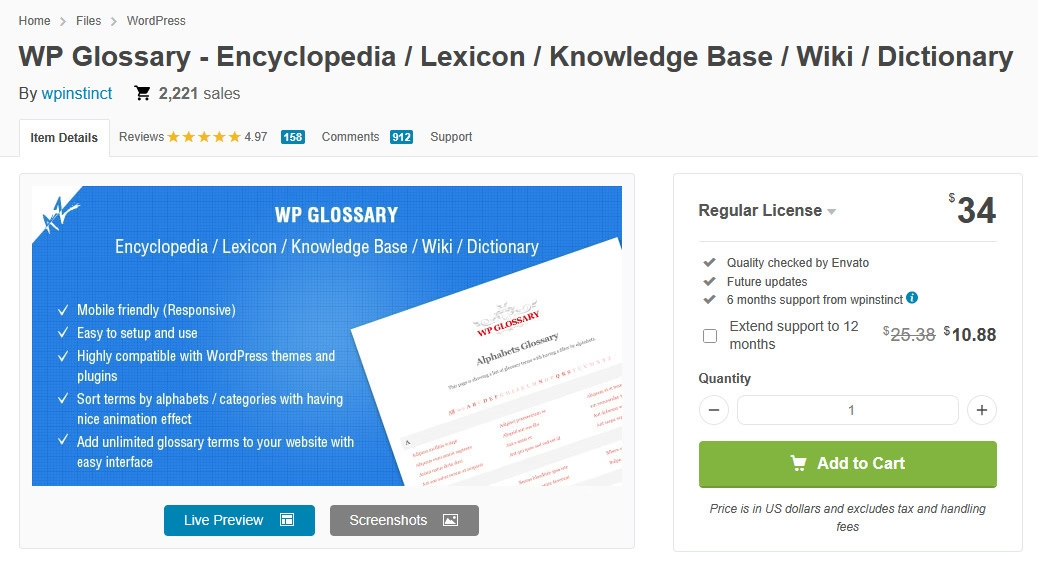
WP Glossary est un plugin premium qui vous permet de créer un wiki avec du contenu organisé par catégories, et des glossaires qui organisent les termes par ordre alphabétique. Il crée un nouveau type de publication personnalisé pour le contenu wiki, mais vous pouvez également utiliser les types de publication existants. Vos articles sont ensuite compilés dans une page d'index au design épuré.
Il a un design simple et des styles intégrés afin que vous n'ayez pas besoin de le personnaliser beaucoup pour qu'il s'intègre à votre site Web. Cependant, vous pouvez personnaliser des éléments tels que les pop-ups d'infobulle, les couleurs du texte, et plus encore, selon vos besoins.
Les principales caractéristiques de WP Glossary incluent :
- Afficher les termes du glossaire avec des effets d'animation
- Hyperlien les termes avec les publications pour améliorer le référencement
- Afficher une infobulle au survol de la souris
- Styles personnalisés
- Ajoutez un wiki à n'importe quelle publication ou page avec des shortcodes
- Compatible avec BuddyPress, WooCommerce, etc.
5. Encyclopédie / Glossaire / Wiki

Encyclopedia / Glossary / Wiki est un plugin gratuit et polyvalent que vous pouvez utiliser pour créer un dictionnaire en ligne, un lexique, un wiki ou une encyclopédie.
Il crée un nouveau type de publication personnalisé basé sur la fonctionnalité native des articles de blog dans WordPress. Vous pouvez publier de nouveaux articles de manière similaire à la publication d'articles WordPress, ainsi qu'une page d'index dédiée où tous ces articles apparaissent dans l'ordre chronologique inverse, tout comme votre blog.
Les fonctionnalités clés incluent :
- Page d'index générée automatiquement
- Étiquettes et catégories pour classer les articles du wiki
- Liens croisés automatiques des articles apparaissant dans les articles et les pages
- Prêt pour la traduction et prend en charge WPML
- Sauvegarde des révisions pour les articles du wiki
- Commentaires sur les articles du wiki
- Prend en charge les droits et capacités des utilisateurs WordPress
- Recherche dédiée avec un widget de barre latérale
- Autocomplétion et suggestions d'articles pour les requêtes de recherche
- Widget pour afficher les articles, les étiquettes et les catégories dans la barre latérale
6. Aperçu Wikipédia
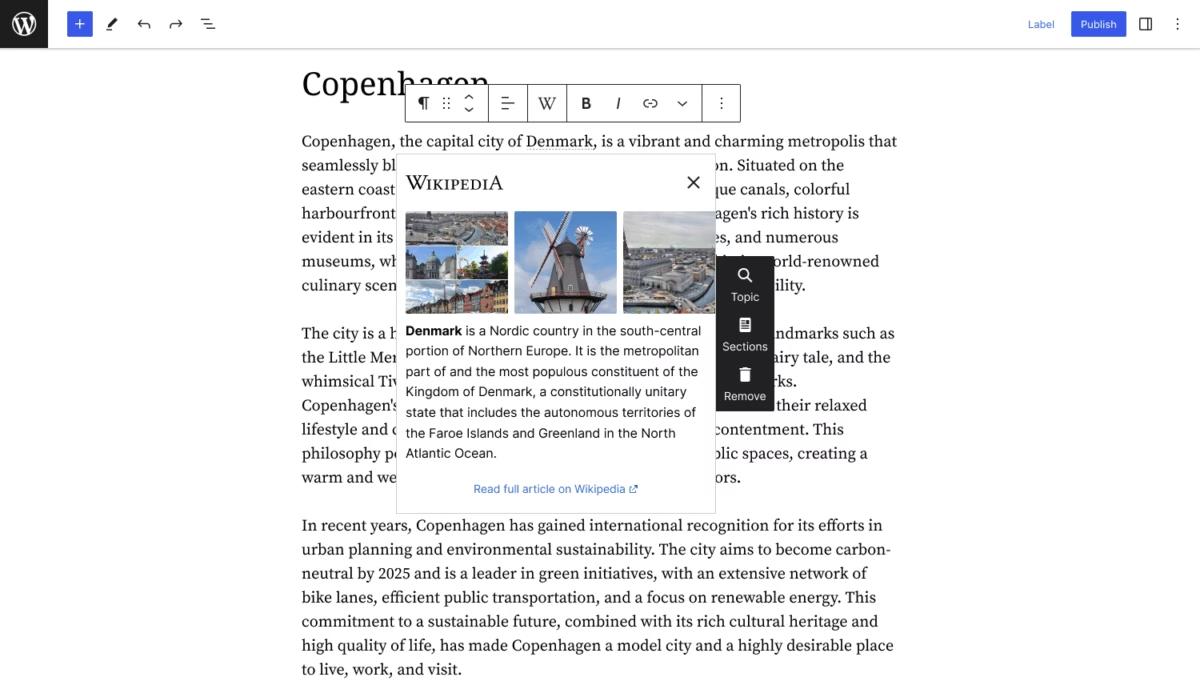
Wikipedia Preview est un plugin WordPress gratuit créé par la Wikimedia Foundation. Il intègre des cartes de résumé de Wikipédia sur un site WordPress.
Lorsqu'un lecteur survole ou clique sur un terme lié, une petite boîte contextuelle apparaît, contenant une brève description et des images de l'article Wikipédia correspondant.
Cette fonctionnalité offre aux visiteurs un contexte rapide sur les sujets sans quitter le site.
Caractéristiques principales de Wikipedia Preview :
- Affiche des aperçus d'articles Wikipédia au survol ou au clic sur un lien
- Récupère les résumés et les images directement de Wikipédia
- Prise en charge de plusieurs langues
- Fonctionne avec l'éditeur de blocs et l'éditeur classique
- Option pour choisir la section de l'article qui apparaît
- Mode sombre
7. Base de connaissances très simple
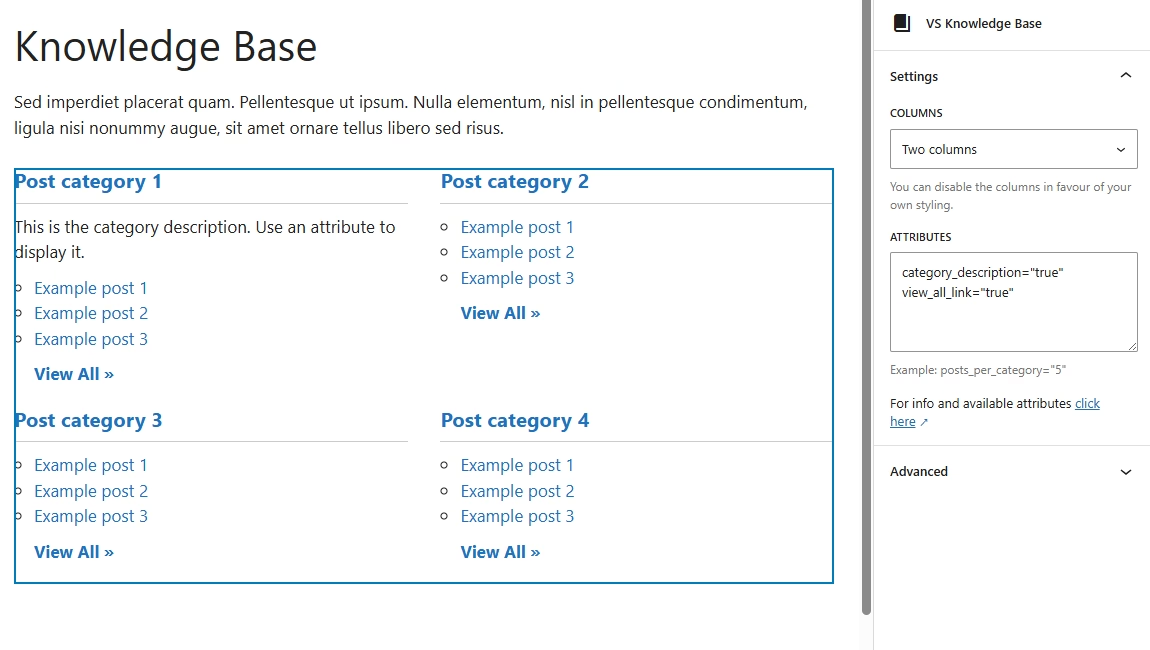
Very Simple Knowledge Base est un plugin wiki WordPress gratuit et léger qui vous offre un moyen simple de créer et d'organiser des articles wiki.
Cependant, si vous recherchez une solution qui vous aide à gérer votre contenu wiki séparément des autres contenus, ou pour que vos visiteurs puissent rechercher uniquement votre contenu wiki, alors vous devriez chercher ailleurs.
Les principales caractéristiques de Very Simple Knowledge Base incluent :
- Créez une FAQ, un wiki ou un portail de liens
- En utilisant un shortcode ou un widget, vous pouvez afficher le contenu de vos articles existants et de vos types d'articles personnalisés dans plusieurs colonnes adaptatives
- Ajustez les shortcodes et les widgets pour filtrer les publications par catégories
- Changez l'ordre dans lequel les articles apparaissent lors de l'utilisation d'un shortcode ou d'un widget
8. RiseWiki
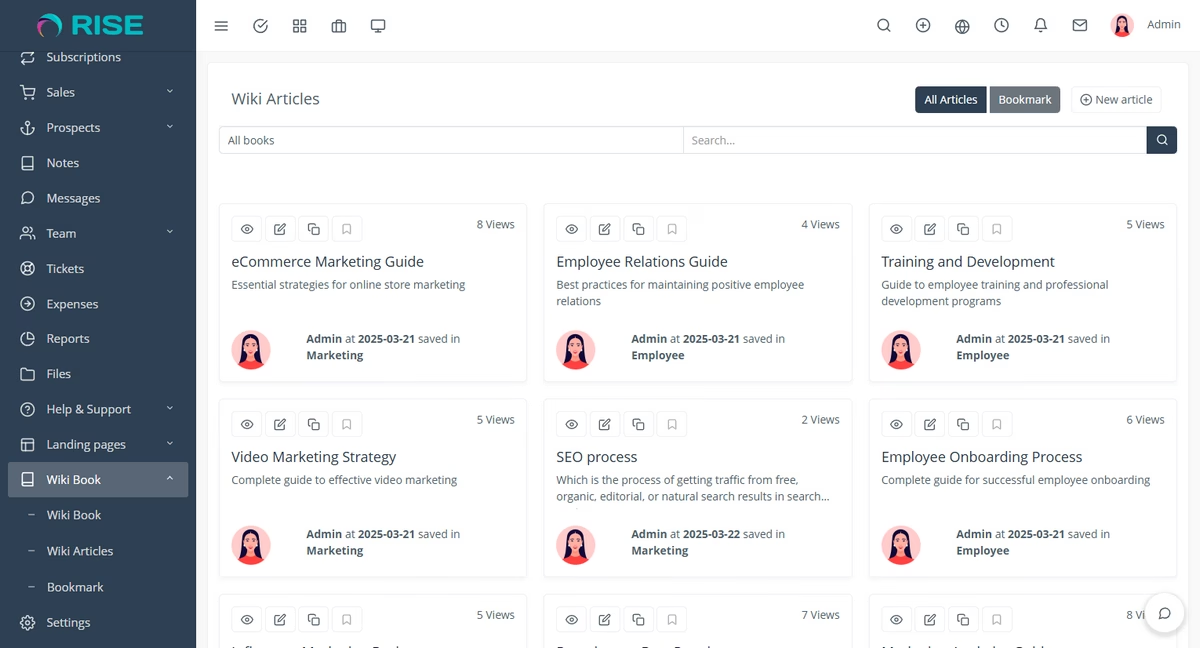
RiseWiki est un plugin WordPress dédié à la création de portails wiki internes.
Il vous aide à organiser et à gérer vos ressources de connaissances.
Cependant, vous devez le coupler avec le plugin RISE – Ultimate Project Manager & CRM. Ce qui peut être coûteux pour les petites équipes.
Caractéristiques principales du plugin RiseWiki :
- Wiki interne intégré directement dans RISE
- Structure de livres et d'articles pour des connaissances organisées
- Recherche intégrée pour une découverte rapide d'articles
- Marquez des articles pour un accès rapide
- Éditeur de texte riche pour la rédaction de documentation
- Table des matières automatique
- Liens d'articles partageables
- Types de contenu multiples
- Suivi du nombre de vues d'articles
9. DW Knowledge Base Pro
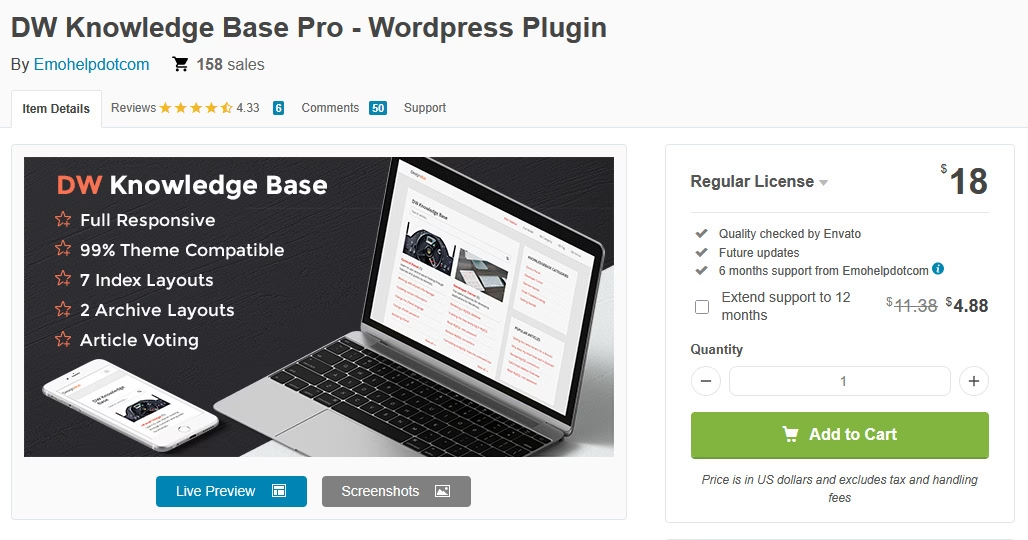
DW Knowledge Base Pro est un plugin wiki WordPress premium et abordable. Il vous permet de créer un wiki avec une bonne expérience utilisateur grâce à diverses mises en page, des designs épurés, et plus encore.
Les principales caractéristiques de DW Knowledge Base Pro incluent :
- Mises en page prédéfinies pour la page d'archive et la page d'index
- Formulaire de recherche qui suggère automatiquement des articles
- Formulaires de commentaires
- Fil d'Ariane
- Statistiques de vues d'articles
10. Intégration Wiki RDP
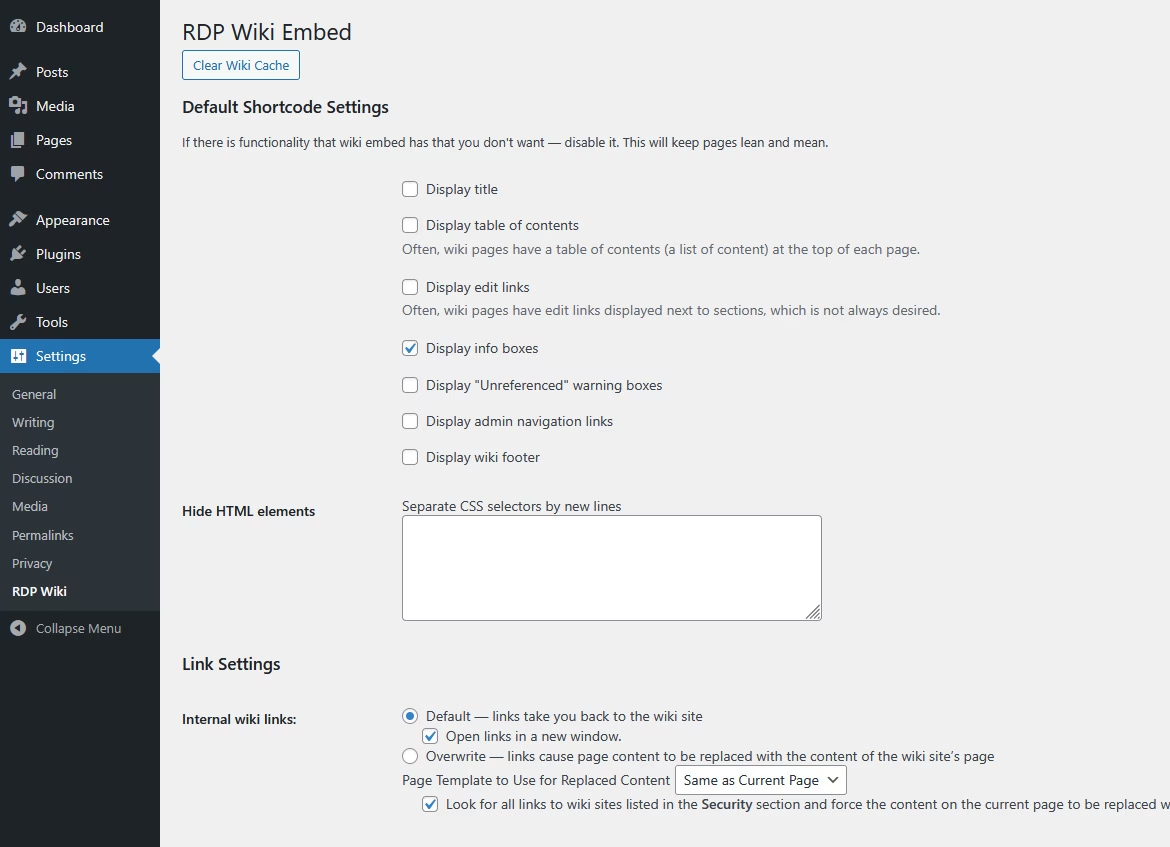
RDP Wiki Embed est un plugin wiki gratuit qui vous permet d'intégrer une page wiki externe ou une section de page wiki dans un site Web WordPress à l'aide de shortcodes. Vous pouvez également modifier l'apparence de la page, avec des options pour afficher des blocs d'informations, personnaliser les liens et afficher une table des matières.
Cependant, il n'est pas codé pour fonctionner avec le nouvel éditeur de blocs Gutenberg. Vous devrez donc l'utiliser avec un autre plugin qui restaure l'éditeur classique.
Les principales caractéristiques de RDP Wiki Embed incluent :
- Récupérer le contenu de n'importe quel site Web Mediawiki (tel que wikipedia.org)
- Supprimer et reformater le contenu récupéré
- Les visiteurs peuvent lire des articles wiki sans quitter votre site
Obtenir le meilleur plugin Wiki WordPress
La manière dont vous fournissez des réponses à vos clients actuels ou potentiels peut faire ou défaire votre réputation. La création d'un wiki ne génère pas seulement du trafic, mais rend également votre entreprise plus efficace et améliore la satisfaction client.
Avec les plugins listés ci-dessus, vous pouvez créer un wiki en quelques clics. Que vous ayez besoin d'un wiki petit et simple ou d'un grand plugin wiki de niveau entreprise, Heroic Knowledge Base est votre meilleur choix. Obtenez-le ici aujourd'hui.
Lectures complémentaires
10 meilleurs logiciels de base de connaissances open source gratuits
12 meilleurs logiciels Wiki gratuits pour 2026
Les 5 meilleurs plugins de table WordPress comparés (2026)
Meilleurs plugins gratuits de centre d'aide WordPress
Meilleurs thèmes Wiki WordPress pour 2026
Meilleurs exemples de Wiki : Hubs de connaissances publics et wikis internes d'entreprise






Laisser un commentaire ?
Vous devez être connecté pour poster un commentaire.