Introducing Heroic Inbox 3: A Faster, More Reliable Shared Inbox for WordPress

If you manage a support or sales queue, you know the feeling.
The tool gets sluggish once real volume arrives. The interface buries the reply box under panels you never asked for. And every month, the invoice grows, because you are paying per agent, per ticket, or per feature you barely use, while your customer data lives on someone else’s platform.
Every one of those slow loads and extra clicks is a customer waiting longer than they should. That is the cost of the status quo, and it compounds daily.
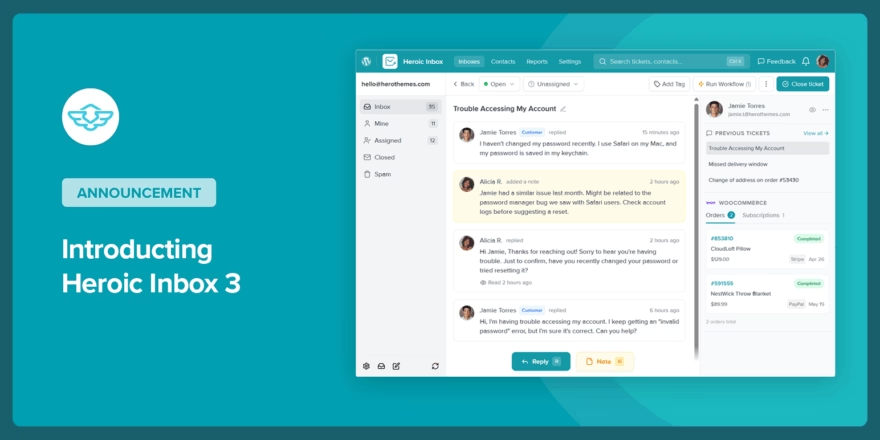
Today, we are introducing Heroic Inbox 3: a shared inbox for WordPress, rebuilt from the ground up so your team can get to the reply faster, on a system that stays quick as your inbox fills with real volume.
To celebrate the Heroic Inbox 3 update, we are offering 60% OFF for new subscribers.
That’s right, you can start with Heroic Inbox for just $79.60/year.
- 2 Mailboxes
- Unlimited Users and Tickets
- All Essential Features
(We also offer 100% No-Risk Money Back Guarantee)
What Heroic Inbox 3 does
Heroic Inbox turns your WordPress site into a shared inbox and helpdesk. Your team manages support, sales, and any other mailbox from one place, with assignments, notes, saved replies, and automated workflows, while your data stays on your own site.
Version 3 is not a coat of paint. We rebuilt the foundation rather than stacking new features on the old one, because the two things that slow every helpdesk team down are a system that drags under volume and an interface that gets in the way of replying. Heroic Inbox 3 fixes both.
And there are no agent caps and no ticket caps. Your team grows; your bill does not.
Replies that keep pace with your queue
Speed is the most important feature a helpdesk has, so the new base is built for it. Heroic Inbox 3 runs fast even on inexpensive hosting, and it stays responsive when your mailbox holds months of real conversation history rather than demo data.
We did not test this on demo data. Our own support mailbox at HeroThemes holds over 30,000 tickets, and it is where every build gets proven first. In that same mailbox, Heroic Inbox 3 loads 5x faster than version 2.
Since launch, we have already shipped hundreds of bug fixes and small optimizations on top of the rebuild, guided directly by customer feedback. The result is a helpdesk that is reliable, stable, and ready to replace your existing system.
An interface that gets out of the way
The entire UI has been redesigned around research and user feedback, with one goal: help you decide what to do with a ticket and do it in as few clicks as possible.
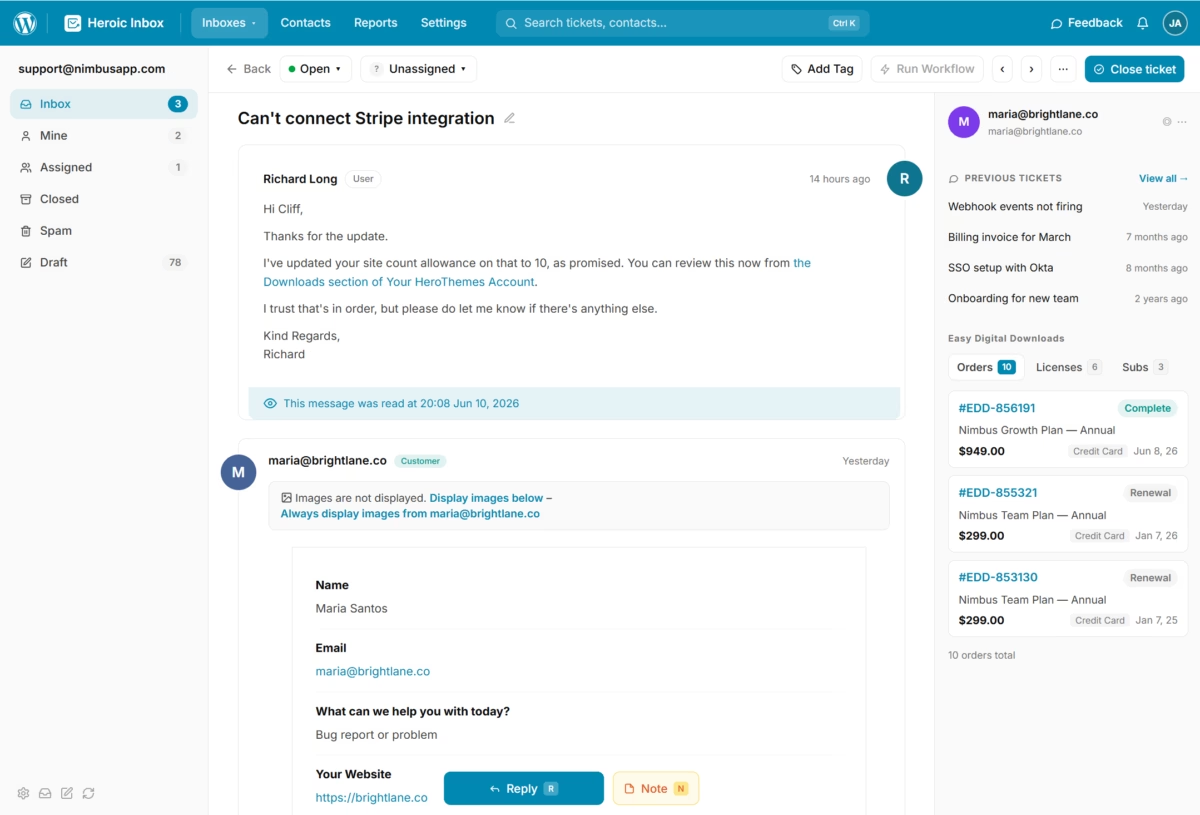
The ticket view puts the conversation and customer history front and center, so the context you need for a helpful reply is already on screen. No hunting through tabs, no guessing what was promised last time.
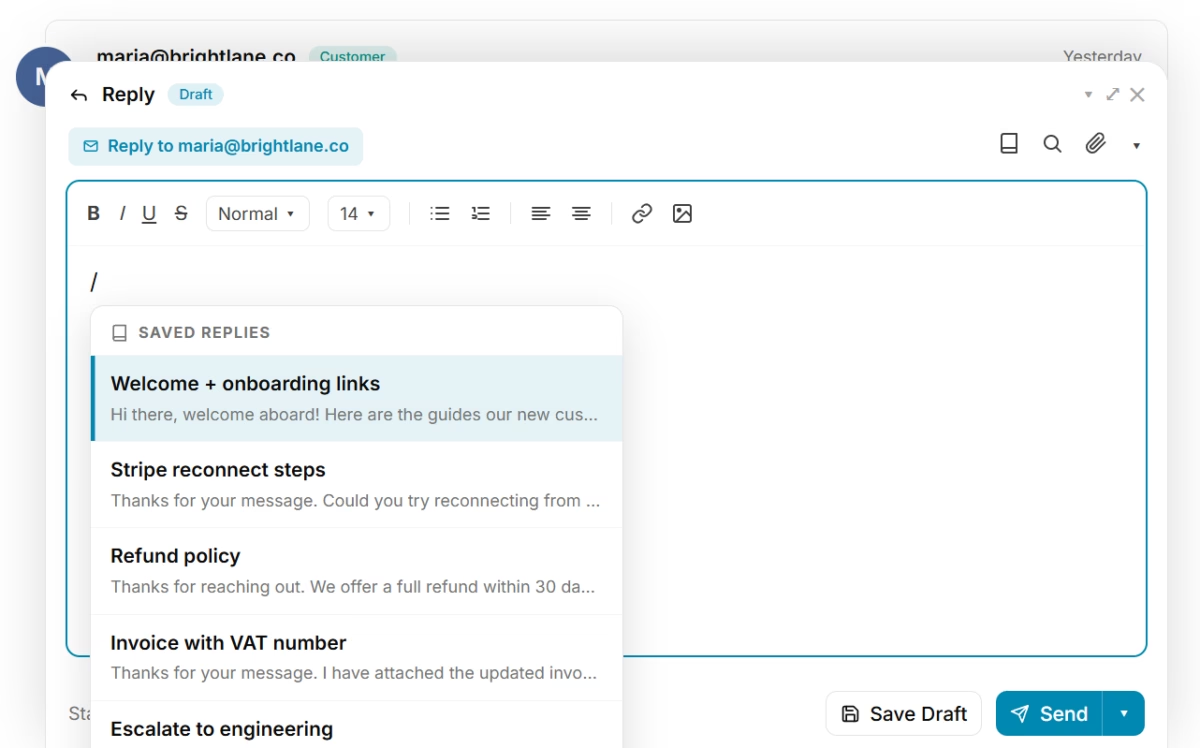
The new editor shows your message exactly as the customer will see it, with quick actions and keyboard shortcuts built in. Quote text from the ticket history, insert a saved reply by typing “/”, attach files, CC teammates, and pull in knowledge base articles without leaving the reply box. Your favorite grammar extensions work too.
Connect Gmail or Outlook in one click
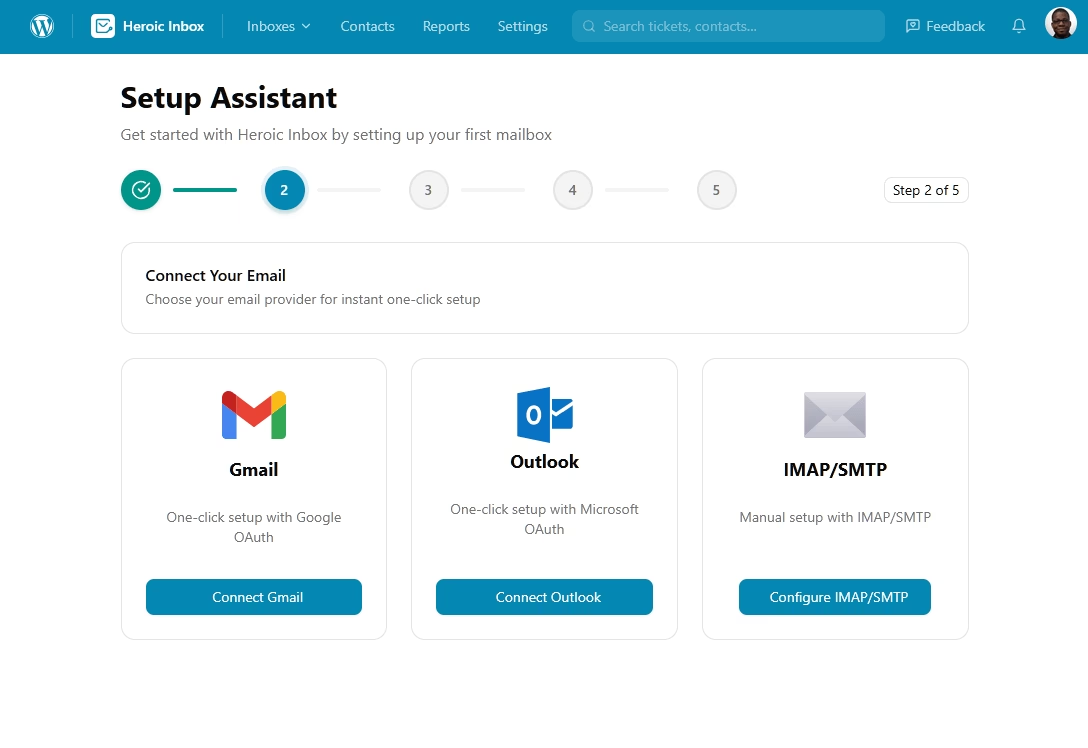
Connecting a mailbox used to be the most fragile part of any helpdesk setup. In Heroic Inbox 3, Gmail and Outlook connect with one click through secure OAuth. Using a different provider? IMAP and SMTP support covers virtually any mailbox.
The setup assistant walks you through it, and most teams have their first mailbox live within five minutes of installing the plugin.
Bring your history with you
Switching helpdesks usually means abandoning years of customer context. Email Import removes that tradeoff: pull your existing email history into Heroic Inbox so past conversations sit right alongside new ones from day one.
That makes migration from Gmail, Outlook, or an existing helpdesk a process measured in minutes, not weeks, and your team never has to answer a customer blind.
And switching carries no risk. The import copies your history; your original mailbox stays exactly where it is, so nothing is lost if you change your mind. If you hit a snag at any point, our support team will walk you through the migration personally. And every plan is backed by a 100% no-risk money-back guarantee, so you can run Heroic Inbox alongside your current helpdesk and decide once you have seen it handle your real volume.
“Heroic Inbox replaced our Help Scout subscription and saves us over $300/month. Setup took 10 minutes, and the team was up and running the same day.”
– Amy B., Founder, Launch and Sell
What’s New?
Automated Workflows
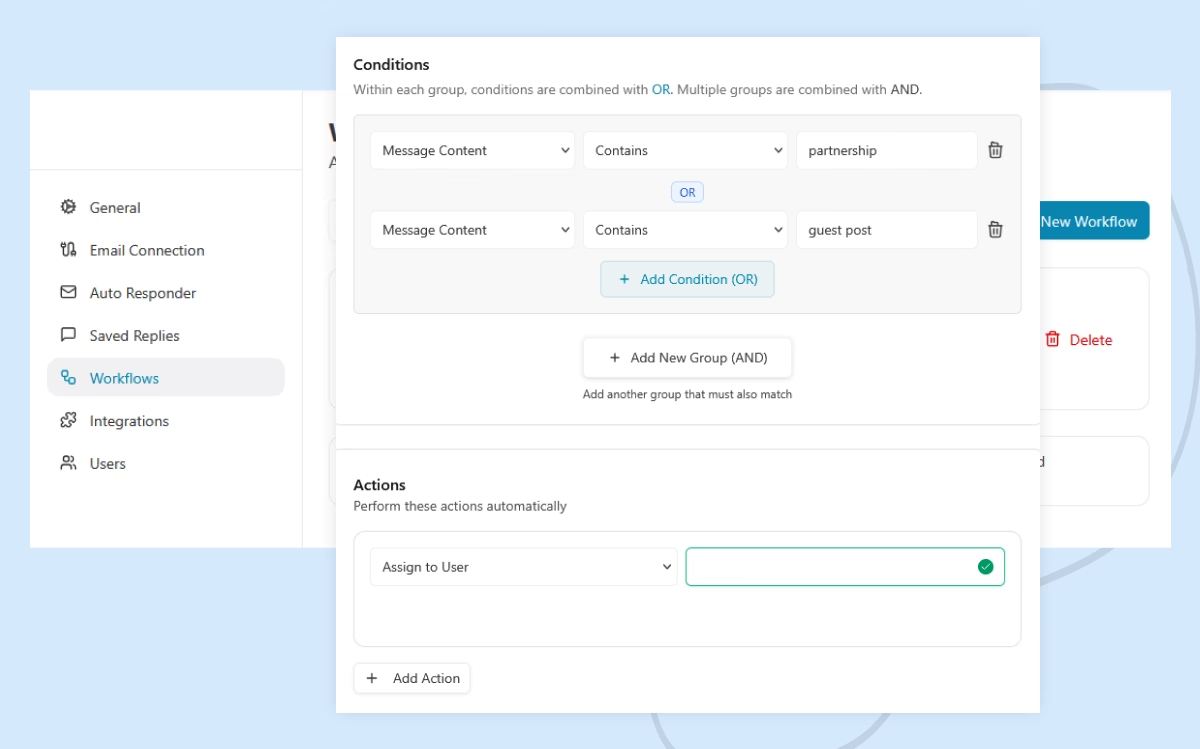
Change how you manage tickets/emails with hundreds of possible automated workflows. Such as:
- Auto tagging a senior member and add the p1 tag if the ticket or email is from a VIP customer.
- Closing the ticket and sending a feedback email when the ‘feedback’ tag is added to the ticket.
- Sending an automated follow-up message if a customer doesn’t reply within a certain number of days.
This can drastically reduce the amount of time spent on repetitive tasks, allowing you to focus on discussing and solving real issues.
Powerful Editor
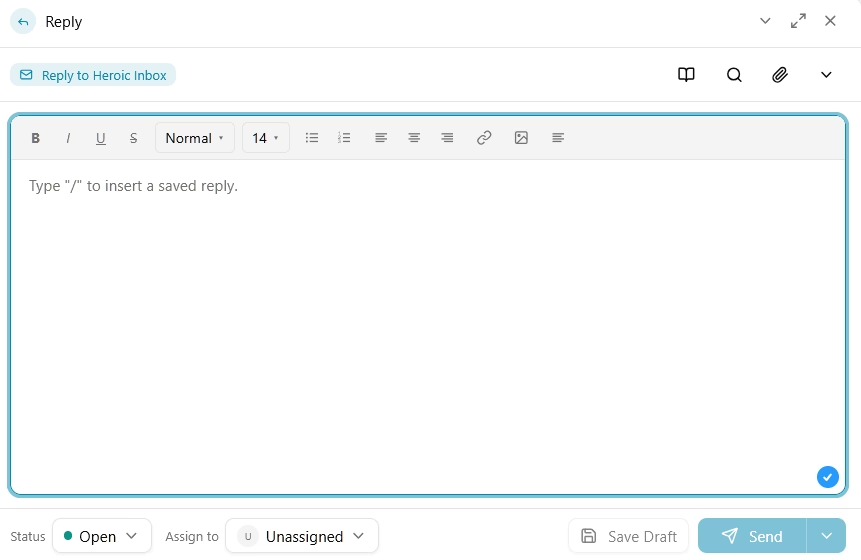
Powerful editor that shows exactly how your message will look. With necessary controls, quick actions and shortcut keys.
This includes:
- Quoting certain text from ticket history
- Inserting saved replies or email templates without clicking a button
- Attachment and CC support
- Integrated knowledge base to find and insert relevant articles
- Support for your favorite grammar extensions.
Agent Tagging
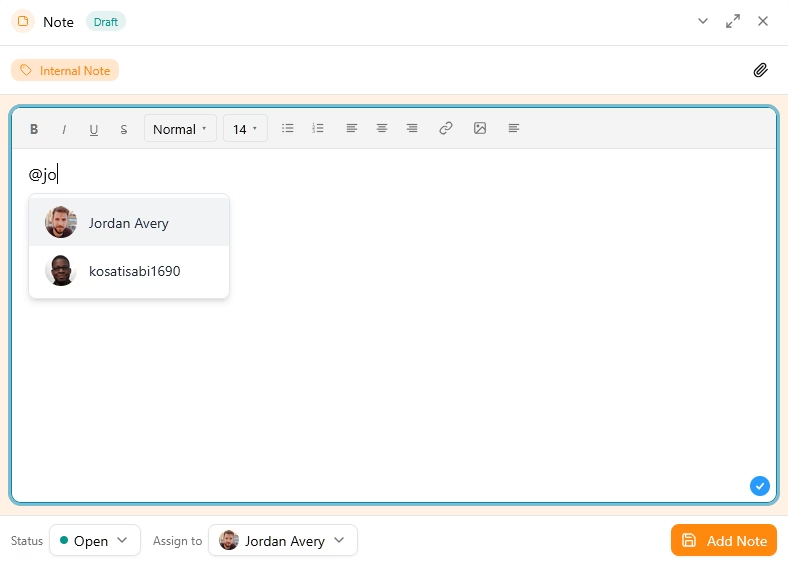
Communicate with your teammates without leaving the Heroic Inbox platform.
There’s no need for an additional Slack channel or personal message to get things done.
User management
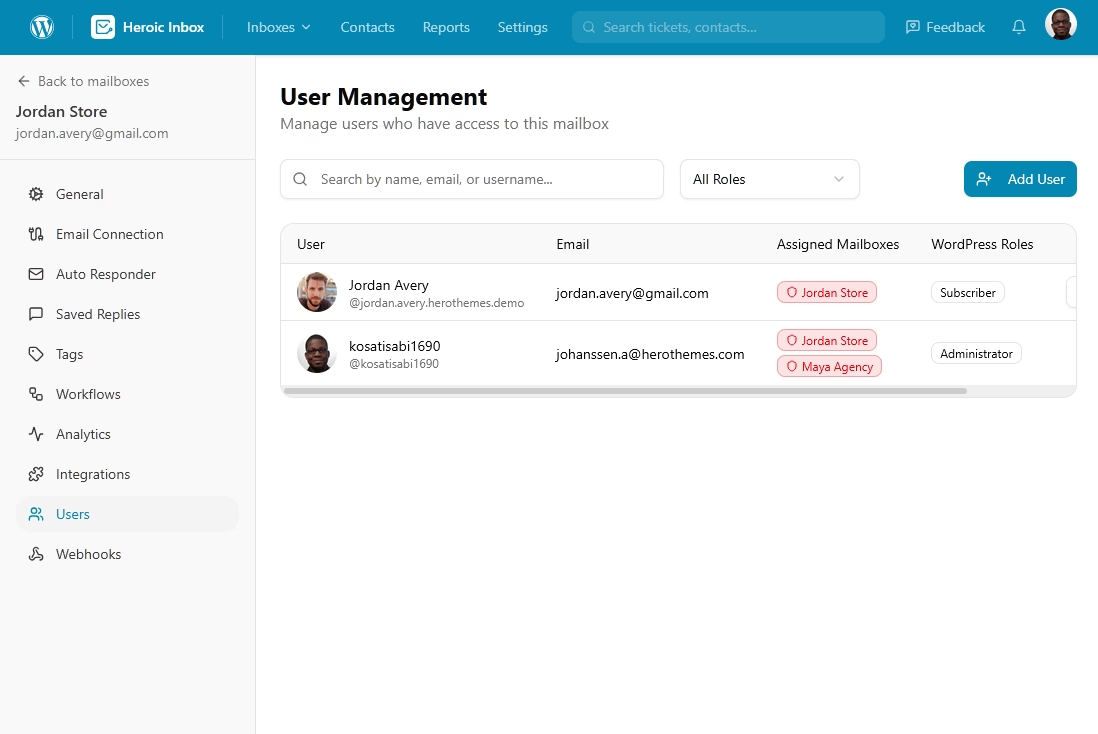
Manage users and their mailbox access from the Heroic Inbox settings:
- Control which mailbox users can access
- Roles: Agent, Manager and Admin
Saved Replies / Email Templates
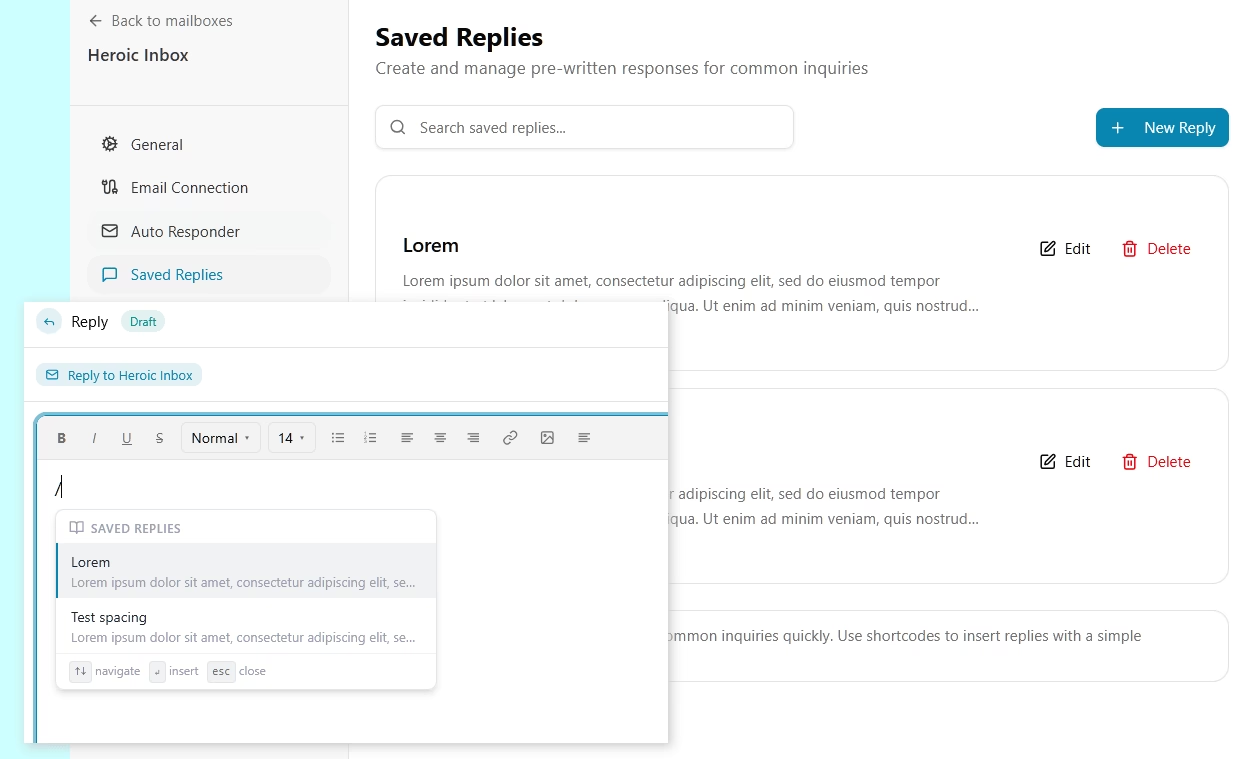
Heroic Inbox aims to provide one of the most important features of any ticketing system – email templates or saved replies.
Not just a way to add email templates that will sit in a corner of the settings page, but a robust feature that your team will use every day.
It will save time when answering common questions and crafting messages, such as:
- Answering questions like – Do you offer refunds? Or What is your return policy?
- Quickly inserting introductions or final thoughts.
Saved replies in Heroic Inbox can be inserted by typing “/”, or by accessing the saved reply button.
Similarly, we made sure creating saved replies are easier.
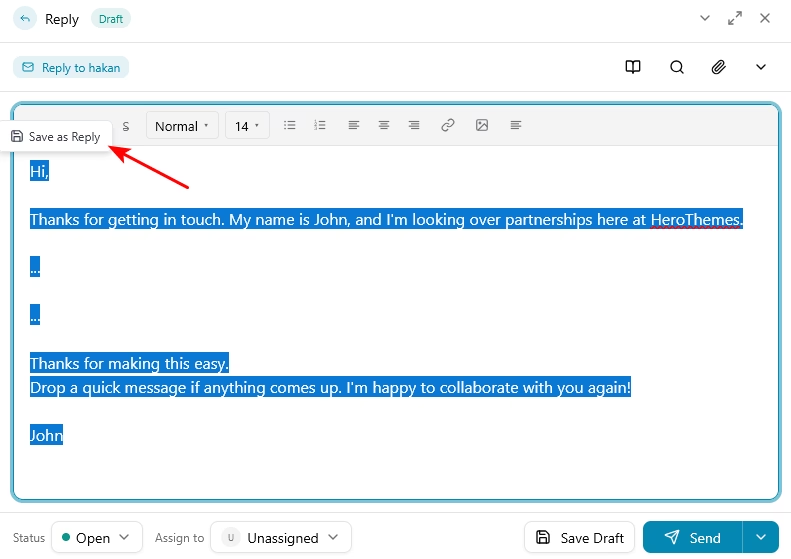
Just select the text you want to save as template from the reply box and hit that cute little “Save as Reply” button.
Who Heroic Inbox 3 is for
- Support and sales leads at small and mid-sized businesses who manage a daily queue and are tired of paying per-agent prices for a helpdesk that slows down at volume.
- Growing eCommerce, SaaS, and healthcare businesses that handle high email volume, need team-specific inboxes, and want customer data on their own site rather than a third-party platform.
- Agencies and teams migrating off an expensive helpdesk, where one-click connection and Email Import remove the usual switching friction.
- Professionals who live in their inbox, from consultants to HR to founders, currently tracking conversations across Gmail and a spreadsheet and still missing follow-ups.
- Anyone who answers customer email as a team and wants it to cost less and move faster.
What this looks like in practice
Imagine a Tuesday morning. Overnight orders brought in forty new emails. The VIP customer’s message was already tagged priority and assigned to your senior agent by a workflow before anyone logged in. Your first reply of the day takes three keystrokes: open the ticket, type “/”, insert the saved reply, send. The customer’s full history sat beside the conversation the whole time. By the time your coffee is cool, the queue is half clear.
That is the daily difference a rebuilt foundation makes.
Get started with Heroic Inbox 3 at 60% off
To celebrate the release, new subscribers get 60% off. That means you can start with Heroic Inbox for $79.60/year, with 2 mailboxes, unlimited users and tickets. No per-agent pricing, ever.
Do the math against what you pay now. A team of four on Help Scout, at $30 per user per month, costs $120 a month, or $1,440 a year. A single month of that bill costs more than a full year of Heroic Inbox.
Getting set up takes roughly 10 to 30 minutes, depending on how much email history you import:
Step 1. Subscribe to a Heroic Inbox plan
Pick any plan at the introductory 60% off pricing.
Step 2. Download and install the plugin
Grab Heroic Inbox from your account dashboard and install it on your WordPress site.
Step 3. Connect your mailbox
Follow the setup assistant. Gmail and Outlook connect in one click; IMAP and SMTP cover everything else.
Step 4. Import your emails
Bring your history over so your team starts with full context.
Already a Heroic Inbox customer? If your subscription is active, the version 3 upgrade is waiting in your dashboard. The upgrade is seamless: install it and pick up right where you left off.
Not ready to commit? Every plan comes with a 100% no-risk money-back guarantee, so the only thing to lose is the per-agent invoice.
Thank you for being part of HeroThemes. Over 15 years and 32,000+ customers, your feedback has shaped everything we build, and Heroic Inbox 3 most of all.
The HeroThemes Team
P.S. Still paying per agent, per month? Every renewal is a decision, and your current helpdesk is counting on you not making one. One click to connect, one import to keep your history, and a year of Heroic Inbox costs less than a single month of a four-seat SaaS helpdesk. The math does not get better by waiting.





Leave A Comment?
You must be logged in to post a comment.