Using WPML with the Knowledge Base Archive as front page
When WPML is in use have the Knowledge Base Archive set as the homepage, you need to perform some additional steps:
- First, ensure you are navigating your WordPress admin in the primary site language. The WPML language in the admin bar should match the language from Settings > General > Site Language.
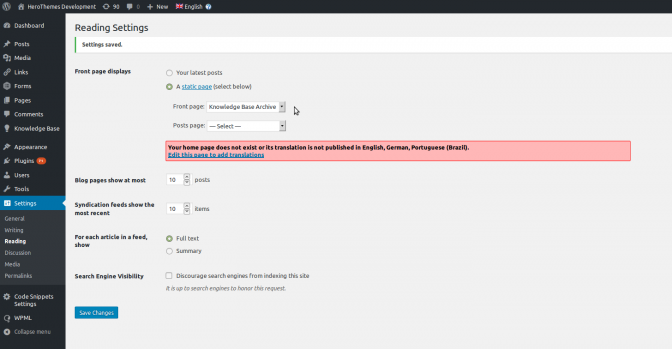
- Set the Knowledge Base Archive to the front page as usual in Settings > Reading > Front Page Displays.
- WPML will remind you that there are no translations available for the other languages, so add these now by clicking on the Edit page to add Translations link.
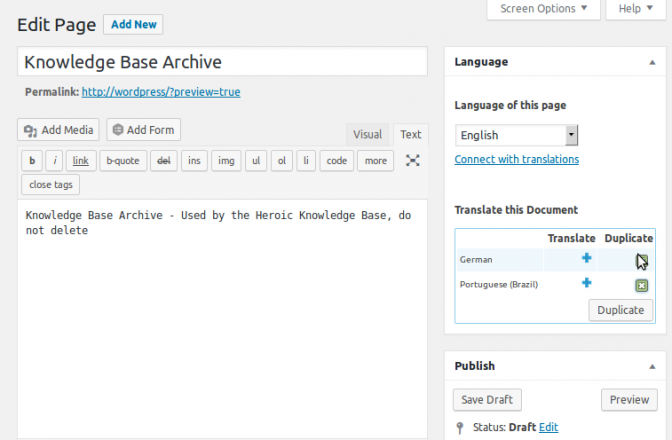
- On the edit page screen, select the languages you wish to offer as a front page on the right, within the Translate this Document box and click the Duplicate button. This will duplicate the archive dummy page.
- Remember that this is just a dummy page, you cannot use it to add any content.
- Also note that you will need to translate each article, category and tag to ensure complete multi-lingual availability of your knowledge base.
Related Articles