Translating Heroic Plugins
Our plugins are translation ready. To translate the themes or plugins you need to copy and edit the PO file contained in the languages folder of the theme and plugins on your site.
Ensure all the theme or plugin folder of the translation target is on your local machine before starting the translation. Do not edit them on a remote server or PO Edit cannot scan and parse the translation strings correctly.
Using a program such as PO Edit, you can edit the translations directly, with the following steps, outlined below:
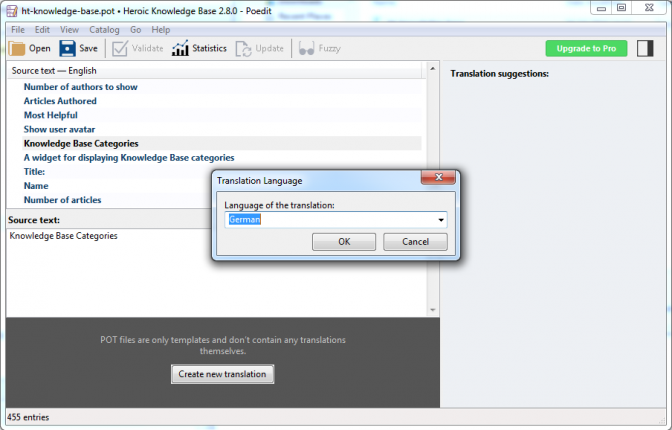
- Open the ht-knowledge-base.pot translation template file in PO Edit, and click Create new translation to select a language file to create.
- Now you can go through the source text and enter your translations. Be sure that for any translations that have plural terms, you enter the singular and plural forms.
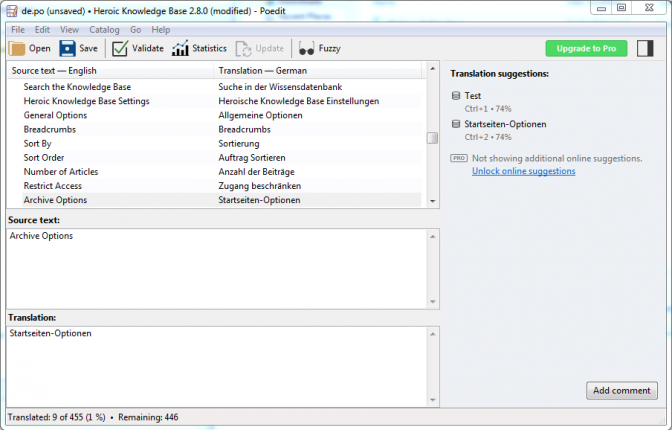
- Click Validate then File > Save As. Save the PO file as the name of the POT with the correct locale code appended. This becomes the translation template for that language. eg. ht-knowledge-base-de_DE.mo, for a German translation.
- Click File > Compile to MO to compile the completed translation file, save in the same format, but with a .mo extension.
- Upload the newly created / updated language files to your WordPress installation, to the relevant lang or languages folder in the relevant plugin. In the case of the knowledge base plugin, place the MO and PO files in wp-content/languages/plugins/

Set your WordPress language from Settings > General > Site Language. Alternatively a plugin such as WPML can manage the translations for you.

For additional support and guidance with translations, refer to the Translating WordPress on the WordPress Codex.