How To Write a Professional Email in 2026: Steps, Tips, and Examples

The fastest way to write a professional email is to choose one request and put it in the subject line, and let the first two sentences do the work. Everything else in this guide (greetings, tone, follow-ups, AI tools) exists to support those two sentences.
Here at HeroThemes, we have spent years managing a support queue and building software that can help us better support our customer base.
The emails that got answered first weren’t the most polished. They were the ones where you could tell what the sender wanted inside five seconds of opening them.
That’s the whole trick.
A professional email is a clear, courteous message written for a workplace or business purpose. Whether you’re contacting a client, responding to a colleague, making a request, or sharing an update, your message should explain its purpose, provide the necessary context, and make the next step easy to understand.
HelpJet – FREE AI Chatbot
An AI happiness engineer that handles 80% of customer questions, so your team can focus on what matters most.
In This Guide
- Why Professional Email Writing Still Matters in 2026
- Professional Email Format: The 7 Essential Parts
- How To Write a Professional Email, Step by Step
- Step 1: Decide What You're Actually Asking For
- Step 2: Write a Subject Line That Does the Work
- Step 3: Pick the Right Greeting
- Step 4: Lead With the Point
- Step 5: Keep the Body Short and Scannable
- Step 6: Make the Call to Action Impossible to Miss
- Step 7: Close With the Right Sign-Off (and a Signature That Won't Embarrass You)
- Step 8: Choose the Right Tone for a Professional Email
- Step 9: Proofread, Then Give Yourself a Safety Net
- Professional Email Etiquette: Replies, CC, Attachments, and Follow-Ups
- Professional Email Writing for Customer Support Teams
- Professional Email Examples You Can Steal
Why Professional Email Writing Still Matters in 2026
A fair question before we start: hasn’t Slack killed email? Not really. It’s just changed email’s job.
Short, chatty messages have migrated to chat. What stays in the inbox is the stuff that counts: client agreements, approvals, job offers, refund decisions, escalations, anything you might need to pull up again in six months.
A sloppy Slack message slides into the scroll and dies. A sloppy email gets forwarded, saved, and sometimes quoted back at you.
So the stakes are higher, not lower. For most clients, hiring managers, and prospects you’ll ever write to, your email is you. They’ve never heard your voice.
What does a good one actually buy you?
- Faster replies (because people don’t have to re-read it)
- Fewer follow-ups (because the ask is impossible to miss)
- A better first impression from strangers
- A cleaner paper trail
Professional Email Format: The 7 Essential Parts
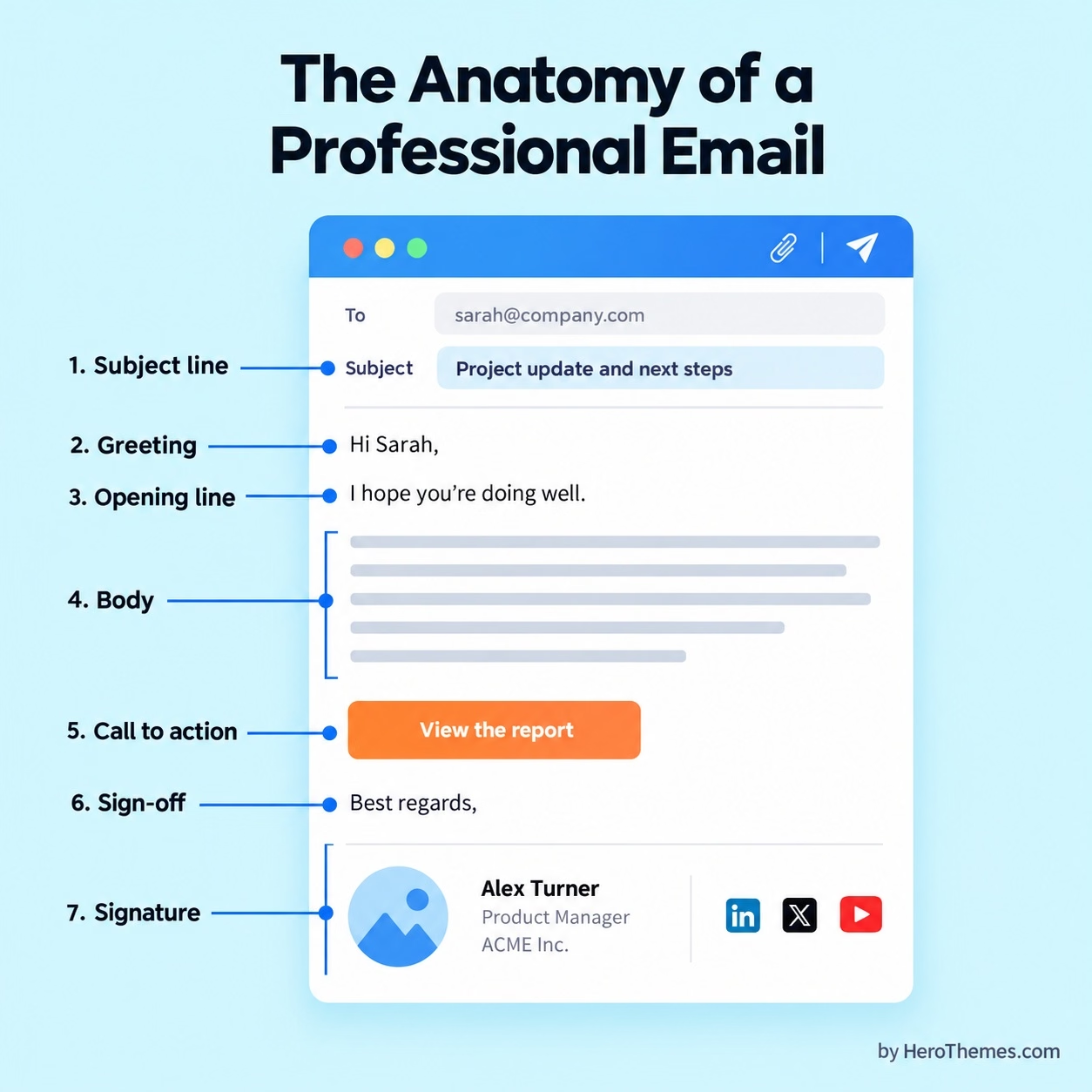
Every professional email, whatever its tone, has the same seven parts. You can soften them, you can tighten them, but you skip one at your own risk.
Here’s what belongs in each message:
- Subject line: A short, specific label that says what the email is about and what you need.
- Greeting: The reader’s name with “Hi,” “Hello,” or “Dear,” depending on formality.
- Opening line: One or two sentences stating why you’re writing.
- Body: The context the reader needs to act, no more.
- Call to action (CTA): The exact thing you want them to do, with a deadline when one exists.
- Sign-off: A short closing phrase before your name.
- Signature: Your full name, role, company, and a sensible way to reach you.
How To Write a Professional Email, Step by Step
Writing a clear business email becomes easier when you follow a repeatable process.
Start by deciding what you need from the recipient, then build your message around a useful subject line, an appropriate greeting, concise body copy, and a clear next step.
The following steps will help you write emails for everyday workplace situations, client communication, and formal business requests.
Step 1: Decide What You’re Actually Asking For
Before you touch the keyboard, finish this sentence out loud: “After reading this, I want [person] to [action] by [time].” If you can’t finish it, you’re not ready to write.
Most bad emails get written because the sender starts typing before the thinking is done. Half an hour later, three paragraphs of backstory have piled up, there are two half-questions floating around, and the actual ask is buried somewhere near the bottom (if it made it in at all).
Stick to one ask per email whenever you can. Two unrelated requests in one message and the reader will answer the easy one, then forget the hard one.
Pro tip: Write your ask as the first line of the draft, even if you plan to move it. It acts like a compass while the rest comes together.
Step 2: Write a Subject Line That Does the Work
Your email subject line should help the reader decide when to open the email and what to do with it.
Subject lines like “Quick question” and “Following up” fail that test. They tell the reader nothing about the topic or the urgency, and they land in the same mental bucket as cold spam.
A strong subject line usually names the topic, the action, and (when it matters) the timing.
For example:
- Approval needed: Q4 ad budget by Oct. 16
- FYI: New refund policy starts Nov. 1red.
Keep the subject line short enough to survive the preview on a phone. Mobile inboxes cut subject lines off after roughly 40 characters, so front-load the critical words.
Here’s a side-by-side you can use as a gut check:
| Weak Subject Line | Strong Subject Line | Why It’s Better |
|---|---|---|
| Quick question | Can you review the pricing page copy by Friday? | Names the task and the deadline |
| Following up | Following up: Proposal for Acme website redesign | Ties the follow-up to a real thread |
| Meeting | 30-minute call next week to plan the Q1 launch? | States length, timing, and purpose |
| Hi | Introduction: Maya Chen, referred by Leo Park | Explains who you are and why you wrote |
| Problem | Order #10293 arrived damaged: replacement request | Hands support everything needed to route it |
One more habit worth building: when a thread drifts to a new topic, change the subject line.
“Re: Re: Re: Lunch” is a terrible place for a contract renewal to live.
For dozens of subject-line patterns broken down by use case, we have a growing library, including follow-up email subject lines and cold email subject lines for outreach that you can lift from directly.
Step 3: Pick the Right Greeting
The default greeting in a 2026 professional email is “Hi [First Name],”. It’s friendly without being casual, and it works for colleagues, clients, and most strangers.
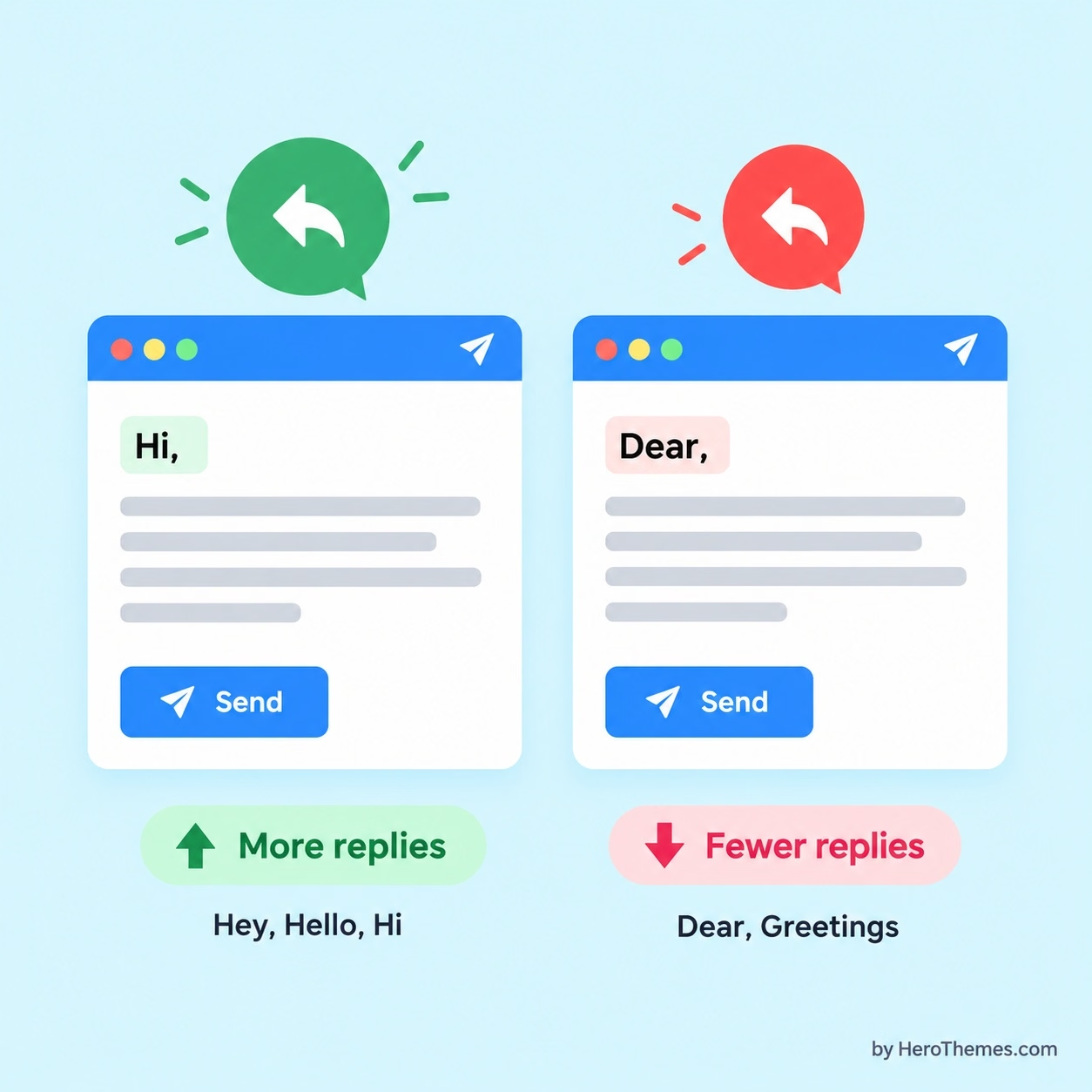
Boomerang’s analysis of more than 300,000 email threads found that casual openings like “Hey,” “Hello,” and “Hi” earned more replies than “Dear” or “Greetings.”
So is “Dear” dead? Not even close.
Law firms, government bodies, universities, hospitals, and executive assistants still expect it. My rule of thumb:
- Use “Dear [Title] [Last Name],” when writing to legal, government, academic, medical, or senior executive contacts you’ve never met. Also for formal job applications and cultures that expect it.
- Use “Hi [First Name],” for everything else, including first contact with most businesses.
- Use “Hey [Name],” only with colleagues you already chat with casually.
- Mirror the other person. If a client signs off “Cheers, Jo,” you can drop “Dear Ms. Smith” in your reply.
Two greetings I’d retire for good: “To Whom It May Concern” and “Dear Sir or Madam.” Both signal that you didn’t look for a name, and the second one guesses at gender.
If you really can’t find a name, address the role: “Hi Hiring Team,” or “Hello Billing Team,”.
Step 4: Lead With the Point
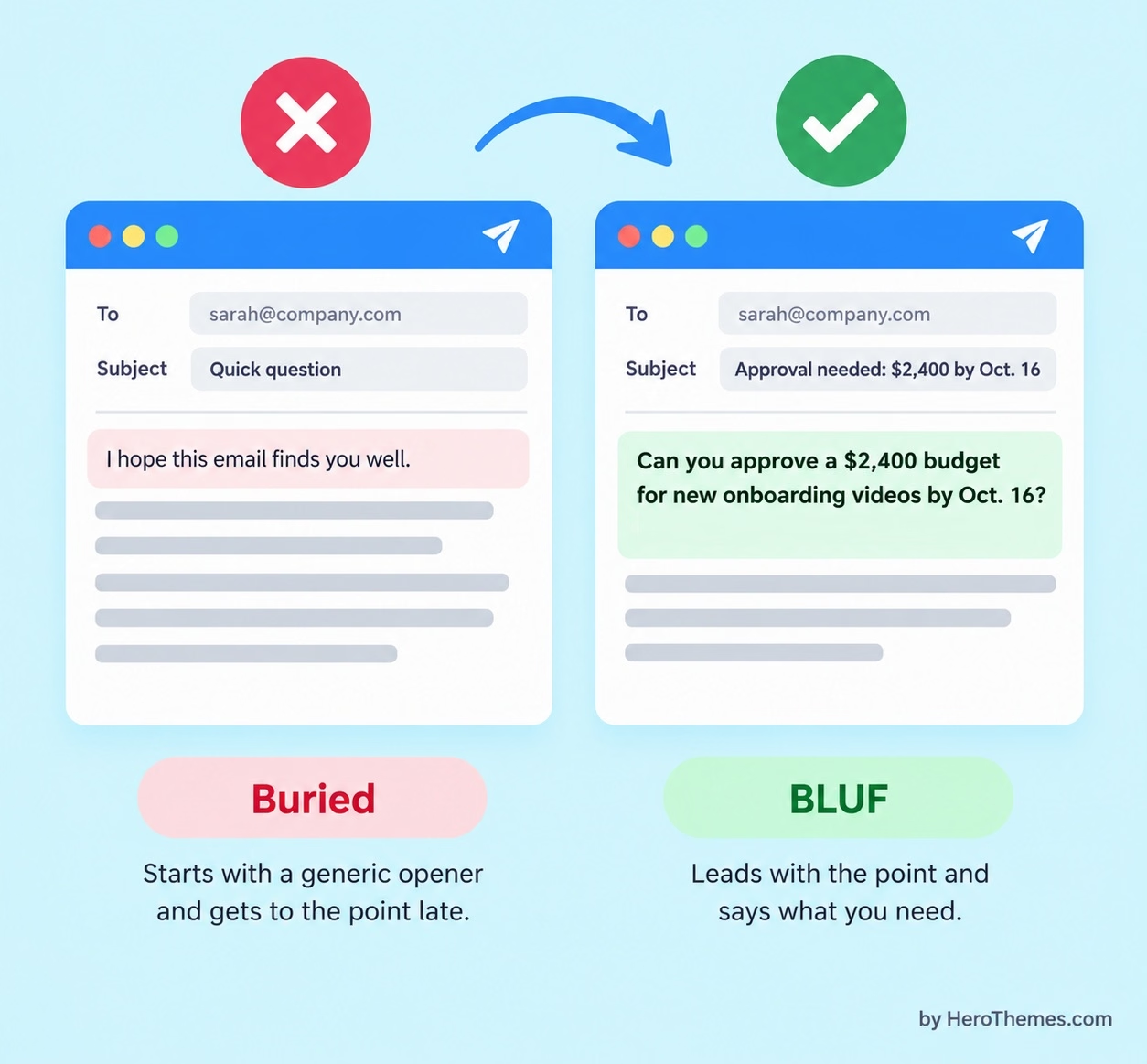
The single best habit you can borrow from military writing is BLUF, short for “bottom line up front.” Readers under pressure want the conclusion first and the background second. Your inbox-fatigued reader is under exactly that kind of pressure.
In practice, that means your first one or two sentences say why you’re writing and what you need.
Compare these two examples of leading email:
- Buried: “I hope this email finds you well. I wanted to reach out because over the past few weeks our team has been looking at our onboarding process…”
- BLUF: “Can you approve a $2,400 budget for new onboarding videos by Oct. 16? Here’s the short version of why.”
The BLUF version is still polite. It just respects the reader enough to save them the hunt.
Wording like “I hope this email finds you well.” It isn’t rude. It’s just filler, and it pushes the real reason you wrote below the preview text on a phone.
Either skip it or make it specific (something like “Congrats on the product launch last week”).
The warmest thing you can do for a busy person is get to the point.
Step 5: Keep the Body Short and Scannable
How long should an email be?
Answer: long enough to give the reader what they need to act, and not a word longer.
50 and 125 words are good enough to convey your message. While a two-line email that leaves the reader guessing just kicks off a second round of questions.
Here’s how I’d structure the body:
- Keep paragraphs to two or three sentences, one idea each.
- Break anything with three or more items into a bulleted list.
- Bold the deadline or the decision, not whole sentences.
- Use plain words. “Use” instead of “utilize,” “before” instead of “prior to,” “help” instead of “facilitate.”
If the email starts to need more than five bullets or two screens of scrolling, you’re probably writing a document.
If that’s the case, write the document, link it, and use the email to summarize.
Nobody wants to read a brief in their inbox.
Step 6: Make the Call to Action Impossible to Miss
A clear request is one of the most important parts of effective business email writing.
It deserves its own line, preferably near the top, and worth repeating in one sentence before your sign-off.
For me, a good CTA answers three questions in one go: what, who, and when.
Compare these examples:
- Vague CTA: “Let me know your thoughts.”
- Clear CTA: “Could you reply with a yes or no on the new vendor by 3 p.m. Thursday?”
- Vague CTA: “Any feedback would be great.”
- Clear CTA: “Please add comments to slides 4 through 7 in the deck by Monday morning.”
Some writers worry that deadlines come across as pushy. I used to worry about that too, until I started asking the executives I worked with.
Almost without exception, they said the opposite: a deadline tells them where your request fits in their week.
Step 7: Close With the Right Sign-Off (and a Signature That Won’t Embarrass You)
How you end a professional email matter more than most writers realize. Boomerang’s study of more than 350,000 email threads found that emails ending with a form of thanks earned replies 62% of the time, compared with 46% for emails without any gratitude at all.
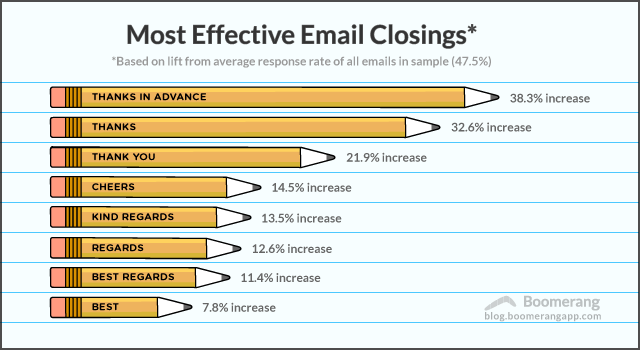
“Thanks in advance,” “Thanks,” and “Thank you” topped the list. Plain “Best” sat near the bottom.
The table below is the cheat sheet we give new hires on support team:
| Formality Level | Best Greetings | Best Sign-Offs | Use It For |
|---|---|---|---|
| Formal | Dear Dr. Patel, / Dear Ms. Romero, / Dear Hiring Committee, | Sincerely, / Kind regards, / Respectfully, | Job applications, legal or government contacts, senior executives you haven’t met |
| Professional (default) | Hi Dana, / Hello Dana, / Good morning, Dana, | Thanks, / Thank you, / Best regards, / Best, | Clients, vendors, managers, cold outreach, customers |
| Friendly professional | Hi Dana, / Hi team, / Hi everyone, | Thanks, / Cheers, / Talk soon, | Colleagues you work with often, recurring partners |
| Casual internal | Hey Dana, / Dana, (name only) | Thanks! / Cheers, / (initials) | Close teammates, quick internal threads |
Your signature should be short and useful:
- Your name
- Title
- Company
- one or two ways to reach you
That’s it.
Inspirational quotes, oversized logos that render as attachments, every social link you own, these all make you look less professional, not more. The cleaner the signature, the more senior the sender tends to be.
Step 8: Choose the Right Tone for a Professional Email
Good emails often go wrong in the tone department. Since readers can’t hear your voice, neutral writing often comes across as cold. A short reply from a busy person may seem annoyed.
Your job is to add just enough warmth so the reader won’t fill the silence with their own worries.
Adjust the tone depending on who’s on the other end:
- Your manager: Be direct and solution-focused. Lead with the decision you need. Offer a recommendation, not just a problem.
- Colleagues: Be friendly and brief. Say thanks, skip the ceremony, keep threads moving.
- Clients: Be warm, confident, and specific. Clients want to feel like a competent human owns their problem.
- Customers (especially unhappy ones): Be human first. Acknowledge the situation in their own words before you explain anything.
- Strangers: Be polite and quick to the point. Say who you are and why you picked them in the first two lines.
Step 9: Proofread, Then Give Yourself a Safety Net
Proofreading is an essential part of professional business writing.
Before sending an important work email, check for spelling mistakes, unclear wording, incorrect names, dates, broken links, and missing attachments.
People doubt the competence of writers who misspell words, and these are the easiest mistakes in the world to prevent.
- Read it aloud, or at least move your lips. Your ear catches awkward phrasing and your eyes skip over.
- Check every name, number, date, and link against the source.
- Search the draft for “attach” and confirm the file is actually attached.
- Reread the subject line and the first two sentences as if you were the busiest person you know.
- Fill in the “To” field last, so you can’t send a half-finished draft by accident.
Then give yourself a safety net. In Gmail on desktop, go to Settings, then See all settings, then Undo Send, and set the send cancellation period to 30 seconds (the maximum).
In classic Outlook for Windows, you can create a rule that defers delivery of all your mail by up to 120 minutes. New Outlook has its own Undo send delay and scheduled sending built in.
Professional Email Etiquette: Replies, CC, Attachments, and Follow-Ups
The above steps cover the mechanics of one email. Email etiquette covers everything else: who you copy, when you follow up, and when email is not the right tool.
These are the rules that I see experienced professionals break the most.
Reply, Reply-All, CC, and BCC
Before you hit Reply-All, ask whether every person on the thread genuinely needs your answer.
The fields themselves are easy to misuse, so here’s how I use them:
- To: The people who need to act or answer.
- CC: People who need to be aware but don’t need to act. Tell them so, with something like “Copying Priya for visibility.”
- BCC: Large external lists where recipients shouldn’t see each other’s addresses. Also useful when you move someone off a thread: “Moving Sam to BCC to spare his inbox.”
- Never: CC someone’s boss on a minor issue to pressure them. Everyone can see what you’re doing, including the boss.
Attachments and Links
Name your files so they make sense out of context. “Acme_Proposal_v2_Oct2026.pdf” beats “final_FINAL(3).pdf” by a mile.
Mention every attachment in the body so the reader knows it’s there, and say what you want them to do with it.
Follow-Up Emails and How Long To Wait
My working rules:
- Urgent, time-bound requests: Follow up after one business day, or sooner if the deadline is close.
- Routine work requests: Wait two to three business days.
- Cold outreach and senior contacts: Wait about a week. Harvard Business Review’s follow-up advice points to about a week as the sweet spot for the first nudge.
- After the second follow-up: Change channels. Call, message, ping a mutual contact.
When you follow up, try to reply in the original thread so the context travels with it, and add something new.
If the thread is time-sensitive and you need to signal that without crossing into pushy territory, our guide on how to express urgency in an email has specific phrasing you can borrow.
When To Pick Up the Phone Instead
Email is the wrong tool more often than we admit.
Switch to a call or a video chat when:
- Emotions are running high. Bad news, conflict, and performance feedback all land better with a voice attached.
- The thread passes three rounds without progress. A five-minute call will save an hour.
- The topic is complex and open-ended. Brainstorms and negotiations need real-time back-and-forth.
After the call, send a short recap email so everyone has the same written record.
Email is actually best used as a receipt, not a conversation.
Professional Email Writing for Customer Support Teams
Support emails play by the same rules as any professional email, with one big twist.
The reader is often frustrated, and they’re reading for one question: “Did this person understand my problem, and is it fixed?”
Every line of your reply should address this.
- Acknowledge the problem in the customer’s own words, in the first sentence.
- Give the answer or the fix next, before any explanation.
- Explain briefly, and only if the customer needs context to avoid the problem again.
- State the next step, including who owns it and (if you’re promising an update) when.
- Leave the door open with a simple “Reply here if anything still looks off.”
Saved replies, sometimes called canned responses, make this faster and keep the tone consistent across the team.
If you need a starting point, we’ve put together a library of ready-to-adapt canned email templates for customer support and situation-specific support ticket response templates.
Our WordPress shared inbox plugin, Heroic Inbox, is built around the problems that wreck support emails.
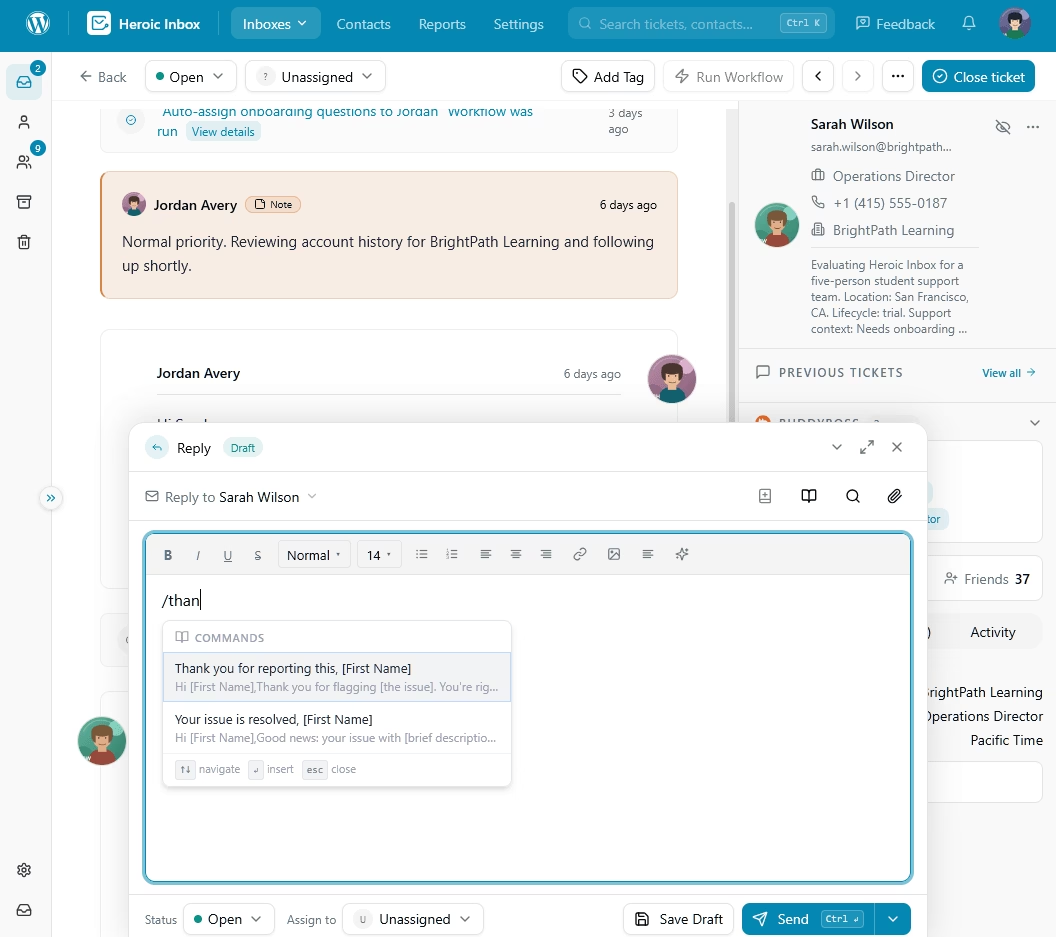
Key features include:
- Saved replies with slash commands. Agents drop in a vetted answer in seconds, then layer the personal line on top.
- Collision detection. Everyone sees when a teammate is viewing or replying, so customers never get two different answers to the same email.
- Internal notes. Teammates discuss a tricky ticket inside the thread, and the customer sees none of it.
- Shared drafts. A team lead can open a new agent’s draft, polish the tone, and send it. Easiest way to coach new hires.
- Customer context in the sidebar. WooCommerce and Easy Digital Downloads order details sit next to the conversation.
- A built-in AI writing assistant. It drafts replies, but an agent reviews and confirms before anything is inserted. A human stays in charge of the final wording.
The other secret to short, professional support replies is a good knowledge base.
Instead of writing 400 words of setup instructions, link to a help article that already explains it, with screenshots.
Heroic Knowledge Base plugs into Heroic Inbox, so agents see suggested help articles right inside the mailbox and can drop in the right link in one click.
Professional Email Examples You Can Steal
The examples below cover the situations people ask about most. Each follows the steps above, and each comes with a short note on why it works. Swap in your own details, but keep the shape.
1. Introduction or Cold Outreach Email
Subject: Leo Park Suggested I Reach Out

Hi Jordan,

Leo Park suggested I get in touch because your team recently moved its support operations to WordPress. I'm considering the same switch at Brightline Studio and would value your advice.

Would you be open to a 20-minute call in the next two weeks?

I'd love to hear what you'd do differently, and I'm happy to share the migration checklist we've built so far.

If a call doesn't fit your schedule, even a few sentences by email would be a big help.

Thanks for considering it.

Best,

Maya Chen
Support Lead, Brightline Studio
[email protected] | (555) 214-0198
2. Request to Your Manager Email
Subject: Approval needed: $2,400 for onboarding videos by Oct. 16

Hi Priya,

Can you approve a $2,400 budget for three customer onboarding videos by Friday, Oct. 16? I need your approval by then to reserve time with the video team.

Here's the short case:

- New customers ask the same 10 setup questions in their first week.
- The videos would answer those questions and live in our help center.
- I expect this to cut first-week tickets noticeably, and I'll report back after 60 days.

The quote is attached for your review. I'm happy to walk you through the proposal in a quick five-minute call if that's helpful.

Thanks,

Sam
3. Follow-Up After No Response Email
Subject: Re: Proposal for Acme website redesign

Hi Elena,

Bumping this up in case it got buried during your launch week. I know timing's been tight on your end.

To make the decision easier, I've attached a one-page summary comparing the two options side by side.

If you can let me know which option you prefer by Wednesday, Oct. 21, we can still keep the planned Nov. 2 start date.

If the project is on hold, that's completely fine too. Just let me know, and I'll plan to check back in January.

Thanks for your time, Elena. I look forward to hearing what works best for you.

Best,

Chris
4. Meeting Request Email
Subject: Q1 launch planning: 30-minute meeting next week

Hi team,

I'd like to get 30 minutes on the calendar next week to agree on the Q1 launch timeline and owners.

Here are two times that work for me (Eastern Time):

- Tuesday, Oct. 20, at 10 a.m.
- Thursday, Oct. 22, at 2 p.m.

Please reply with the option that works best for you. If neither suits your schedule, feel free to suggest another time.

Once we've settled on a slot, I'll send the calendar invite along with a short agenda so everyone knows what we'll cover.

Thanks,
Ava
Explore: 21 Email Subject Line for Meeting Request for 2026 (With Examples)
5. Apology to a Customer Email
Subject: We charged you twice, and your refund is on its way

Hi Marcus,

You're right. We charged your card twice for your October renewal. That was our mistake, and I'm sorry for the hassle.

I've refunded the duplicate $49 charge today. Depending on your bank, the money should appear in your account within three to five business days.

We've also fixed the billing setting that caused the double charge, so this won't happen on your next renewal.

If the refund hasn't appeared by October 16, reply to this email, and I'll follow up with the payment processor personally.

I'm sorry again for the inconvenience, and thank you for bringing this to our attention.

Sincerely,

Dana Ruiz
Customer Support Manager, Northwind Apps
For more scenarios where you need to say sorry professionally, our collection of apology email templates covers everything from billing errors to shipping delays.
6. Declining a Request Email
Subject: Re: Help with the partner webinar on Nov. 12

Hi Tom,

Thanks for thinking of me for the partner webinar on November 12. I’ll have to decline this time because I’m leading our support migration through mid-November and won’t be able to give the preparation the attention it deserves.

A couple of options might help:

- Rachel on my team ran last year's webinar and knows the format well.
- I'm happy to review your slides for 20 minutes the week before.

I hope it goes well, and please keep me in mind for the spring session.

Best,
Nina
Final Thoughts
Professional email writing isn’t about sounding impressive. It’s about making your message easy to understand and your request easy to act on.
Focus on a useful subject line, a suitable greeting, a clear message, and a specific next step.
With consistent business email writing habits, you can make workplace communication easier to understand, reduce avoidable back-and-forth, and help recipients respond with confidence.
If your team writes professional emails all day (support, sales, or whoever owns that shared info@ address), give them tools that keep tone consistent and nothing slips through.
Heroic Inbox pulls saved replies, internal notes, collision detection, and customer history into your WordPress dashboard.
Heroic Knowledge Base on other hand lets you link a clear help article instead of rewriting the same explanation for the hundredth time.
Further Reading
Free AI Email Writer: Draft Professional Emails in Seconds (2026)
24+ Professional Thank You Email Templates
Best Email Management Software (2026 Edition)
10 Best AI Email Assistants (Free Options Included)
Free AI Email Reply Generator (No Sign-Up, Unlimited Use)





Leave A Comment?
You must be logged in to post a comment.