11 Customer Retention Email Examples & Templates (Plus Writing Tips)
 Shankar Chavan
Most businesses spend the bulk of their marketing budget chasing new customers. New revenue feels good, growth charts go up—Everyone’s happy.
But the statistics from Harvard Business Review tell a different story:
- Retaining an existing customer costs 5 to 25 times less than acquiring a new one.
- A 5% bump in retention can increase profits by 25% to 95%.
And email is still the most reliable channel to pull this off.
So yeah, retention emails aren’t just a nice-to-have. They’re probably the highest-return thing you can do with your marketing team right now.
In this guide, I will share the best retention email templates you can use right away—backed with examples and writing tips.
Let’s start!
In This Guide
- What Are Customer Retention Emails?
- Best Retention Email Examples and Templates
- 1. Re-engagement/Retention Email Template for Inactive Customers
- 2. Loyalty Rewards Email to Retain Customers
- 3. Subscription Renewal Retention Email
- 4. Feedback Request Email to Improve Retention
- 5. Milestone and Anniversary Email
- 6. Exclusive Offer Email for Retaining VIP Segments
- 7. Retention Email Template for Cart Abandonment
- 8. Onboarding Email Series to Improve Retention
- 9. Referral Program Retention Email
- 10. Product Update Email
- 11. Employee Retention Email Template
- 1. Re-engagement/Retention Email Template for Inactive Customers
- Retention Email FAQs

We rigorously test and research every product that we recommend through HeroThemes. Our review process. We may also earn a commission if you make a purchase through our links.
What Are Customer Retention Emails?
Customer retention emails are messages sent to existing customers or subscribers with the goal of keeping them engaged and happy.
Retention emails can include:
- Welcome sequences
- Win-back campaigns
- Loyalty updates
- Feedback requests
- Subscription renewal reminders
- Birthday messages
- Churn prevention flows
Each type hits a different moment in the customer lifecycle.
Best Retention Email Examples and Templates
Pro Tip: Use Heroic Inbox to manage your customer support requests alongside their past interactions and purchase history.
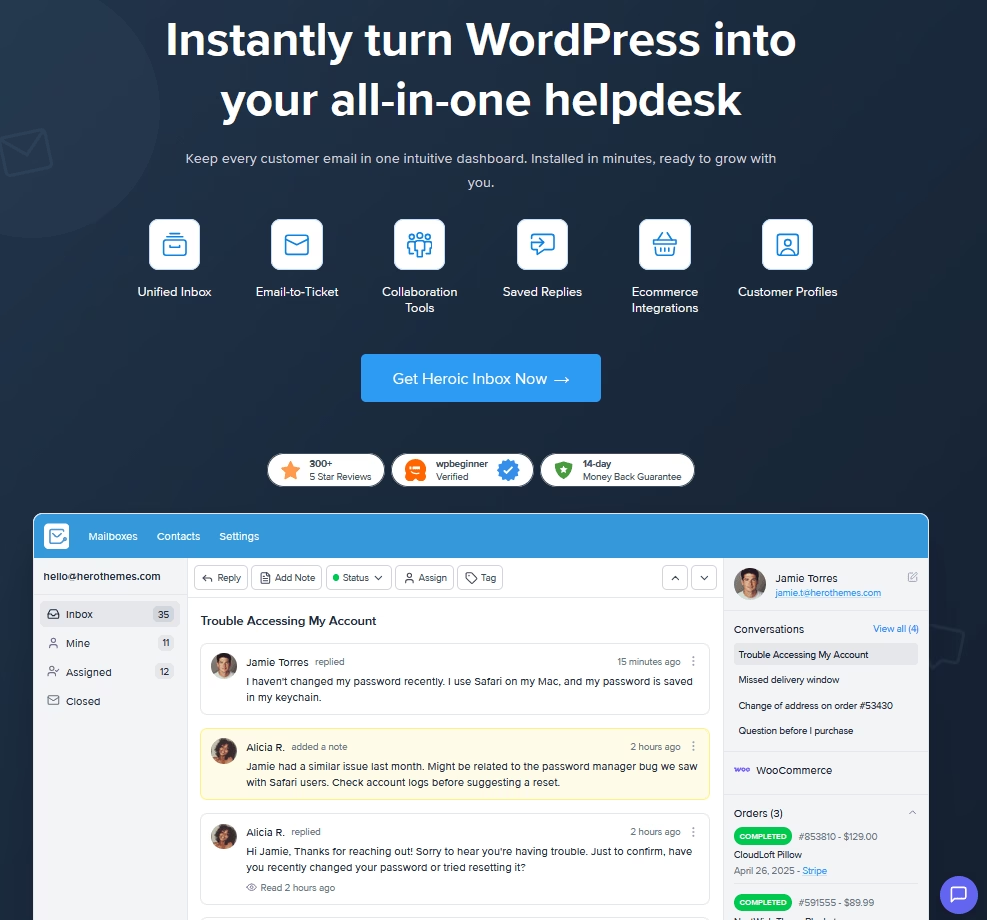
Heroic Inbox includes many other features that help with customer retention, such as:
- Collaboration features, including a shared inbox, notes, and agent mentions.
- Templates or canned responses
- Workflow automation tool
- Unlimited users and conversations
- Analytics
Here are some of the best retention email examples, crafted based on different scenarios.
Copy them, tweak it—make it yours.
1. Re-engagement/Retention Email Template for Inactive Customers
The most common type of retention campaign involves reaching out to inactive customers.
The goal is simple:
- Create a list of inactive customers (those who haven’t purchased from you in XX days, or aren’t active on your platform for XX days)
- Reach out them with some kind of offer
- Get them back to be paying customers or as an engaged user.
Subject: 20% off to pick up where you left off

Hi [First Name],

It’s been a while since you last used [Product Name], and I wanted to check in.

We've made some improvements based on user feedback, including [brief mention of one or two relevant improvements].

If you're ready to give it another go, here's 20% off your next [month/quarter/year]:

Code: WELCOME20

The code is valid for the next 14 days.

If there was something that wasn't working for you before, I'd genuinely like to know. A quick reply would be helpful.

[CTA Button: Reactivate My Account]

Thanks,

[Your Name] [Title],
[Company]
Or, you can use something like this.
Subject: [First Name], a few things have changed

Hi [First Name],

It's been a while since your last [purchased / logged in], and we wanted to share what's new.

Since [date], we've made some updates you might find useful:

- [Improvement or new feature #1]
- [Improvement or new feature #2]
- [Improvement or new feature #3]

If you'd like to give us another look, here's [specific incentive: $15 off your next order / a free month / bonus gift] to make it easy:

[CTA Button: Claim Your [Offer]]

This offer expires on [date].

And if something specific made you leave, I'd like to hear about it. Just reply to this email. Your feedback directly shapes what we work on next.

We look forward to having you back!

[Your Name]
[Brand Name]
Tips for Re-Engagement Retention Campaigns:
- Start such campaigns when you have something to offer. Like a discount or a new feature that makes your product/platform much better than before.
- Nail the subject line! Check out the re-engagement email subject lines guide to learn more.
- Create urgency without being manipulative. If it’s a limited time offer, perfect. If not, don’t try to be creative. It can hurt your brand image when you try to be manipulative.
- Make the CTA crystal clear.
- A two-to-three email sequence typically outperforms a one-off blast. For example, send a second email right before the sale ends.
- Optimize send times based on customers engagement data. Re-engagement emails often perform better mid-week, mid-morning.
Here’s a retention email example from AWeber:
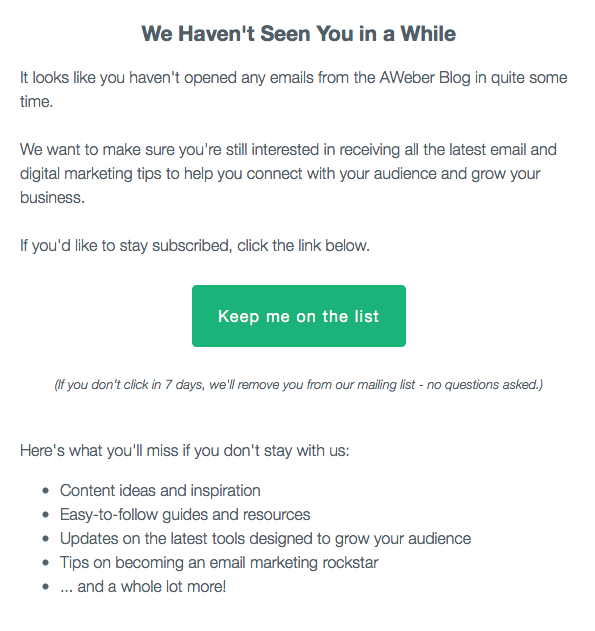
It’s targeted towards inactive subscribers, to possibly retain them.
The email clearly states what subscribers are going to miss, and it also creates a sense of urgency.
It also helps AWeber to keep their email lists clean. If the subscribers aren’t interacting with them for months or years, they’ve probably lost interest.
At that point AWeber is just wasting their resources by sending emails to inactive subscribers.
2. Loyalty Rewards Email to Retain Customers
If your system provides loyalty rewards (such as affiliate programs giving extra credits or on X purchase you get something free), Great!
Don’t limit yourself to displaying loyalty points on the system/platform dashboard. Reach out to your users via email to inspire them to earn and use more loyalty points.
Here’s how you can do it with this retention email template:
Subject: You're [X] points away from [reward], [First Name]

Hi [First Name],

You've earned [X] points so far. [Y] more will unlock [specific reward: free item, discount tier, exclusive access].

Here are two quick ways to get there:
- [Action #1: e.g., "Shop this week and earn 2x points"]
- [Action #2: e.g., "Refer a friend for 100 bonus points"]

Your rewards:
- Current tier: [Tier Name]
- Points balance: [X]
- Next reward: [Reward description] at [Y] points

Thanks for being a rewards member. We appreciate your loyalty.

[Your Name / Brand Name]
Tips for Loyalty Rewards Retention Emails:
- Send it Monthly as a summary, or triggered when a customer reaches 75%+ of their next reward tier.
- You can also send loyalty program retention emails after user activity drops off, before points expire, and during promotional periods.
3. Subscription Renewal Retention Email
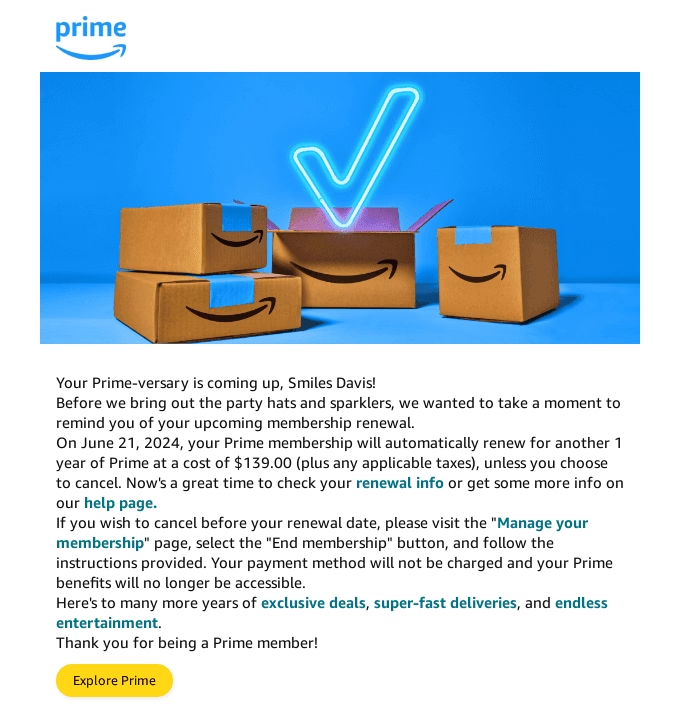
Most companies send renewal reminders 60 days before the charge date.
With the email they provide exact date, pricing, and links to manage renewal details.
This builds trust with the customers.
Even if customers choose not to renew their subscription, they will gladly remember you when they need a similar service in the future.
In some countries, these reminders are legally required, especially with auto-renewal subscriptions.
So, how can you fulfill legal and retention requirements at the same time?
- Show customers how your product helped them with proper statistics, and personalization.
- Provide clear CTA and guidelines.
- Don’t force customers with renewal (like adding a fee to cancel subscription or going out of topic and comparing your product with the competitors).
Subject: Your [Product Name] subscription renews on [Date]

Hi [First Name],

Quick heads-up: your [Product Name] [plan name] subscription renews on [Date].

Here's what you got out of [Product Name] this year:
- [Usage stat #1: e.g., "247 documents processed"]
- [Usage stat #2: e.g., "1,340 errors caught"]
- [Usage stat #3: e.g., "Saved an estimated 18 hours"]

Renewal details:
- Plan: [Plan Name]
- Amount: [Price]
- Payment method: Card ending in [XXXX]

You don't need to do anything to continue. If you would like to change your plan or update your payment details, you can do so here: [link]

We are glad to have you,

[Your Name / Brand Name]
4. Feedback Request Email to Improve Retention
Customer feedback request emails play a much bigger role in retention than we expect.
By sending a feedback request email you are assuring customers that you are ready to hear their voice, and act upon it. The product is improving.
The product is improving. The bug that causing customers to find alternatives might get fixed in the next update.
So, customers choose to stay with the current product.
Subject: What's one thing we could do better?

Hi [First Name],

You've been with [Brand Name] for [X months/years]. We'd like to hear how it's going.

We're working on making things better, and your input helps us decide what to prioritize.

If you have 3 minutes, we'd appreciate your honest feedback.

[CTA Button: Share Your Feedback]

Every response is read by a real person. Good, bad, or mixed, it all helps.

As a thank you, everyone who completes the survey receives [incentive].

Thanks,

[Your Name]

P.S. Not in the mood for a survey? Just reply with one thing we could improve. That works too!
Tips for Feedback Request Emails:
- Make the survey as quick as possible.
- Actually work on improving your product based on user feedback.
- You can also collect customer feedback when they decide to leave. Ask them what went wrong or what could have been done.
- Properly categorize your email lists for surveys. For example, send them to new customers after a month or two has passed, or when you need customer feedback to decide on new features.
Explore:
Best Email Subject Line Asking for Feedback (2026 Picks)
Good Customer Feedback Email Template + Samples
5. Milestone and Anniversary Email
Celebrating achievements fosters a positive emotional association with the brand.
A data recap reminds people of the value they’ve already received, making them less likely to leave.
Here’s an email template for celebrating milestones and anniversaries to improve the retention rate:
Subject: [X] years with us, [First Name]

Hi [First Name],

It's been [X years/months] since you joined [Brand Name], and we wanted to mark the moment.

Here's a quick look at what you've accomplished with us:
- [Personalized stat #1: e.g., "32 orders placed"]
- [Personalized stat #2: e.g., "14 different products tried"]
- [Personalized stat #3: e.g., "Member since [date]"]

As a thank you, here's [discount/gift detail: e.g., "15% off your next order with code ANNIVERSARY15"].

[CTA Button: Claim Your [Discount/Gift]]

Thanks for being part of this. Here's to more!

[Your Name / Brand Name]6. Exclusive Offer Email for Retaining VIP Segments
The word “exclusive” only works when the offer truly isn’t available to every subscriber.
If everyone receives the same email (or same discount every time for example), trust erodes quickly.
VIP for example can be:
- High-value customers (customers on your highest-tier plan)
- Customers with longest tenure
- Top affiliates
- Engaged community members
- Professional or enterprise accounts
Use this email template for product launches, seasonal events, or when VIP engagement starts dipping. This will definitely help you retain more VIP customers.
Subject: [First Name], this one's just for you

Hi [First Name],

As one of our most valued customers/members, we wanted to share this with you before anyone else sees it.

Your exclusive offer:

[Specific offer: "$25 gift card," "48-hour early access," or "Free upgrade for one month"]

This offer is only available to [describe the qualifying group, e.g., "customers on our Pro plan" or "members with 2+ years"], and it expires [date].

[CTA Button: Claim Your Offer]

Thanks for being with us,

[Your Name / Brand Name]
7. Retention Email Template for Cart Abandonment
Retention emails guide and there is nothing about cart abandonment seems impossible right?
Here’s a simple and proven email template to retain cart abandonments:
Subject: [First Name], Your cart is still here

Hi [First Name],

You left a few items in your cart. They're still saved if you want to pick up where you left off.

- [Product name] – [Price]
- [Product name] – [Price]

[CTA Button: Complete Your Order]

Still on the fence? Here's what a recent customer said:

"[Short testimonial about the product]" – [Customer first name]

Plus, your order ships with [key benefit: free shipping, 30-day returns, price match].

If you have questions, just reply.

[Your Name / Brand Name]
Tips for Cart Abandonment Retention Emails:
- Only bring in a discount for email #2 or #3 if needed.
- Use urgency only when real. Customers start to doubt easily when you send stock ending soon with every recovery email.
- Save cart abandonment retention emails for high-value items. You probably don’t want to spam customers for every small thing.
Explore:
Proven Abandoned Cart Email Subject Lines With Examples
18 High-Converting Subject Lines for eCommerce Emails
8. Onboarding Email Series to Improve Retention
New users who find answers quickly are far less likely to churn.
Through our guides, we recommend clients to create a self-service portal or a knowledge base with getting-started guides that help users quickly get value for their money.
Similarly, you can also run onboarding email campaigns to improve user retention rate.
Subject: Your account is ready. Here's where to start.

Hi [First Name],

Welcome to [Brand Name].

Here's how most users start with [product]:

1. [First meaningful action, e.g., "Set up your first project"]. It takes about 2 minutes.
2. Browse the Getting Started Guide for a quick walkthrough: [link to knowledge base]
3. [Second quick win, e.g., "Invite a teammate"] to see how collaboration works.

Complete Step One and you'll have a clear picture of how [Product Name] fits your workflow.

Over the next few days, I'll send two more short emails with practical tips to help you get the most out of your account.

Nothing generic, just the steps that actually matter early on.

If you get stuck, the self-service portal [link] has answers to most questions, or you can reply here and we will gladly assist you.

Welcome aboard!

[Name]
[Title], [Company]
Tips for Onboarding Retention Emails:
- Use bite-sized steps to reduce friction.
- Avoid robotic tone
- Don’t waste readers’ attention with bland “thanks for signing up” phrases or subject lines.
- Guide the user toward their first meaningful action.
- Set expectations for future emails.
- Link to the self-service knowledge base wherever necessary instead of increasing email copy.
- Start this email sequence immediately after user signup.
9. Referral Program Retention Email
The most effective referral emails work when the customer is happiest.
For example, right after a positive experience like a 5-star review or a great support interaction.
Subject: Give $20, get $20

Hi [First Name],

Know someone who'd love [Brand Name]? Here's a way to make it worth their while (and yours).

Here's how it works:

Share your referral link: [Unique referral URL]

When they [make a purchase / sign up], they get $20 off their first order

You get $20 in credit

[CTA Button: Share Your Link]

There's no cap on referrals. The more you share, the more you save.

Thanks,

[Your Name / Brand Name]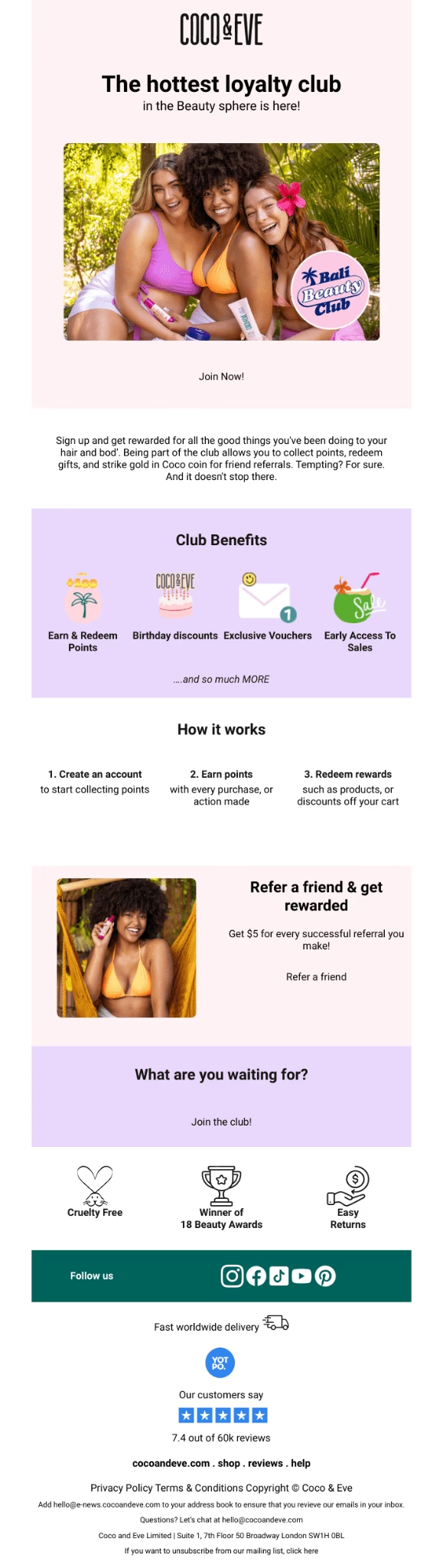
10. Product Update Email
Product updates should feel like brand moments rather than boring changelogs.
When you finally implement a feature (or fix a bug) that users have been asking for, it’s worth celebrating.
And if your product is popular, news like this is often covered in community posts, podcasts, and shared on social media. Which helps you reach to the new audience and ones that already tried your product.
Subject: You asked. We built it. Here's what's new.

Hi [First Name],

You asked for [feature/fix], and we listened. It's live now.

[One sentence describing what the update does in plain language. Focus on the outcome for the user, not the technical detail.]

This was one of our most requested changes, and we're glad to finally ship it.

Here's what's new:
- [Feature/fix #1]
- [Feature/fix #2]

You can start using it today. No setup changes needed. [Or: Here's a quick guide to get started → link.]

If you've been waiting for this update, thank you for your patience. Your feedback shaped what we built.

Have more feedback for us? Reply to this email.

[Your Name]
[Role], [Company Name]11. Employee Retention Email Template
The same principles apply to the employee retention emails. Show your employees the same care and love that you show customers. Most, and most will appreciate it.
Here’s an employee recognition email template to get you started:
Subject: [Employee Name], your work on [Project] made a difference

Hi [Employee Name],

I wanted to recognize what you pulled off with [specific project].

[Specific detail: e.g., "You brought the onboarding timeline down from 14 days to 6 days, which directly moved our Q1 retention numbers."]

That kind of work doesn't go unnoticed.

Thank you.

[CEO Name]
Simple right? These kinds of emails motivate us employees to try our best.
It assures us that things are going great. You might not get the promotion right away, but there’s a chance you will get in the future.
And hey! At least you know someone isn’t stealing your credit.
Retention Email FAQs
How Often Should You Send Retention Emails?
It depends on your product, and trial and error. If you bombard customers with email after email, they are going to put you in a spam list.
Trigger-based, celebratory, and discount retention emails tend to be the most effective.
Should Retention Emails Always Include Discounts?
No, use them strategically. First, lead with valuable communication.
Start Sending Retention Emails This Week
Here you have it.
Now go and start your own retention email strategy:
- You can work on onboarding email sequence
- Plan product update emails
- Engage more with affiliates and customers
- Create exclusive offers
- Re-engage with inactive customers
There are many possibilities. You have the perfect idea now and retention email templates to work with.
Customer support tools like the Heroic Knowledge Base and Heroic Inbox will help you retain more customers along the way. Give them a try!
Further Reading
Best Email Management Software for Business and Customer Support
Best Quotation Email Templates, Examples
Top AI Email Assistants of 2026 (Free Options Included)
How to Handle Customer Inquiries Like a Pro
Return and Refund Emails Best Practices, Examples, and Templates
How to Respond to Angry Emails
7 IT Help Desk Ticket Examples to Learn From